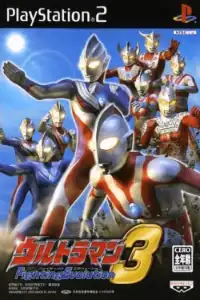
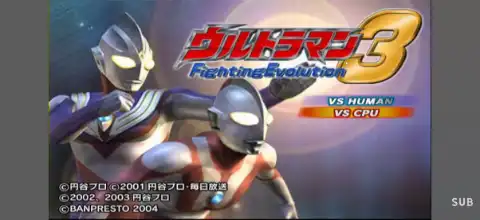

Experience Ultraman Fighting Evolution 3 with epic battles, iconic heroes, unlockable characters, multiple modes, and smooth emulator gameplay today anywhere.
Ultraman Fighting Evolution 3 PS2 Overview
Ultraman Fighting Evolution 3 is widely considered one of the best Ultraman games ever released. Developed by Banpresto for the PlayStation 2 in 2004, the game features a huge roster of Ultras and Kaiju, story scenarios inspired by the TV series, cinematic special attacks, and fast-paced battles that still hold up today.
Even after more than two decades, many fans regard it as the peak of the Fighting Evolution series thanks to its excellent gameplay and massive amount of unlockable content.
Game Modes
Ultra Mode (Story Mode)
Ultra Mode is the main attraction of the game. Players can experience famous battles and story scenarios from various Ultraman series. Many missions recreate iconic moments from the TV shows, while some scenarios are completely original. Completing these missions is also the primary way to unlock new characters, stages, and additional content.
Battle Mode
Battle Mode works like a traditional arcade mode. Choose your favorite Ultra or Kaiju and defeat a series of opponents in consecutive matches. Finishing Battle Mode with certain characters can unlock additional fighters and modes.
VS Mode
VS Mode allows players to battle against either the CPU or another player. All unlocked characters can be selected, making it perfect for competitive matches with friends.
Tag Mode
Tag Mode lets two players team up as Ultramen and fight through multiple battles together. This mode becomes available after progressing through Battle Mode.
Custom Mode
Custom Mode allows players to customize abilities, special attacks, and other character attributes. This adds extra depth and replay value for players who enjoy experimenting with different builds.
Practice Mode
A training mode where players can learn combos, practice special attacks, and test different characters without any time restrictions.
Tutorial Mode
New players can learn the game’s controls, combat mechanics, and energy management system through guided tutorials.
Replay & View Mode
Replay Mode allows players to watch previously recorded matches from different camera angles, while View Mode contains information about Ultras, Kaiju, and other game content.
Gameplay Features
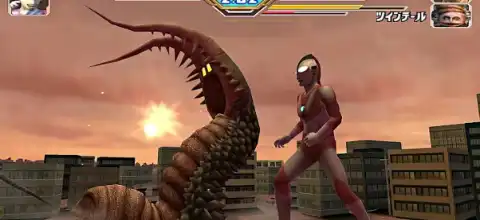
The gameplay combines traditional 3D arena fighting with signature Ultraman mechanics. Players can punch, kick, dodge, grab, and perform devastating beam attacks. Unlike many fighting games, energy management is extremely important. Players must build up their energy gauge before unleashing finishing moves such as the Spacium Ray, Specium Beam, or other iconic attacks.
Some key gameplay features include:
- Large roster of Ultramen and Kaiju.
- Multiple forms for certain characters.
- Signature beam attacks and finishers.
- Story missions based on classic TV episodes.
- Destructible environments and cinematic battles.
- Character customization through Custom Mode.
- Local multiplayer support.
How to Unlock All Characters Using Save Data
How to Install the Save File
- Download and extract the Ultraman Fighting Evolution 3 save data file.
- Open AetherSX2 or NetherSX2 on your Android device.
- Tap the ≡ Menu button and open App Settings.
- Go to Memory Cards.
- Select the memory card slot you want to use (usually Mcd001.ps2).
- Replace your current memory card with the downloaded save file.
- Make sure the new memory card is assigned to the selected slot.
- Restart the emulator after copying the memory card file.
How to Load the Save Data
- Launch Ultraman Fighting Evolution 3 (NTSC-J).
- The game will automatically detect the save data.
- Load the game and access the unlocked content.
- Start playing with all available characters and features.
Save Data Features
- All playable characters unlocked
- Hidden characters unlocked
- Battle Mode progress completed
- Story Mode completed
- All stages unlocked
- All special attacks and abilities available
- Gallery and bonus content unlocked
- Rankings and records unlocked
- Maximum game completion progress
- Additional secret content available
Compatible with: AetherSX2, NetherSX2, PCSX2, IPSX2, and original PlayStation 2 consoles using a memory card.
Unlockable Characters and Content
One of the biggest reasons players still love Ultraman Fighting Evolution 3 is its enormous amount of unlockable content.
Some notable unlockables include:
- Ultraman Legend
- Ultraman 80
- Zoffy
- Astra
- Justice
- Agul
- Ace Robot
- Evil Tiga
- Imitation Dyna
- Red King
- Gomora
- Zetton
- Dada
Additional story scenarios and special stages such as the famous 10 Cities Invasion Stage can also be unlocked by achieving specific ranks in Ultra Mode missions.
Best AetherSX2 Settings for Ultraman Fighting Evolution 3
If you’re playing on Android using AetherSX2, these settings provide the best balance between performance and graphics.
Graphics Settings
- Renderer: Vulkan
- Upscale Multiplier: 2x (Mid-range phones)
- Upscale Multiplier: 3x–4x (Flagship phones)
- Texture Filtering: Bilinear
- Blending Accuracy: Basic
- Hardware Download Mode: Disable Readbacks
System Settings
- EE Cycle Rate: 100%
- EE Cycle Skip: Normal (0)
- Multi-threaded VU1: Enabled
- Fastmem: Enabled
- Instant VU1: Enabled
Speed Hacks
- Enable Fast Boot
- Enable Threaded Presentation
- Enable MTVU
These settings typically allow the game to run at full speed on modern Snapdragon, Dimensity, and flagship Android devices.
How to Download and Play Ultraman Fighting Evolution 3 on Android
- Download the Ultraman Fighting Evolution 3 ISO from our website.
- Install the AetherSX2 emulator on your Android device.
- Open AetherSX2 and complete the initial setup.
- Add your PS2 BIOS file.
- Locate the downloaded ISO file.
- Tap the game icon to launch it.
- Apply the recommended settings above for smoother gameplay.
- Enjoy Ultraman Fighting Evolution 3 on your Android smartphone.
Final Thoughts
Ultraman Fighting Evolution 3 remains one of the greatest Ultraman games ever made. Its excellent combat system, faithful recreation of classic Ultraman battles, large roster of heroes and monsters, and huge collection of unlockables make it a must-play title for every Ultraman fan. Whether you’re revisiting the game on a PS2 or playing it through emulation on Android or iOS, it still delivers an amazing tokusatsu gaming experience today.