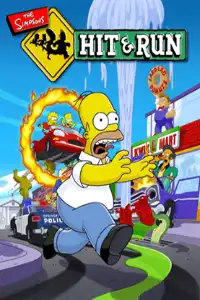

Relive the classic Simpsons adventure on your mobile! Download The Simpsons: Hit & Run PS2 ISO and enjoy smooth gameplay on Android and iOS.

The Simpsons: Hit & Run PS2 Overview
One of the most popular video games based on the classic TV show is The Simpsons: Hit & Run, which was released for the PlayStation 2 in 2003. Developed by Radical Entertainment, the game combines open-world exploration, fast-paced driving, and humorous story missions inspired by the world of Springfield. Its gameplay is often compared to classic GTA titles, but with a family-friendly twist and the signature comedy of The Simpsons.
If you’re feeling nostalgic, you can now enjoy the PS2 version on your Android or iOS device using a PS2 emulator. With the right emulator settings, the game runs smoothly on most modern smartphones.
Game Modes
The Simpsons: Hit & Run includes a number of gameplay activities that keep players occupied for hours, while being essentially a single-player experience.
Story Mode
Story Mode is the main attraction of the game. Players progress through seven different levels while controlling various characters, including Homer, Bart, Lisa, Marge, and Apu. Each chapter features unique missions that gradually reveal a hilarious alien conspiracy taking place in Springfield.
Bonus Missions
Every level contains optional bonus missions. Completing these challenges rewards players with new vehicles and extra coins, making exploration more rewarding.
Street Races
Players can participate in checkpoint races and wager races throughout Springfield. Winning these races unlocks additional vehicles while helping you earn more in-game coins.
Mini Racing Game
Collecting all Collector Cards in each level unlocks extra race tracks for the Mini Racing mode, allowing players to enjoy arcade-style races using unlocked vehicles.
Gameplay Features
The gameplay is a perfect mix of driving, platforming, exploration, and mission-based objectives.
Some of the game’s best features include:
- Large open-world Springfield with multiple districts to explore.
- Drive dozens of different vehicles inspired by The Simpsons TV series.
- Third-person exploration with running, jumping, and melee attacks.
- Phone booths that allow you to switch between unlocked vehicles.
- Hidden shortcuts, collectibles, and secret areas.
- The famous Hit & Run Meter, where reckless driving causes police cars to chase you.
- Coin collection system used to purchase outfits and vehicles.
- Humorous dialogue voiced by the original cast, making every mission entertaining.
Unlockable Elements
For completionists, The Simpsons: Hit & Run has a ton of unlockable material.
Unlockable Vehicles
Completing bonus missions and races unlocks exclusive vehicles that can be selected from phone booths throughout Springfield.
Character Costumes
Each playable character can purchase alternate outfits using collected coins. These costumes reference famous episodes from the TV series and add extra fun during gameplay.
Collector Cards
Each level hides seven Collector Cards in difficult-to-reach locations. Collecting every card in a level unlocks a new Mini Racing track.
A special Itchy & Scratchy video called “500-Yard Gash” can be unlocked by gathering every Collector Card in the game.
Best AetherSX2 Settings for The Simpsons: Hit & Run
To achieve smooth gameplay on Android, use these recommended AetherSX2 settings.
- Graphics Renderer: Vulkan (recommended) or OpenGL if Vulkan causes issues
- Internal Resolution: 1x Native (increase to 2x on flagship devices)
- Blending Accuracy: Basic
- Texture Filtering: Bilinear
- Hardware Download Mode: Disable Readbacks
- Anisotropic Filtering: 2x
- V-Sync: Off
- Multi-threaded VU1: Enabled
- EE Cycle Rate: 100%
- EE Cycle Skip: Normal (0)
- Fast Boot: Enabled
- Frame Limit: 100%
- Audio Latency: Low
For mid-range devices, staying at 1x resolution usually provides the smoothest gameplay with minimal frame drops, while powerful Snapdragon processors can comfortably handle higher resolutions.
How to Download and Play The Simpsons: Hit & Run on Android and iOS
Follow these simple steps to start playing on your mobile device:
- The Simpsons: Hit & Run PS2 ISO can be downloaded from our website.
- Download and install AetherSX2 on Android.
- On iPhone or iPad, install IPSX2 or ArmSX2.
- Add your PlayStation 2 BIOS to the emulator.
- Open the emulator and locate the downloaded ISO file.
- Import the game into your emulator library.
- Apply the recommended graphics settings listed above for smoother gameplay.
- Connect a Bluetooth controller (optional) for the best experience.
- Launch the game and enjoy playing The Simpsons: Hit & Run on your Android or iOS device.
Final Words
The Simpsons: Hit & Run remains one of the greatest PlayStation 2 games ever made. Its entertaining missions, memorable humor, open-world exploration, unlockable vehicles, and classic Simpsons atmosphere make it a timeless experience. Thanks to modern PS2 emulators like AetherSX2 for Android and IPSX2/ArmSX2 for iOS, you can relive this legendary adventure directly on your smartphone. Simply download the PS2 ISO from our website, follow the setup steps above, and start exploring Springfield anytime, anywhere.