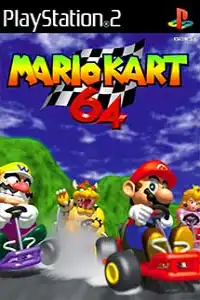
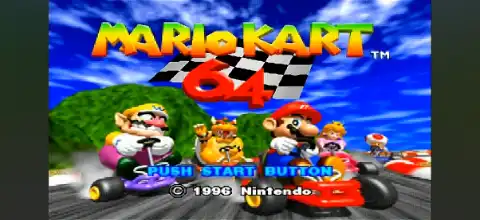

Mario Kart 64 PS2 Port delivers classic kart racing, exciting multiplayer, smooth emulator performance, and nostalgic gameplay everywhere.
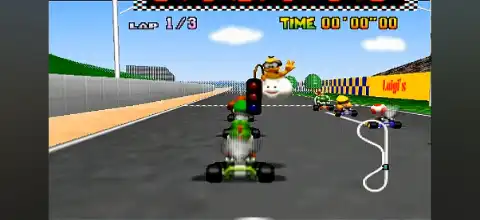
Mario Kart 64 (Port) PS2 Discription
Mario Kart 64 is one of the most iconic kart racing games ever released, and thanks to the fan-made PS2 port, players can now enjoy this classic title on modern devices through PlayStation 2 emulators. The port preserves the original charm of Nintendo’s legendary racer while making it accessible on platforms that never officially received the game.
Whether you’re revisiting childhood memories or experiencing the game for the first time, the Mario Kart 64 PS2 Port delivers fast-paced racing, exciting power-ups, and competitive multiplayer gameplay. With the proper emulator configuration, the game delivers smooth performance on Android and iOS.
Game Modes
The Mario Kart 64 PS2 Port includes the same core game modes that made the original version so memorable.
Grand Prix
Grand Prix is the main single-player mode where you compete against AI racers across four cups. Each cup contains four tracks, and your objective is to finish with the highest total points to earn trophies and unlock higher difficulty levels.
Time Trial
In Time Trial mode, you’ll race alone without rival racers. This mode is perfect for practicing tracks, improving lap times, and mastering shortcuts. Experienced players often use Time Trial to compete for personal best records.
VS Mode
VS Mode lets players customize races with different rules and track selections. You can race against AI or enjoy local multiplayer if your emulator supports multiple controllers.
Battle Mode
Battle Mode replaces traditional racing with arena-based combat. Players use shells, bananas, and other items to burst opponents’ balloons. It’s a fun alternative to standard races and remains one of the game’s most entertaining multiplayer experiences.
Gameplay Features
Mario Kart 64 combines simple controls with strategic gameplay, making it enjoyable for beginners and experienced players alike.
Some of its standout features include:
- Multiple playable characters, each with unique speed and handling characteristics.
- Creative race tracks featuring shortcuts, hazards, jumps, and obstacles.
- Classic Mario-themed power-ups such as Red Shells, Green Shells, Bananas, Lightning, Stars, Mushrooms, and Bob-ombs.
- Smooth drifting mechanics that allow skilled players to maintain speed around corners.
- Four difficulty levels that provide increasing challenges.
- Split-screen multiplayer support for local racing sessions.
- Colorful visuals and memorable soundtrack faithfully preserved in the PS2 port.
The balance between luck and skill keeps every race exciting, ensuring that no lead is ever completely safe.
Unlockable Elements
Depending on the specific PS2 fan port you’re using, unlockable content generally follows the original Mario Kart 64 progression.
Players can unlock:
Extra (Mirror) Mode by winning every cup in the highest available difficulty.
Higher engine classes and increased difficulty levels as you progress.
Trophy completion across all Grand Prix cups.
Some fan-made ports may already have every mode unlocked from the beginning, while others retain the original unlock progression. Availability can vary depending on the version of the port.
Best AetherSX2 Emulator Settings for Android
For smooth gameplay with good graphics, use the recommended AetherSX2 settings below. They offer an ideal balance of performance and visual quality on most Android devices.
- Renderer: Use Vulkan for the best performance. If you notice graphical glitches or compatibility issues, switch to OpenGL.
- Internal Resolution: 2x Native (1080p). Use Native (1x) for low-end devices.
- Blending Accuracy: Basic.
- Texture Filtering: Bilinear.
- Anisotropic Filtering: 2x or Default.
- V-Sync: Off.
- Threaded Presentation: Enabled.
- Multi-Threaded VU1: Enabled.
- Instant VU1: Enabled.
- EE Cycle Rate: 100% (Default).
- EE Cycle Skip: Normal.
- Fast Boot: Enabled.
- Frame Limit: 100%.
- Hardware Download Mode: Disabled (Accurate only if required).
These settings provide excellent performance while maintaining visual quality for most devices powered by Snapdragon, MediaTek Dimensity, or newer processors.
How to Download and Play Mario Kart 64 (Port) PS2 on Android and iOS
- Download the Mario Kart 64 (Port) PS2 ISO from our website.
- Install AetherSX2 on Android or IPSX2/ArmSX2 on iPhone and iPad.
- Complete the emulator setup and import a compatible PS2 BIOS if prompted.
- Open the emulator and grant storage permission.
- Locate and import the downloaded Mario Kart 64 PS2 ISO.
- Allow the emulator to scan your games library.
- Use recommended graphics settings for smooth performance. Pair a Bluetooth controller optionally.
- Tap the game icon and start playing Mario Kart 64 on your Android or iOS device.
Final Words
The Mario Kart 64 PS2 Port is an excellent way to relive one of the greatest kart racing games ever created without requiring the original Nintendo hardware. The gameplay remains addictive, the tracks are timeless, and the multiplayer modes continue to provide endless fun.
Download the Mario Kart 64 (Port) PS2 ISO from our website, load it into AetherSX2 on Android or IPSX2/ArmSX2 on iOS, apply the recommended settings, and enjoy smooth classic kart racing on your mobile device.