

Explore Gumball 3000 PS2 gameplay modes, unlockables, and emulator settings for smooth Android racing experience.
Gumball 3000 PS2 Overview
Released for PlayStation 2 in 2002, Gumball 3000 is an arcade-style racing game based on the famous real-world Gumball 3000 rally. Developed by Climax Solent and published by SCi Games, the game combines high-speed European road races, exotic cars, police chases, and challenge-based events.
Unlike traditional racing games focused only on finishing first, Gumball 3000 mixes racing with objectives, vehicle challenges, and progression systems. Players travel through locations inspired by the real rally route, including areas across the UK and Europe, competing in different events to unlock new content.
Gumball 3000 PS2 Gameplay Features
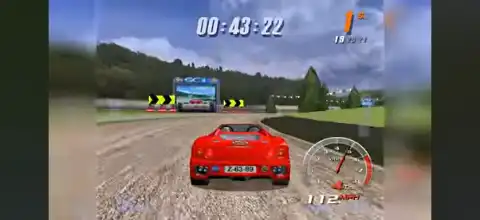
The core gameplay focuses on fast-paced arcade racing rather than realistic simulation. Players control a variety of high-performance vehicles while avoiding traffic, dealing with police interference, and managing vehicle damage.
The game features:
- High-speed street racing across European locations.
- Multiple vehicle classes with different handling characteristics.
- Damage effects that visually change vehicles during races.
- Shortcuts and alternate routes on many tracks.
- Police pursuit events where players must chase or escape opponents.
- Challenge objectives that reward additional progression points.
The main Gumball race follows a long rally structure where players complete multiple stages across different countries. Each stage has its own challenges and objectives, making progression more than just winning races.
Gumball 3000 PS2 Game Modes
Gumball 3000 includes several single-player and multiplayer modes:
Spirit of Gumball
This is the primary gameplay section and includes multiple race types.
Single Race:
Players compete against other vehicles on unlocked tracks. More locations become available as progress is made through the game.
Gumball 3000 Rally:
The main career-style mode where players follow the complete rally route. The objective is to complete stages, earn points, and improve their position throughout the event.
Gumball Gallery:
A challenge-based mode where players complete special tasks during races. These objectives can include reaching specific speeds, collecting items, defeating opponents, or completing other stage goals.
Gumball Squad
In this mode, players take control of police vehicles and attempt to stop racers. This mode becomes available after earning enough Gumball points.
Gumball King
A competitive mode where players select vehicles and compete through multiple races. It offers a different style of competition compared to the main rally mode.
Time Trial
Time Trial removes opponents and traffic, allowing players to focus on setting the fastest possible lap or stage times. Completing records can unlock additional vehicles.
Multiplayer
The game supports multiplayer racing with modes such as Single Race, Gumball Squad, and Gumball King.
Unlockable Cars, Tracks, and Features
Gumball 3000 includes several unlockable elements that encourage replaying races and completing challenges.
Players can unlock:
- New vehicles.
- Additional rally stages.
- Challenge tracks.
- Police levels.
- Extra maps.
- Special vehicle upgrades.
Some unlockables can also be accessed through cheat codes entered from the main menu. Available cheats include unlocking all game modes, all Gumball vehicles, all maps, challenge tracks, police levels, and special vehicle options.
Progression through the main game is the intended way to experience these rewards, as completing races and challenges gradually expands available content.
Best AetherSX2 Settings for Gumball 3000 PS2 on Android
Gumball 3000 runs well on most modern Android devices using AetherSX2 or similar PS2 emulators. Performance depends heavily on your phone’s chipset, RAM, and GPU.
Recommended settings:
Graphics Settings
- Renderer: Vulkan (try OpenGL if Vulkan causes issues)
- Resolution: 2x Native for mid-range phones
- Resolution: 3x–4x Native for flagship devices
- Texture Filtering: Bilinear (PS2)
- Anisotropic Filtering: 4x or 8x
- Blending Accuracy: Basic
- Multi-Threaded VU1: Enabled
- Fast Texture Invalidation: Enabled
System Settings
- EE Cycle Rate: 100%
- EE Cycle Skip: Off
- Instant VU1: Enabled
- Host VSync: Disabled for better performance
Performance Tips
- Close background apps before playing.
- Use Vulkan if your device supports it.
- Lower internal resolution if you experience frame drops.
- Keep the emulator updated for improved compatibility.
For most devices with Snapdragon 700-series or newer processors, 2x–3x resolution should provide smooth gameplay.
How to Play Gumball 3000 PS2 on Android and iOS
- Download and Play Steps
- Obtain a legal backup of your own Gumball 3000 PS2 game disc by creating a PS2 ISO image using appropriate dumping tools.
- Transfer the ISO backup file to your Android or iOS device storage.
- Install a compatible PS2 emulator:
- Android users can use AetherSX2.
- iOS users can use compatible PS2 emulators such as IPSX2 or Armsx2 where available.
- Open the emulator and give it storage permissions.
- Add the folder containing your legally created PS2 ISO backup.
- Scan the game library and select Gumball 3000.
- Apply the recommended graphics settings for your device.
- Start the game and adjust controls, resolution, and performance options according to your phone.
- Use a Bluetooth controller for the best experience, as racing games benefit greatly from physical controls.
Final Thoughts
Gumball 3000 PS2 is an underrated arcade racer that delivers a unique combination of rally racing, police chases, challenges, and unlockable content. Its variety of game modes and progression system make it more than a simple racing title.
With the right emulator configuration, Android and iOS users can enjoy this classic PS2 experience with improved visuals, smoother performance, and modern convenience.