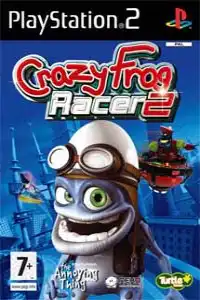

Crazy Frog Arcade Racer PS2 delivers fast-paced kart racing, exciting game modes, unlockables, smooth emulation, and nostalgic arcade fun.
Crazy Frog Arcade Racer PS2 Discription
If you’re looking for a fun and fast-paced kart racing game for the PlayStation 2, Crazy Frog Arcade Racer is worth trying. Released in 2006, the game features the iconic Crazy Frog along with several quirky characters competing across colorful tracks filled with power-ups, shortcuts, and chaotic action. Although it isn’t as well-known as Mario Kart, it delivers plenty of arcade-style fun and runs perfectly on modern PS2 emulators for Android and iOS.
In this guide, we’ll cover the game modes, gameplay features, unlockable content, the best AetherSX2 settings for smooth performance, and how to play the game on Android and iPhone.
Crazy Frog Arcade Racer Gameplay Features
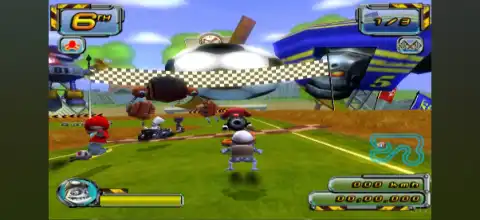
Crazy Frog Arcade Racer offers an easy-to-learn arcade racing experience suitable for players of all ages. The controls are simple, making it easy to jump into races, while the power-ups and weapon system keep every race unpredictable.
Some of the game’s best gameplay features include:
- Fast-paced arcade kart racing with simple controls.
- Multiple playable characters, each with different driving characteristics.
- 12 unique race tracks featuring cities, beaches, football stadiums, icy roads, and more.
- Collectable weapons and power-ups such as rockets, mines, speed boosts, shields, and defensive items.
- Hidden shortcuts and alternate routes on many tracks.
- Single-player and local multiplayer modes.
- Battle arenas where players fight using weapons instead of racing.
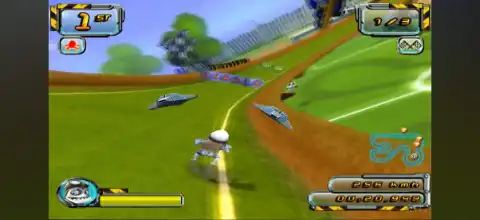
- Bright cartoon visuals that run well even on mid-range Android devices using emulation.
Game Modes
Crazy Frog Arcade Racer includes several game modes that provide plenty of replay value.
Championship Mode
This is the main progression mode. Players compete in a series of races across different cups. Initially, only the first championship is available, while additional cups become available after winning previous ones.
Single Race
Choose any unlocked track and race against AI opponents without progressing through a championship. It’s perfect for casual play or practicing your favorite tracks.
Time Trial
Race alone against the clock and try to set the fastest lap times. Since there are no opponents, this mode is ideal for mastering each circuit.
Pursuit (Chase) Mode
Instead of racing to the finish line, you’ll be chased by aggressive drones. Your objective is simply to survive for as long as possible while avoiding attacks and collecting helpful power-ups.
Battle Mode
Battle Mode replaces racing with combat. Players fight inside dedicated arenas using rockets, traps, shields, and other weapons until only one player remains standing. This mode is available for local multiplayer after unlocking battle arenas through Championship progression.
Unlockable Elements
Crazy Frog Arcade Racer includes several unlockables that reward players for completing the game’s championships.
Unlockable content includes:
- New Championship Cups.
- Special Cup after clearing the previous championships.
- Battle Arenas for multiplayer.
- Hidden playable character Matilda (Crazy Cow) after completing the Special Cup.
- Completing the entire game unlocks nearly all remaining content, including every battle arena and bonus content.
Best AetherSX2 Settings for Crazy Frog Arcade Racer
Crazy Frog Arcade Racer is not a demanding PS2 game, so it runs smoothly on most modern Android phones.
Use these recommended AetherSX2 settings for the best experience:
- Graphics Renderer: Vulkan (recommended) or OpenGL if Vulkan causes issues.
- Internal Resolution: 2x Native (3x on high-end devices).
- Blending Accuracy: Basic.
- Hardware Download Mode: Disable Readbacks.
- Texture Preloading: Full.
- VSync: Off.
- Enable Multi-Threaded VU1: On.
- EE Cycle Rate: 100%.
- EE Cycle Skip: Normal (0).
- Fast Boot: Enabled.
- Frame Limit: 100%.
- Widescreen Patches: Optional.
- Safe Preset: Default or Fast.
These settings provide full-speed gameplay on most Snapdragon 7-series, 8-series, Dimensity 800+, Tensor, and newer flagship processors.
How to Download and Play Crazy Frog Arcade Racer on Android & iOS
Follow the steps below to play Crazy Frog Arcade Racer on both Android and iPhone/iPad:
- Download the Crazy Frog Arcade Racer PS2 ISO from our website.
- Android users should install AetherSX2.
- iPhone and iPad users should install IPSX2 or ArmSX2.
- Extract the downloaded ISO if it comes in ZIP, RAR, or 7Z format.
- Download a PlayStation 2 BIOS file and place it inside your emulator.
- Open your emulator and complete the initial BIOS setup.
- Tap Add Game or Scan Folder.
- Select the folder containing the Crazy Frog Arcade Racer ISO.
- The game will appear in your library.
- Apply the recommended emulator settings for smoother performance.
- Connect a Bluetooth controller (optional) for a better gameplay experience.
- Launch the game and enjoy Crazy Frog Arcade Racer on your Android or iOS device.
Final Thoughts
Crazy Frog Arcade Racer is a lighthearted PS2 kart racer packed with colorful environments, entertaining power-ups, and several enjoyable game modes. Whether you’re playing through Championship mode, battling friends in Battle Mode, or trying to beat your best Time Trial records, the game still offers plenty of nostalgic fun.
Thanks to modern PS2 emulators like AetherSX2 on Android and IPSX2/ArmSX2 on iOS, you can easily enjoy this classic on your smartphone with smooth performance and enhanced graphics.