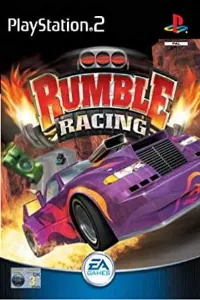

Download the Rumble Racing PS2 ISO from our site and enjoy fast-paced arcade racing with AetherSX2 on Android or iOS.
Rumble Racing (PS2) – Full Game Overview
Rumble Racing is a classic arcade-style racing game released for the PlayStation 2 by Electronic Arts. It stands out for its over-the-top stunt mechanics, explosive power-ups, and high-speed chaotic racing. Inspired by NASCAR Rumble, the game blends traditional racing with combat-style gameplay, making it one of the most fun early PS2 racing titles.
Game Modes in Rumble Racing
Rumble Racing offers multiple engaging modes that keep the gameplay fresh and replayable:
Championship Mode
This is the main progression mode of the game. Players compete through a series of cups and events across different difficulty levels: Rookie, Pro, and Elite. Winning races earns points, and finishing first is essential to unlock new tracks, cars, and higher-tier championships. As you progress, AI opponents become more aggressive and skilled, using shortcuts and power-ups effectively.
Single Race Mode
This mode allows players to select any unlocked track and race freely without progression pressure. It is perfect for practicing difficult tracks or experimenting with different vehicles.
Stunt Challenge Mode
One of the most unique modes in the game, Stunt Challenge focuses entirely on performing aerial tricks, flips, and stunts within a time limit. Every successful stunt fills a boost meter, which rewards skilled driving with speed advantages. This mode emphasizes style over pure racing.
Showdown Mode
Showdown is a quick one-lap duel against a single opponent. It is fast, intense, and perfect for short gameplay sessions.
Multiplayer Mode
The game also features split-screen multiplayer where two players can race, compete, or even team up in co-op style races against AI. This adds a social and competitive edge to the gameplay experience.
Gameplay Features
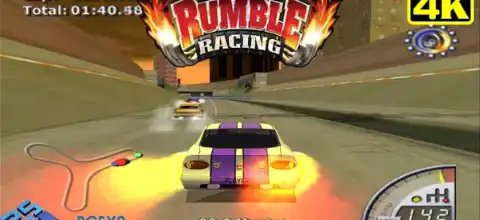
Rumble Racing is not a realistic simulator—it is pure arcade chaos.
Power-ups & Combat Racing
Throughout races, players collect power-ups that can attack opponents, boost speed, or create obstacles. These abilities make every race unpredictable and exciting.
Stunt System
A core gameplay feature is the stunt mechanic. Players can perform flips, barrel rolls, and jumps while racing. Successfully landing tricks gives a boost, encouraging risky driving for rewards.
Shortcuts & Interactive Tracks
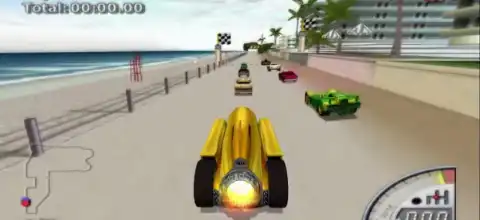
Each track is designed with hidden shortcuts, ramps, and environmental hazards. Mastering track layouts is key to winning races.
Adaptive AI
The AI difficulty increases significantly as you progress. Higher-level opponents aggressively use power-ups, shortcuts, and advanced driving techniques, making later races more challenging.
Vehicle Classes
Cars are divided into three performance tiers: Rookie, Pro, and Elite. Each tier offers faster speed, better handling, and improved abilities.
Unlockable Content
One of the most rewarding aspects of Rumble Racing is its extensive unlock system.
Unlockable Cars
Players unlock cars by winning specific championship cups or discovering Easter eggs hidden in tracks. Examples include:
- Dragon (Rookie Cup reward)
- Cataclysm (Pro Cup reward)
- El Diablo (Elite-tier unlock)
- Jolly Roger, Malice, Direwolf, and more
Unlockable Tracks
New environments are unlocked by progressing through championships:
Beach, desert, stunt arenas, mountains, and airport tracks
Special tracks like The Gauntlet, Over Easy, and Wild Kingdom
Easter Egg Vehicles
Hidden throughout tracks are secret “egg” pickups. Finding them unlocks unique vehicles like Buck Shot, Cobalt, and Vortex.
Password System
The game also includes cheat passwords that can unlock cars, tracks, and even full game progression instantly. For example:
“ZEAGTLUKE” unlocks everything (master code)
How to Play Rumble Racing on Android & iOS
Since Rumble Racing is a PS2 game, it requires emulation to run on mobile devices.
Get the Game File (ISO)
You need the PS2 ISO file of Rumble Racing.
- Download it from our site:
- Download the ISO from our site and save it on your device storage.”
(Make sure the file is properly extracted if it comes in ZIP or RAR format.)
Install Emulator
- Android: Install AetherSX2
- iOS: Use a PS2 emulator alternative (availability may vary depending on device restrictions)
Load the Game
- Open the emulator
- Select “Add Game Directory”
- Locate the folder where ISO is saved
- Tap Rumble Racing ISO** to start playing
Best AetherSX2 Settings for Smooth Gameplay (Android)
To run Rumble Racing smoothly, adjust these settings:
Performance Settings
- EE Cycle Rate: -1 (Underclock 1)
- EE Cycle Skip: 1
- Multi-threaded VU1: ON
Graphics Settings
- Renderer: Vulkan (best) or OpenGL
- Internal Resolution: 1x or 2x (for low-end devices)
- Blending Accuracy: Basic
- Texture Filtering: Bilinear (PS2)
Speed Hacks
- Disable Widescreen patches (if lag occurs)
- Turn ON Preload Textures
- Frame Skipping: Optional for low-end phones
Device Tips
- Close background apps
- Use performance mode on phone
- Keep device cool to avoid throttling
These settings help maintain stable FPS and reduce stutter during heavy stunt sequences.
Final Thoughts
Rumble Racing remains a hidden gem of the PS2 era. Its combination of stunt-based gameplay, chaotic racing mechanics, and unlockable content makes it endlessly replayable. Unlike traditional racers, it rewards creativity, risk-taking, and aggressive driving.
Even today, it runs surprisingly well on mobile through emulators like AetherSX2, allowing new players to experience this classic arcade racer on the go.