
Experience One Piece Grand Battle! 3’s PS2 action with exciting modes, unlockables, and smooth Android emulation using AetherSX2.
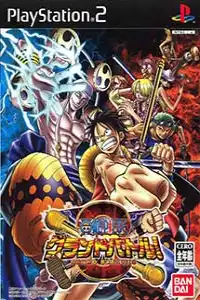
One Piece Grand Battle! 3 PS2 Discription
One Piece Grand Battle! 3 is one of the most popular 3D fighting games based on the legendary One Piece anime series. Originally released for PlayStation 2, the game brings together the Straw Hat Pirates and several powerful enemies in fast-paced arena battles filled with special attacks, unique abilities, and anime-style action.
Developed by Ganbarion and published by Bandai, the game features a roster of 16 playable characters, including Luffy, Zoro, Sanji, Nami, Robin, Ace, Shanks, Enel, Crocodile, Smoker, and more.
Thanks to modern PS2 emulation, Android and iOS users can now experience this classic One Piece fighter on mobile devices with improved resolution, smoother performance, and customizable controls.
One Piece Grand Battle! 3 Gameplay Features
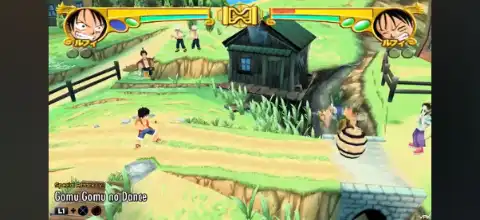
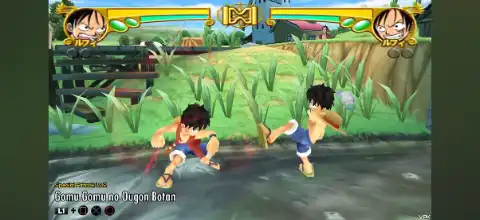
Unlike traditional 2D fighting games, One Piece Grand Battle! 3 uses a free-movement 3D arena fighting system. Players can run around stages, avoid attacks, use environmental objects, collect items, and unleash powerful special moves.
Each character has a unique fighting style based on their abilities from the anime. For example:
- Luffy uses his Gum-Gum techniques with long-range stretching attacks.
- Zoro relies on powerful sword strikes.
- Sanji focuses on fast kicks and close-range combos.
- Enel uses devastating lightning-based attacks.
- Ace uses fire-based special moves.
The game includes normal attacks, combos, special attacks, super moves, support attacks, and defensive mechanics. Players must manage their energy gauge carefully because stronger attacks require stored power.
Stages are also interactive, allowing players to use objects and hazards during battles. This creates a more dynamic experience compared to standard fighting games.
Game Modes in One Piece Grand Battle! 3
Event Battle
Event Battle is the main single-player mode where players select a character and fight through a series of battles against CPU opponents. Each character has their own storyline-inspired progression, ending with a special cinematic after completion.
Completing Event Battle with different characters is also the primary way to unlock hidden fighters and bonus content.
Grand Battle
Grand Battle is the classic versus mode where players can fight against CPU opponents or another player. It allows customization of battles, including:
- Stage selection
- Time limits
- Number of rounds
- Handicap settings
- Item frequency
This mode is perfect for quick battles or testing different characters.
Grand Tours
Grand Tours is a tournament-style mode where multiple characters compete in a bracket system. Players can fight through a series of matches and become the ultimate champion.
Training Mode
Training Mode helps players learn character moves, practice combos, and improve their skills. Players can check commands, damage output, and experiment with special attacks without normal battle pressure.
Completing training objectives also helps unlock additional content.
Unlockable Characters and Bonus Elements
One Piece Grand Battle! 3 contains several unlockable characters, stages, costumes, and collection items.
Some notable unlockable characters include:
- Smoker
- Crocodile
- Wiper
- Ohm
- Enel
- Hina
- Bon Clay
- Ace
- Shanks
These characters are generally unlocked by completing Event Battle with specific characters and meeting certain requirements.
The game also includes unlockable stages such as:
- Marine HQ Training Stage
- Windmill Village
Players can also unlock alternate costumes for several characters by completing specific challenges, including training tasks and higher difficulty battles.
The Treasure section contains additional collectible content, including:
- Character information
- Player statistics
- Theater videos
- Sound collection
- Gallery artwork
- Card collection features
Best AetherSX2 Settings for One Piece Grand Battle! 3 on Android
One Piece Grand Battle! 3 usually runs well on Android devices, but adjusting emulator settings can improve stability and performance.
Recommended AetherSX2 settings:
Graphics Settings
- Renderer: Vulkan (recommended)
- Resolution: 2x Native for mid-range phones
- Resolution: 3x or 4x Native for flagship devices
- Texture Filtering: Bilinear (PS2)
- Anisotropic Filtering: 2x or 4x
- Blending Accuracy: Basic
- Hardware Download Mode: Disabled
System Settings
- Enable Fast Boot
- Enable Multi-Threaded VU1
- Enable Instant VU1
- Enable EE Cycle Rate Underclock if experiencing slowdowns
Performance Tips
- Close background apps before playing.
- Use Vulkan if OpenGL gives frame drops.
- Lower resolution if your phone heats up.
- Keep frames locked at normal speed for stable gameplay.
For most modern Android phones, 2x–3x resolution provides a good balance between graphics quality and smooth performance.
How to Download and Play One Piece Grand Battle! 3 on Android and iOS
- Get a legally owned copy of the One Piece Grand Battle! 3 PS2 game image file and transfer it to your mobile device.
- Install a compatible PS2 emulator:
- Android users can use AetherSX2.
- iOS users can use PS2 emulators such as IPX2/ArmSX2 (where available).
- Open the emulator and give the required storage permissions.
- Add the PS2 game image file to your emulator game directory.
- Scan your game library or manually select the game file.
- Configure controller settings, graphics options, and performance settings according to your device.
- Launch One Piece Grand Battle! 3 and adjust emulator settings if you experience lag or graphical issues.
With proper emulator configuration, One Piece Grand Battle! 3 remains an enjoyable PS2 classic on modern smartphones. Whether you want to replay the Event Battles, unlock hidden characters, or simply enjoy One Piece fighting action anywhere, this game delivers a nostalgic experience for anime and fighting game fans.