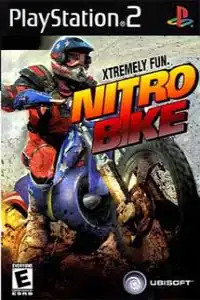
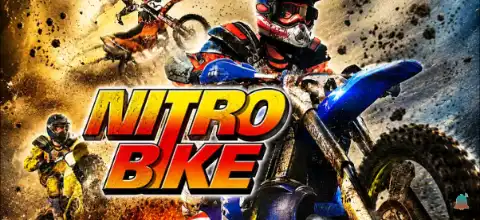

Nitrobike PS2 delivers fast-paced arcade motocross racing with nitro boosts, unlockables, and exciting action.
Nitrobike PS2 Discription
If you’re a fan of fast-paced arcade racing games, Nitrobike for PlayStation 2 is a hidden gem worth trying. Developed by Left Field Productions and published by Ubisoft, the game delivers adrenaline-filled motocross racing with explosive nitro boosts, massive jumps, and intense off-road tracks. Unlike realistic motocross simulators, Nitrobike focuses on arcade-style action, making every race fast, chaotic, and entertaining.
Today, thanks to powerful PS2 emulators, you can enjoy Nitrobike on both Android and iOS devices with smooth performance. In this guide, we’ll cover everything you need to know about the game’s gameplay, game modes, unlockable content, the best AetherSX2 settings, and how to play it on your smartphone.
Nitrobike PS2 Gameplay Features
Nitrobike is built around arcade motocross racing where speed matters more than realism. Every race is packed with jumps, shortcuts, obstacles, and aggressive AI opponents.
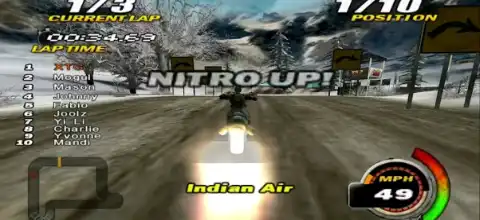
One of the game’s biggest highlights is the Nitro Boost system. Players can collect and use nitro to gain a huge burst of speed, helping them overtake rivals or recover after making mistakes. Timing your boost correctly is often the key to winning races.
The tracks feature plenty of environmental hazards including rocks, mud, ramps, water sections, and tight corners that keep every race exciting. You’ll also encounter explosive crashes whenever riders collide with obstacles or other competitors.
Key gameplay features include:
- Fast-paced arcade motocross racing
- Nitro Boost system for instant speed bursts
- Huge jumps and stunt-filled tracks
- Multiple riders and motorcycles
- Dynamic off-road environments
- Easy-to-learn controls with challenging races
- Split-screen multiplayer support on the original PS2 version
Although the graphics are modest by today’s standards, the game’s speed and arcade gameplay still make it enjoyable for racing fans.
Game Modes in Nitrobike PS2
Nitrobike offers several game modes that keep the gameplay fresh.
Career Mode
Career Mode is the main attraction where players compete across different championships and events. Winning races earns progression points, allowing you to unlock additional content as you advance.
Quick Race
Want instant action? Quick Race lets you jump directly into any unlocked track without progressing through Career Mode.
Time Trial
Challenge yourself to set the fastest lap times. This mode is perfect for mastering each course and improving racing lines.
Multiplayer
The PS2 version supports local multiplayer, allowing friends to compete against each other on the same console for exciting split-screen races.
Unlockable Elements
Nitrobike rewards players for progressing through Career Mode. As you earn medals and complete events, you’ll unlock additional content.
Unlockables include:
- New motorcycles
- Additional riders
- Extra racing circuits
- GT-1 Carbon bike after full Career completion
- Most bikes and tracks become available by earning Career points and winning events.
Best AetherSX2 Settings for Nitrobike on Android
Nitrobike is not a very demanding PS2 game, so most modern Android phones can run it smoothly with the right emulator settings.
Recommended AetherSX2 settings:
- Graphics Renderer: Vulkan (recommended) or OpenGL
- Internal Resolution: 2x (1080p devices) or 1x for low-end phones
- Blending Accuracy: Basic
- Texture Filtering: Bilinear (PS2)
- Hardware Download Mode: Disable Readbacks
- V-Sync: Off
- Multi-Threaded VU1: Enabled
- EE Cycle Rate: 100%
- EE Cycle Skip: Normal (0)
- Instant VU1: Enabled
- Frame Limit: 100%
- Fast Boot: Enabled
For Snapdragon 7-series, 8-series, Dimensity 800+, and newer flagship chipsets, the game generally maintains full speed. Older devices can lower the internal resolution to 1x for smoother gameplay.
How to Download and Play Nitrobike PS2 on Android and iOS
Follow the steps below to enjoy Nitrobike on your smartphone:
- Download the Nitrobike PS2 ISO from our website.
- Install AetherSX2 if you’re using an Android device.
- Install iPSX2 or ArmSX2 if you’re using an iPhone or iPad.
- Open the emulator after installation.
- Grant storage permissions when prompted.
- Locate the downloaded Nitrobike ISO file.
- Add or scan the ISO inside the emulator.
- Configure the recommended graphics settings for better performance.
- Connect a Bluetooth controller if you prefer physical controls (optional).
- Launch the game and start racing.
That’s it! You’re now ready to experience classic PS2 motocross racing on your Android or iOS device.
Final Words
Nitrobike may not be the most famous motocross game on the PlayStation 2, but it offers a fun arcade experience with fast races, explosive nitro boosts, unlockable bikes, and entertaining off-road tracks. The game runs exceptionally well through modern PS2 emulators like AetherSX2 on Android and iPSX2 or ArmSX2 on iOS, making it an excellent choice for retro gaming enthusiasts.
If you’re looking for an action-packed dirt bike racing game with simple controls and exciting gameplay, Nitrobike is definitely worth adding to your PS2 collection.