Experience Naruto Shippuden Ultimate Ninja 6 with smooth gameplay, unlockables, and easy mobile emulation today.
Naruto Shippuden Ultimate Ninja 6 PS2 Discription
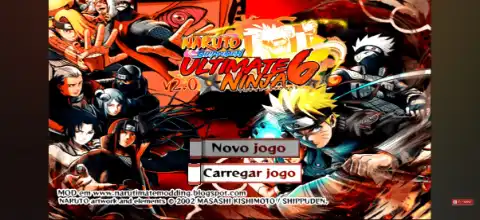
If you’re a fan of classic Naruto fighting games, Naruto Shippuden: Ultimate Ninja 6 for the PlayStation 2 remains one of the best anime fighters ever released. Featuring an expanded roster, fast-paced combat, cinematic Ultimate Jutsu attacks, and a story based on the early Shippuden saga, this game is still incredibly enjoyable today through PS2 emulation on mobile devices.
Whether you’re using an Android phone or an iPhone, you can easily experience this classic title with the right emulator. In this guide, we’ll cover the game’s features, gameplay modes, unlockable content, the best AetherSX2 settings for smooth performance, and how to download and play it on your smartphone.
Gameplay Features
Naruto Shippuden: Ultimate Ninja 6 builds upon the mechanics introduced in previous Ultimate Ninja games while adding new characters, improved animations, and smoother combat.
Some of its standout gameplay features include:
- Fast-paced 2.5D anime fighting gameplay
- Large roster featuring Shippuden and classic Naruto characters
- Spectacular Ultimate Jutsu with cinematic cutscenes
- Awakening transformations during battle
- Support character system
- Wall running and arena movement
- Chakra-based attacks and substitutions
- Special combo chains unique to every character
- Beautiful anime-inspired graphics that still look great on modern devices
The controls are easy to learn, making the game enjoyable for both beginners and experienced fighting game fans.
Game Modes
Naruto Shippuden: Ultimate Ninja 6 includes several game modes that provide dozens of hours of gameplay.
Story Mode
Relive the early events of Naruto Shippuden through story battles, character encounters, and anime-style cutscenes. Completing Story Mode is also the primary way to unlock many characters.
Free Battle
Fight against the CPU or another player using any unlocked character. You can freely choose the stage, characters, and difficulty level.
Practice Mode
Perfect your combos, Ultimate Jutsu, substitutions, and chakra management without any pressure.
Survival Mode
Defeat as many opponents as possible while managing your health between fights. This mode is great for testing your skills.
Mission Mode
Complete various combat challenges with specific objectives such as defeating enemies within a time limit or winning under special conditions.
Multiplayer (Local)
Using supported controllers or multiplayer setups, two players can battle each other on the same device through the emulator.
Unlockable Elements
One of the most enjoyable aspects of Ultimate Ninja 6 is unlocking new content as you progress.
Players can unlock:
- New playable characters
- Classic Naruto characters
- Shippuden characters
- Support characters
- Additional costumes
- New battle stages
- Ultimate Jutsu
- Gallery artwork
- Music tracks
- Collection items and bonuses
Most unlockables become available by progressing through Story Mode, completing missions, and fulfilling specific in-game requirements. This progression system encourages players to experience every game mode instead of only playing Free Battle.
Best AetherSX2 Emulator Settings for Naruto Shippuden Ultimate Ninja 6
Naruto Ultimate Ninja 6 runs extremely well on most modern Android devices. For the smoothest gameplay, use the following AetherSX2 settings.
Graphics
- Graphics Renderer: Vulkan (Recommended)
- Switch to OpenGL if Vulkan causes graphical issues
- Internal Resolution: 2x (1080p)
- 3x for flagship devices
- Bilinear Filtering: Bilinear (PS2)
- Texture Filtering: Default
- Hardware Download Mode: Disable Readbacks
- Aspect Ratio: 16:9 (Widescreen Patch) or Original 4:3
System
- EE Cycle Rate: 100%
- EE Cycle Skip: Normal (0)
- Multi-threaded VU: Enabled
- Fast Boot: Enabled
Audio
- Audio Latency: Low
- Time Stretching: Enabled
Controller
- Enable On-Screen Controls
- Customize button size and opacity according to your preference
- Bluetooth controllers are also fully supported
These settings allow most Snapdragon, Dimensity, Tensor, and newer mid-range processors to maintain full speed with excellent visuals.
How to Download and Play Naruto Shippuden Ultimate Ninja 6 on Android & iOS
- Download the Naruto Shippuden Ultimate Ninja 6 PS2 ISO from our website.
- Extract the downloaded archive if the game is compressed in ZIP, RAR, or 7Z format.
- Install AetherSX2 if you’re using Android.
- Install IPSX2 or ArmSX2 if you’re using an iPhone or iPad.
- Launch your emulator.
- Grant storage permissions if requested.
- Tap Add Game or browse to the folder containing the ISO file.
- Select the Naruto Shippuden Ultimate Ninja 6 ISO.
- Configure your graphics settings (use the recommended settings above for Android).
- Save your controller layout or connect a Bluetooth controller if preferred.
- Start the game and enjoy Naruto Shippuden Ultimate Ninja 6 on your mobile device.
Final Words
Naruto Shippuden: Ultimate Ninja 6 remains one of the finest Naruto games ever released for the PlayStation 2. Its exciting combat system, memorable Story Mode, huge character roster, unlockable content, and anime-style presentation make it a timeless experience for Naruto fans.
With modern PS2 emulators like AetherSX2 on Android and IPSX2 or ArmSX2 on iOS, you can enjoy this classic game smoothly on your smartphone. Simply download the ISO from our website, import it into your emulator, apply the recommended settings, and relive one of the best Naruto fighting games ever made.