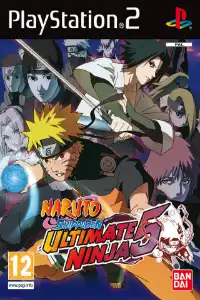


Naruto Shippuden Ultimate Ninja 5 features fast battles, story mode, unlockable characters, assist system, and smooth PS2 emulator gameplay.
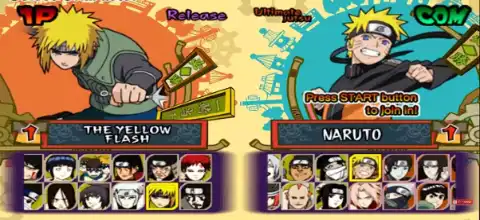
Ultimate Ninja 5 PS2 Overview
Naruto Shippuden: Ultimate Ninja 5 is one of the best Naruto games ever released for the PlayStation 2. Developed by CyberConnect2, the game continues the Shippuden storyline and delivers fast-paced anime battles, an engaging RPG-style story mode, dozens of playable characters, and plenty of unlockable content.
Even today, Ultimate Ninja 5 remains a fan favorite among Naruto enthusiasts and is widely played on Android devices using the AetherSX2 PS2 emulator.
Naruto Shippuden: Ultimate Ninja 5 Gameplay Features
Ultimate Ninja 5 expands upon the mechanics introduced in previous entries and adds several new gameplay improvements.
One of the biggest additions is the Assist Character system. Players can use support characters to strike opponents, prolong combinations, or execute special team tactics during combat. Some character combinations even unlock special cooperative Ultimate Jutsu attacks. The game also updates many character movesets and Ultimate Jutsu animations while retaining the fast and responsive arena-fighting gameplay the series is known for.
Key gameplay features include:
- Fast-paced 3D anime battles
- Assist Character system
- Team-based Ultimate Jutsu attacks
- Character awakenings and transformations
- Multiple combat styles
- Large roster of Naruto and Naruto Shippuden characters
- RPG-style exploration during story mode
- Up to two players can engage in local multiplayer combat.
Game Modes
Master Mode
The primary narrative campaign in the game is Master Mode. Unlike a traditional fighting game story mode, players can freely explore villages and various locations while progressing through the Naruto Shippuden storyline.
The story covers major events from the Kazekage Rescue Arc through the Sai and Sasuke storyline. Players can complete missions, interact with NPCs, collect items, and engage in battles throughout the adventure.
Free Battle Mode
Free Battle lets players select any unlocked characters and fight against the CPU or a friend. This mode is perfect for practicing combos, testing characters, and enjoying quick matches.
Training Mode
Training Mode helps players learn character moves, combos, substitutions, chakra management, and advanced techniques.
Collection Mode
As you progress through the game, you unlock artwork, videos, music, and various collectibles that can be viewed in Collection Mode.
Shop Mode
Through the in-game store, players can purchase collectibles, character content, music, and other extras with the points they have accrued.
How to Unlock All Characters Using Save Data in AetherSX2
Follow these steps to use the 100% completed save data and unlock all characters, items, and content in Naruto Shippuden: Ultimate Ninja 5.
Installation Steps:
- Download and extract the save data package.
- Open AetherSX2 or NetherSX2 on your Android device.
- Tap the ≡ Menu button and open App Settings.
- Navigate to the Memory Cards section.
- Select the memory card slot you want to use (typically Mcd001.ps2).
- Replace your existing memory card with the downloaded Mcd001.ps2 file, or import the save data if your emulator version supports importing saves.
- Confirm that the memory card is assigned to the selected slot.
- Restart AetherSX2 or NetherSX2 after copying the memory card file.
- Launch Naruto Shippuden: Ultimate Ninja 5.
- Open the game’s Load Game menu and load the imported save file.
Troubleshooting
- If the save data does not appear, make sure it matches your game’s exact region and serial number (PAL, NTSC-U, or NTSC-J).
- Some save files are region-locked and may not work with different versions of the game.
- Always create a backup of your original memory card before replacing it with a new save file.
Features of This Save Data
- All Characters Unlocked
- All Ultimate Jutsu Unlocked
- Maximum Character Levels
- Story Mode Completed
- All Items Unlocked
- Missions and Extras Unlocked
- 100% Game Completion
Note: Save files created for one game region may not work with another region. For best compatibility, use the same game version for which the save data was originally created.
Unlockable Characters & Extras
Ultimate Ninja 5 contains a large amount of unlockable content.
Several characters become available after completing specific events in Master Mode, including:
- Itachi Uchiha
- Kisame Hoshigaki
- Kabuto Yakushi
- Orochimaru
- Sai
- Yamato
- Sasori
- Chiyo
- Sasuke Uchiha
Most of these characters are unlocked by defeating them during the story campaign.
Alternate Character Forms
Many characters feature alternate costumes and forms. These can be unlocked by completing story-related objectives and defeating specific characters in Master Mode.
Sasuke RPG Mode
A special Sasuke RPG Mode can be unlocked after finishing Master Mode and completing all side quests.
Narutimate Difficulty
Players looking for an extra challenge can unlock the highest difficulty level by completing Gai’s Training Challenges.
Best AetherSX2/NetherSX2 Settings for Naruto Ultimate Ninja 5
The game runs exceptionally well on most modern Android devices.
Recommended AetherSX2 settings:
System Settings
- EE Cycle Rate: 100% (Normal)
- EE Cycle Skip: Normal (0)
- Multi-Threaded VU1: Enabled
- Fast Boot: Enabled
Graphics Settings
- Renderer: Vulkan (Recommended)
- Internal Resolution:
- 1x for low-end devices
- 2x–3x for mid-range devices
- 4x–5x for flagship devices
- Texture Filtering: Bilinear
- Blending Accuracy: Basic
- GPU Palette Conversion: Enabled
- Hardware Download Mode: Disable Readbacks
Performance Tweaks
- Threaded Presentation: Enabled
- Skip Presenting Duplicate Frames: Enabled
- VSync: Disabled
- Frame Limit: 100%
These settings generally provide smooth 60 FPS gameplay on Snapdragon 845-equivalent devices and above.
How to Download and Play Naruto Ultimate Ninja 5 on Android
Follow these simple steps:
- Download the Game ISO: Download the Naruto Shippuden: Ultimate Ninja 5 PS2 ISO from our website.
- Install AetherSX2: Install the AetherSX2 emulator on your Android device after downloading it.
- Add PS2 BIOS: Launch AetherSX2 and import a valid PS2 BIOS file.
- Import the ISO: Open AetherSX2 and scan the folder where you downloaded the Ultimate Ninja 5 ISO.
- Configure Settings: Apply the recommended settings listed above for the best performance.
- Start Playing: Tap the game icon and enjoy Naruto Shippuden: Ultimate Ninja 5 on your Android device.
How to Use the iPhone and iPad to Play Naruto Ultimate Ninja 5 (iOS)
Although AetherSX2 is not available for iOS, you can still enjoy PS2 games using compatible PS2 emulators available for iPhone and iPad.
Steps:
- Download the Naruto Shippuden: Ultimate Ninja 5 ISO from our website.
- Install a PS2-compatible emulator for iOS like Play! Or IPSX2.
- Import your PS2 BIOS.
- Add the downloaded ISO file to the emulator.
- Configure graphics settings according to your device.
- Launch the game and start playing.
Final Words
Naruto Shippuden: Ultimate Ninja 5 remains one of the finest Naruto games ever released on the PlayStation 2. With its exciting Master Mode, huge roster of characters, assist-based combat system, unlockable content, and excellent emulation performance, it continues to be a must-play title for Naruto fans.
If you want to experience one of the best Naruto fighting games on your smartphone, simply download the Ultimate Ninja 5 PS2 ISO from our website, set it up with Relive the fabled Shippuden journey whenever and wherever you choose with your favorite PS2 emulator.