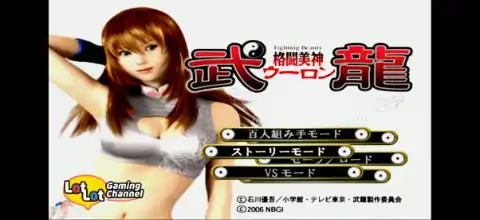

Kakutou Bijin Wulong is an action-packed PS2 anime fighting game featuring martial arts combat and engaging story-driven gameplay.
Kakutou Bijin Wulong PS2 Overview
If you’re a fan of anime-inspired fighting games, Kakutou Bijin Wulong (also known as Fighting Beauty Wulong) is one of the hidden gems released exclusively for the PlayStation 2. Developed by DreamFactory and published by Bandai Namco in 2006, the game is based on the popular manga and anime series of the same name. Instead of being a traditional one-on-one fighter, the game focuses on fast-paced 3D beat ’em up combat with martial arts techniques, making it a unique experience for anime and fighting game fans alike.
Whether you’re planning to play it on Android or iPhone using a PS2 emulator, here’s everything you need to know about the game’s features, modes, unlockables, and the best emulator settings.
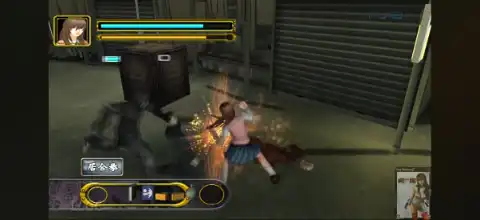
Kakutou Bijin Wulong PS2 Gameplay
Kakutou Bijin Wulong follows the story of Ran Nakanishi, a high school girl who becomes involved in underground martial arts tournaments. The game recreates several events from the anime while allowing players to experience intense close-range combat across multiple stages.
Unlike traditional fighting games where battles take place inside an arena, Wulong uses a 3D beat ’em up style. Players move freely around the environment while defeating groups of opponents before progressing to the next area.
Combat feels fast and responsive, featuring:
- Multiple martial arts fighting styles.
- Light and heavy attack combinations.
- Grapples and throws.
- Counter attacks.
- Powerful special techniques.
- Pick-up items that temporarily boost attacks.
- Smooth character movement with combo chaining.
The game emphasizes timing and positioning more than button mashing, making every battle enjoyable once you master the controls.
Game Modes
Although Kakutou Bijin Wulong isn’t packed with dozens of game modes, it offers enough content for both solo and local multiplayer players.
Story Mode
Story Mode follows the anime storyline and lets players relive major battles. You’ll fight numerous enemies while unlocking new chapters as the story progresses.
Versus Mode
Versus Mode allows two players to battle against each other locally using unlocked characters. It’s perfect for friendly matches on the same device or emulator with controller support.
Collection Mode
Collection Mode lets players view unlocked character artwork, galleries, and various collectibles earned during gameplay. Completionists will spend extra time unlocking everything available.
Unlockable Elements
Kakutou Bijin Wulong includes several unlockable rewards for players who continue progressing through the game.
Some unlockables include:
- Additional playable characters for Versus Mode.
- Collection Mode content.
- Character galleries and artwork.
- Extra fighting styles and bonuses.
- Hidden content unlocked through game completion.
If you complete the Story Mode and continue playing, you’ll gradually unlock almost everything available. Fully completed save files also reveal that all characters become available in Versus Mode alongside the complete Collection Mode.
Best AetherSX2 Settings for Kakutou Bijin Wulong
The game runs surprisingly well on most modern Android devices. These settings provide stable performance without sacrificing visual quality.
Graphics
- Renderer: Vulkan (Recommended)
- OpenGL: Use only if Vulkan causes issues
- Internal Resolution: 2x Native (3x for flagship devices)
- Texture Filtering: Bilinear
- Blending Accuracy: Basic
- Hardware Download Mode: Disable Readbacks
System
- EE Cycle Rate: 100% (Normal)
- EE Cycle Skip: Normal (0)
- Multi-Threaded VU: Enabled
- Fast Boot: Enabled
- Instant VU1: Enabled
Audio
- Time Stretch: Enabled
- Latency: Low
Performance Tips
- Enable Frame Limiter.
- Use Vulkan whenever possible.
- Avoid very high internal resolutions on budget phones.
- Enable Game Mode on your smartphone before launching the emulator.
With these settings, most Snapdragon 778G, 7 Gen series, 8 Gen series, Dimensity 8100+, and newer processors should maintain smooth gameplay.
How to Download and Play Kakutou Bijin Wulong on Android and iOS
Follow these simple steps to start playing Kakutou Bijin Wulong on your smartphone:
- Download the Kakutou Bijin Wulong PS2 ISO from our website.
- Extract the downloaded ZIP or RAR file if the game is compressed.
- Android users should install AetherSX2.
- iPhone and iPad users should install IPSX2 or ArmSX2.
- Launch your emulator.
- Grant storage permissions if requested.
- Locate and select the Kakutou Bijin Wulong ISO file.
- Import the game into the emulator library.
- Apply the recommended emulator settings listed above for smoother gameplay.
- Connect a Bluetooth controller for the best experience (optional).
- Start the game and enjoy playing Kakutou Bijin Wulong on Android or iOS.
Final Words
Kakutou Bijin Wulong is one of those underrated PS2 anime games that deserves more attention. Its combination of beat ’em up gameplay, martial arts combat, anime-inspired story, and local multiplayer makes it a fun title for PS2 fans. Thanks to modern emulators like AetherSX2, IPSX2, and ArmSX2, the game is now fully playable on Android and iOS devices with excellent performance.
If you’re looking for a lesser-known PS2 action game with satisfying combat and anime-style presentation, Kakutou Bijin Wulong is definitely worth adding to your collection.