
Enjoy FIFA 12 Español Latino PS2 with classic gameplay, multiple modes, smooth performance, and mobile emulation support.
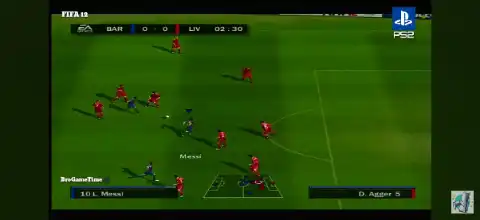
FIFA 12 Español Latino PS2 Overview
If you’re a fan of classic football games, FIFA 12 Español Latino PS2 remains one of the best PlayStation 2 football titles ever released. Featuring Latin Spanish commentary, updated clubs and national teams from its era, smooth gameplay, and multiple offline game modes, it continues to be a favorite among retro football gamers.
Unlike the PlayStation 3 and Xbox 360 versions, the PS2 edition uses the classic FIFA engine with optimized controls, making it lightweight and perfect for emulation on modern Android and iOS devices. It focuses on fast-paced football gameplay while retaining plenty of content to keep players engaged.
FIFA 12 Español Latino PS2 Game Modes
FIFA 12 PS2 offers several enjoyable offline modes that provide hours of gameplay.
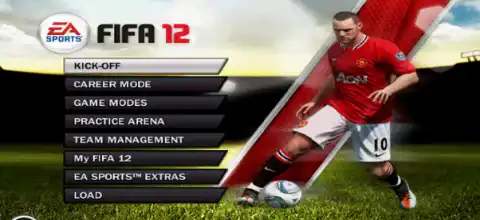
Kick-Off
Jump directly into a quick exhibition match with your favorite club or national team. This is the fastest way to enjoy a casual game with customizable match settings.
Career Mode
Career Mode lets you experience football from different perspectives. You can:
- Become a professional player.
- Play as a player-manager.
- Manage an entire football club.
You’ll handle transfers, lineups, tactics, finances, and compete across league seasons while trying to build a championship-winning team.
Season Mode
Take your favorite club through a complete league season. Compete against every team and try to finish at the top of the standings.
Tournament Mode
Play official-style tournaments using licensed clubs and national teams. This mode is perfect if you want to recreate famous football competitions.
Practice Mode
Practice passing, shooting, free kicks, penalties, dribbling, and defensive skills before jumping into competitive matches.
Be A Pro
Control only one player throughout the entire match instead of the whole team, offering a different football experience focused on positioning and teamwork.
Be A Keeper
Play exclusively as the goalkeeper and make crucial saves to help your team secure victory.
Accomplishment Mode
Complete special football challenges and objectives to earn rewards and unlock bonus content within the game.
Gameplay Features
Although the PS2 version doesn’t include every feature found in newer consoles, it still delivers an enjoyable football experience.
Some of its standout gameplay features include:
- Latin Spanish commentary for a more immersive experience.
- Smooth and responsive player controls.
- Updated player rosters and club kits from the 2011 season.
- Improved AI compared to previous PS2 FIFA titles.
- Realistic passing and shooting mechanics.
- Multiple camera angles.
- Authentic stadium atmosphere.
- Custom formations and tactics.
- Support for multiplayer matches.
- Fast loading times when played through an emulator.
The gameplay remains accessible for beginners while offering enough depth for long-term football fans. The PS2 version is based on EA’s classic FIFA engine with updated squads and competitions rather than the newer physics engine used on HD consoles.
Unlockable Elements
FIFA 12 PS2 includes several unlockable extras that can be earned by completing accomplishments and collecting Fan Shop points.
Unlockable content includes:
- Classic football teams.
- Alternate commentary and sound effects.
- Additional footballs.
- Extra third kits.
- Bonus stadium packs for Practice Mode.
- Fan Shop rewards.
- Various collectible extras unlocked through gameplay progression.
Completing in-game accomplishments is the primary way to unlock these bonus items, giving players additional reasons to continue playing after finishing tournaments or career seasons.
Best AetherSX2 Settings for FIFA 12 Español Latino PS2
FIFA 12 runs extremely well on most mid-range and flagship Android devices. For the smoothest gameplay, use the following AetherSX2 settings.
- Graphics Renderer: Vulkan (recommended) or OpenGL if Vulkan causes issues.
- Internal Resolution: 2x (720p) for mid-range devices, 3x–4x for flagship phones.
- Blending Accuracy: Basic.
- Texture Filtering: Bilinear (PS2).
- Hardware Download Mode: Disable Readbacks.
- Anisotropic Filtering: 4x or Auto.
- Enable Multi-Threaded VU1.
- EE Cycle Rate: 100% (Default).
- EE Cycle Skip: Normal (0).
- Fast Boot: Enabled.
- VSync: Disabled.
- Frame Limit: 100%.
- Widescreen Patches: Optional.
- Enable Game Upscaling if your device has a powerful GPU.
These settings generally provide a stable 60 FPS experience on compatible hardware while maintaining excellent visual quality.
How to Download and Play FIFA 12 Español Latino PS2 on Android and iOS
Follow these steps to start playing FIFA 12 Español Latino on your mobile device.
- Download the FIFA 12 Español Latino PS2 ISO from our website.
- Android users should install AetherSX2.
- iPhone and iPad users should install IPSX2 or ArmSX2.
- Extract the downloaded ISO file if it is compressed.
- Open your emulator.
- Grant storage permission if prompted.
- Locate the FIFA 12 Español Latino PS2 ISO.
- Add the game to the emulator library.
- Configure your graphics settings for the best performance.
- Connect a Bluetooth controller if desired for a console-like experience.
- Launch the game and start playing FIFA 12 Español Latino on your Android or iOS device.
Final Words
FIFA 12 Español Latino PS2 remains one of the most enjoyable classic football games available for emulation. With its Latin Spanish commentary, Career Mode, Season Mode, Tournament Mode, unlockable Fan Shop rewards, and lightweight performance, it’s an excellent choice for football fans who enjoy retro gaming.
Whether you’re reliving nostalgic memories or playing it for the first time, the game performs exceptionally well on modern smartphones using AetherSX2 for Android and IPSX2/ArmSX2 for iOS, making it one of the best PS2 football experiences you can enjoy on mobile.