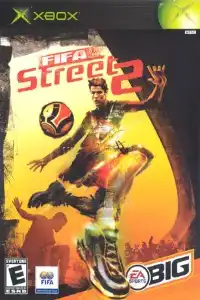

Experience the legendary FIFA Street 2 on Android and iOS with smooth gameplay, exciting tricks, career mode, unlockables, and easy emulator setup.
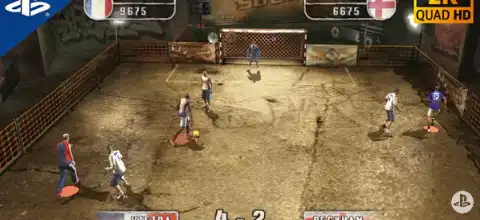
FIFA Street 2 PS2 Download for Android & iOS – Complete Guide
If you’re a fan of arcade-style football games, FIFA Street 2 for the PlayStation 2 is one of the most entertaining titles ever released. Developed by EA Sports BIG, the game focuses on flashy tricks, stylish skills, and fast-paced 4v4 street football instead of realistic simulation. Released in 2006, FIFA Street 2 remains a favorite among retro gamers and is now easily playable on modern Android devices using the AetherSX2 emulator.
In this guide, we’ll cover the gameplay, game modes, unlockable content, the best AetherSX2 settings, and how to play FIFA Street 2 on Android and iOS.
FIFA Street 2 PS2 Gameplay
Unlike traditional FIFA games, FIFA Street 2 is all about creativity and style. Instead of playing in professional stadiums, you’ll compete in urban streets, rooftops, underground courts, and unique football arenas around the world.
The game introduces an improved trick system where players can perform freestyle moves, wall tricks, flicks, nutmegs, and juggling combinations. Successfully chaining tricks fills your Gamebreaker meter, allowing you to unleash powerful skill moves that can instantly change the outcome of the match.
Each player has unique abilities, making every team feel different. Fast dribbling, stylish passes, and quick shots create an exciting arcade experience that still feels fun even today. The sequel also introduced a much deeper trick mechanic than the original FIFA Street, making gameplay smoother and more rewarding.
FIFA Street 2 Game Modes
Rule the Street
This is the game’s career mode. You create your own footballer, build a custom team, earn Skill Bills, improve your player’s rating, unlock better teammates, purchase new clothing, shoes, and accessories, and compete across various international street football tournaments.
Friendly Match
Perfect for quick matches against the AI. Simply choose your favorite teams and jump straight into a game.
Multiplayer
Play against friends using local multiplayer on the original PS2. When emulating, multiplayer support depends on your emulator setup.
Practice Mode
Learn advanced tricks, juggling, passing combinations, and Gamebreaker mechanics before entering tournaments.
Unlockable Content
One of FIFA Street 2’s best features is its progression system. By completing Rule the Street mode and winning tournaments, you can unlock:
- New football venues
- Legendary football players
- Street football stars
- Jerseys and clothing
- Shoes
- Hairstyles
- Accessories
- Player upgrades
- Additional customization options
Completing Rule the Street unlocks nearly all rewards, including players, venues, clothing, and bonus items.
Best AetherSX2 Settings for FIFA Street 2
FIFA Street 2 runs extremely well on most modern Android devices. For the best performance, use these settings:
Graphics
- Renderer: Vulkan (Recommended)
- OpenGL: Use only if Vulkan causes issues
- Internal Resolution:
- 1x (Low-end phones)
- 2x (Mid-range)
- 3x–4x (High-end)
- Texture Filtering: Bilinear
- Hardware Download Mode: Disable Readbacks
- Blending Accuracy: Basic
- V-Sync: Off
System Settings
- EE Cycle Rate: 100%
- EE Cycle Skip: Normal (0)
- Multi-threaded VU: Enabled
- Fast Boot: Enabled
Audio
- Latency: Low
- Time Stretching: Enabled
Performance Tips
- Enable Game Mode on your phone.
- Close background apps before playing.
- Keep your device cool to prevent thermal throttling.
- Use Vulkan for the best FPS on most devices.
With these settings, the game can run at full speed (60 FPS) on many Snapdragon, Dimensity, and Tensor-powered smartphones.
How to Download and Play FIFA Street 2 on Android
- Download the FIFA Street 2 PS2 ISO from our website.
- Install the AetherSX2 Emulator on your Android device.
- Open AetherSX2 and grant storage permission.
- Locate the downloaded FIFA Street 2 ISO file.
- Tap the game icon to add it to your library.
- Apply the recommended emulator settings mentioned above.
- Connect a Bluetooth controller (optional) or customize the on-screen controls.
- Start the game and enjoy FIFA Street 2 on your Android phone.
How to Play FIFA Street 2 on iPhone (iOS)
- Download the FIFA Street 2 PS2 ISO from our website.
- Install a PlayStation 2 emulator available for iOS that supports PS2 ISO files.
- Import the FIFA Street 2 ISO into the emulator.
- Configure the graphics settings according to your device’s performance.
- Pair a Bluetooth controller if desired for a better gaming experience.
- Launch the game and start playing.
Final Words
FIFA Street 2 remains one of the greatest arcade football games ever made. Its addictive trick system, exciting Gamebreaker mechanic, enjoyable career mode, and massive amount of unlockable content make it highly replayable even today. Thanks to PS2 emulation, you can now enjoy this classic on your Android or iPhone without needing the original console.
Simply download the FIFA Street 2 PS2 ISO from our website, install your preferred PS2 emulator, apply the recommended settings, and experience one of the best street football games ever created on your mobile device.