


Download eFootball 2026 PS2 ISO, enjoy updated teams, classic modes, enhanced gameplay, and smooth Android emulator performance today with ease.
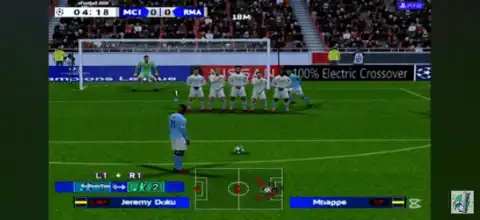
eFootball 2026 PS2 ISO MOD Overview
Football gaming fans still consider the PlayStation 2 era the golden age of PES. Thanks to the dedicated modding community, you can now enjoy eFootball 2026 PS2 with updated transfers, new kits, enhanced graphics, improved gameplay, and modern season content while retaining the classic PES experience. It is important to note that this is a fan-made PS2 mod based on older PES/Winning Eleven games, not an official Konami PS2 release.
eFootball 2026 PS2 Patch
eFootball 2026 PS2 is a modified version of the classic PES engine featuring updated squads, modern club kits, realistic player faces, new stadiums, and various graphical improvements. Most versions are optimized for both original PS2 hardware and PS2 emulators such as AetherSX2 and PCSX2.
Main Features
- Latest 2025/26 season transfers
- Updated club and national team kits
- New player faces and mini-kits
- Improved grass textures and stadium visuals
- Enhanced camera options
- Updated balls and scoreboards
- Peter Drury commentary in many patches
- Better gameplay balance and AI behavior
- HD-style graphics optimized for PS2 hardware
Game Modes
One of the biggest advantages of eFootball 2026 PS2 is that it retains the classic PES game modes loved by football fans.
Exhibition Match
Jump directly into a quick match with your favorite club or national team. This mode is perfect for casual gameplay and testing newly updated teams.
Master League
Master League remains the most popular mode in the game. Manage a club, sign players, develop talent, improve finances, and compete across multiple seasons. Many fans still consider Master League one of the greatest football career modes ever created.
League Mode
Choose any league and attempt to win the championship through a full season campaign.
Cup Mode
Compete in knockout tournaments and try to lift prestigious trophies.
Tournament Mode
Create custom competitions featuring your favorite clubs and national teams.
Training Mode
Practice free kicks, penalties, dribbling, passing, and shooting techniques.
Multiplayer
Play locally against friends using two controllers. Multiplayer support is available on real PS2 hardware and emulators.
Gameplay Improvements
Although it uses an older PS2 football engine, modders have introduced several gameplay enhancements.
Improved AI
Defenders position themselves better and goalkeepers react more realistically compared to older versions.
Better Passing and Shooting
Passing feels smoother while shooting mechanics are more balanced, creating a realistic football experience.
Enhanced Camera Angles
Many patches include Far Camera and Wide Camera options, allowing players to see more of the pitch and build attacks effectively.
Updated Tactical System
Teams use more realistic formations and tactics based on current football styles.
Unlockable Elements
Depending on the patch version, players may unlock:
- Classic teams
- Hidden players
- Additional stadiums
- Extra cups and tournaments
- Master League rewards
- Special kits and bonus content
Availability varies between different mod releases because each patch is created by different modding teams.
Best AetherSX2 Settings for Smooth Gameplay
If you are playing on Android, these settings provide the best balance between graphics and performance.
Graphics
- Renderer: Vulkan
- Internal Resolution: 2x Native
- Bilinear Filtering: Bilinear (PS2)
- Texture Preloading: Full
- Anisotropic Filtering: 4x
- Blending Accuracy: Basic
- Hardware Download Mode: Disable Readbacks
System
- EE Cycle Rate: 100%
- EE Cycle Skip: Normal
- Multi-Threaded VU1: Enabled
- Instant VU1: Enabled
- Fastmem: Enabled
- Performance
- Threaded Presentation: ON
- Frame Limit: 100%
- VSync: OFF
For low-end devices, reduce Internal Resolution to Native (1x) for better FPS.
How to Download and Play eFootball 2026 PS2 on Android
- Download the ISO: Download the eFootball 2026 PS2 ISO file from our website.
- Extract the Files: Use ZArchiver, RAR, or another extraction app to extract the downloaded archive.
- Install AetherSX2: Download and install AetherSX2 on your Android device.
- Configure BIOS: Open AetherSX2 and import your PS2 BIOS file.
- Add the ISO: Move the extracted ISO file to a folder on your phone and scan that folder inside AetherSX2.
- Start Playing: Tap the game icon and enjoy eFootball 2026 PS2 on Android. You can use touch controls or connect a Bluetooth controller for a better experience.
How to Play eFootball 2026 PS2 on iPhone & iPad (iOS)
Since AetherSX2 is not available on iOS, you’ll need a PS2 emulator like Play! Or IPSX2 on your device.
Steps
- Download the eFootball 2026 PS2 ISO from our website.
- Extract the downloaded archive.
- Install a PS2 emulator available for your iOS setup.
- Import the PS2 BIOS.
- Add the extracted ISO file.
- Configure controls and graphics settings.
- Launch the game and start playing.
For the best experience, using a Bluetooth controller is highly recommended.
Final Words
eFootball 2026 PS2 delivers a perfect blend of nostalgia and modern football updates. With updated transfers, new kits, enhanced graphics, improved AI, classic game modes, and smooth emulator support, it remains one of the best football gaming experiences available for retro gaming enthusiasts. Whether you’re playing on Android, iPhone, PC, or an actual PS2 console, this fan-made masterpiece lets you relive the magic of the legendary PES era with the latest football season updates.