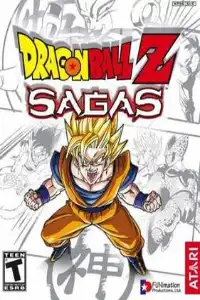


Dragon Ball Z: Sagas is a PS2 beat-em-up game featuring DBZ story missions, co-op gameplay, unlockables, and arcade-style combat.
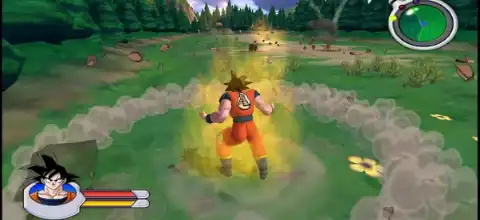
Dragon Ball Z: Sagas (PS2) – Full Overview
Dragon Ball Z: Sagas is a 3D action-adventure game released in 2005 for PlayStation 2, Xbox, and GameCube. Developed by Avalanche Software and published by Atari, it stands out as one of the few Western-developed Dragon Ball Z games.
The game retells the early-to-mid DBZ storyline, starting from the Saiyan Saga up to the Cell Games Saga, letting players control iconic characters like Goku, Vegeta, Gohan, Piccolo, and Future Trunks.
Unlike traditional fighting games in the series, Sagas uses a free-roaming beat ‘em up structure, combining combat, exploration, and light RPG-style upgrades.
Game Modes in Dragon Ball Z: Sagas
The game features a small but focused set of modes designed around replayability and co-op gameplay.
Saga Mode (Main Story Mode)
This is the core experience of the game. Saga Mode allows players to progress through major arcs of the Dragon Ball Z storyline:
- Saiyan Saga
- Namek/Frieza Saga
- Android Saga
- Cell Games Saga
Each level is mission-based, where players complete objectives such as defeating enemies, rescuing allies, or defeating boss characters like Nappa, Frieza, and Cell.
Cutscenes are a mix of anime footage and in-engine scenes that connect each battle. This mode also supports 2-player co-op, letting a second player join the campaign anytime.
Tutorial Mode
A simple training mode that introduces:
- Basic movement
- Melee combat
- Ki attacks
- Lock-on mechanics
- Special moves
It is designed for beginners to understand the controls before entering the main story.
Pendulum Mode (Unlockable)
Pendulum Mode becomes available after completing the game. This mode allows players to:
- Replay any completed level
- Use any unlocked character in any saga
- Mix characters in story missions (for example, using Broly or Bardock in main arcs)
This is one of the most fun replay features in the game, as it breaks story restrictions.
Extras / Unlock Gallery
An additional unlock-based menu where players can view:
- Character models
- Artwork
- Bonus content unlocked during gameplay
This acts as a reward hub for completionists.
Gameplay Features
Dragon Ball Z: Sagas has a simple but fast-paced combat system focused on accessibility rather than complexity.
Combat System
The gameplay revolves around three main attack types:
- Melee Attacks – Fast punches and kicks that stagger enemies
- Combo Attacks – Chain attacks that can reach up to 10 hits
- Ki Attacks – Energy blasts like Kamehameha, using a rechargeable energy meter
Each character also has a Special Move, which is their strongest ability.
Exploration & Missions
Unlike arena fighters, Sagas uses semi-open environments. Players:
- Move through stages freely
- Fight groups of enemies
- Complete objectives
- Face boss battles at the end of each level
The game also includes destructible environments and flying mechanics, making battles feel more dynamic.
Co-op Feature
One of the strongest features is drop-in/drop-out co-op, allowing a second player to join anytime during missions. This makes the game especially fun for couch multiplayer.
Unlockable Elements
The game includes several unlockables that increase replay value:
Unlockable Characters
After completing the game, players can unlock additional fighters such as:
- Bardock
- Broly
- Krillin
- Tien
- Yamcha
These characters can be used in Pendulum Mode and replay missions.
Unlockable Abilities
Players can earn upgrades such as:
- Improved Ki attacks
- Stronger melee combos
- Health and defense boosts
- New special abilities
Upgrades are purchased using in-game currency earned from missions.
Cheat Unlocks (Optional)
Some versions of the game also support cheat codes that can unlock:
- All upgrades
- Invincibility
- Full content access
(This varies depending on platform/emulation setup.)
Best AetherSX2 Settings (Android)
To run Dragon Ball Z: Sagas smoothly on Android using AetherSX2, you need a decent mid-range or high-end device (Snapdragon 845 or above recommended).
Recommended Settings
Graphics Settings:
- Renderer: Vulkan (best performance)
- Internal Resolution: 1x or 2x (don’t go higher on mid devices)
- Blending Accuracy: Basic or Medium
- Texture Filtering: Bilinear (PS2)
- Mipmapping: Off or Basic
System Settings
- EE Cycle Rate: 0 (default)
- VU Cycle Stealing: 0–1 (increase only if lag occurs)
- Multi-threaded VU1: ON
- Fast Boot: ON
Speed Hacks
- MTVU: ON (important for performance boost)
- Frame Skipping: OFF (enable only if severe lag)
Performance Tips
- Use Vulkan instead of OpenGL
- Close background apps
- Keep resolution at 1x for stable 60fps
- Use “Performance Mode” on your phone
With proper settings, the game runs at stable 50–60 FPS on strong devices.
How to Download and Play on Android & iOS
- Download the ISO: You need the game file in ISO format.
- You can download the ISO from “our site” (as requested), then proceed with setup.
- Install Emulator (Android/iOS): Download AetherSX2 or IPSX2 or Play! From our website.
- Install and open the app
- Load the Game: Move ISO file to your phone storage
- Open AetherSX2, Tap “Import Game”, Select DBZ Sagas ISO
- Configure Controls: Use on-screen controls or connect a Bluetooth controller
- Adjust layout for comfort.
Final Thoughts
Dragon Ball Z: Sagas is often remembered as a simpler but nostalgic DBZ experience. While it lacks the depth of later titles like Budokai Tenkaichi, it stands out for its co-op gameplay, saga-based progression, and unlockable replay modes.
On Android, with AetherSX2, it becomes fully playable again, letting fans relive classic DBZ battles anywhere.