
Download Dragon Ball Sparking Zero PS2 ISO MOD with save file. Play updated DBZ BT3 featuring Goku SSJ4 Daima, new characters, transformations, and menus.
Dragon Ball Sparking Zero PS2 Overview
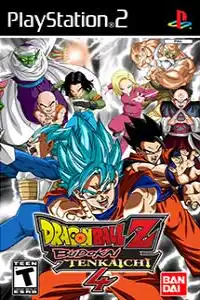
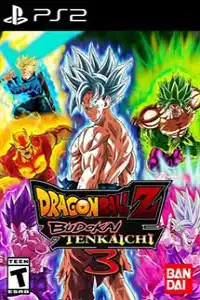
Dragon Ball Sparking Zero PS2 ISO MOD is a fan-made modification of the legendary Dragon Ball Z: Budokai Tenkaichi 3 (DBZ BT3). This mod brings the atmosphere of the latest Dragon Ball: Sparking! ZERO game to the PlayStation 2 engine, featuring a redesigned interface, updated character roster, new transformations, custom menus, and modern graphics while keeping the fast-paced gameplay that made BT3 one of the best Dragon Ball games ever created.
The mod is especially popular among Android, iPhone, and PC players because it can be played through PS2 emulators without requiring a modern gaming console. Along with the ISO, a save file is included to unlock characters, transformations, and other mod-specific content.
What’s New in Dragon Ball Sparking Zero PS2 MOD?
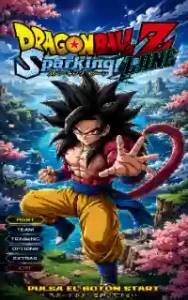
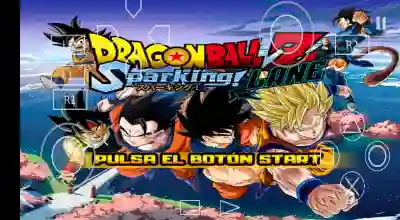
One of the first things you’ll notice is the completely redesigned interface. The classic Budokai Tenkaichi 3 branding has been replaced with a brand-new Dragon Ball Sparking Zero logo, giving the game a modern look inspired by the latest official release.
The menus have been redesigned with custom backgrounds, updated loading screens, new character portraits, and improved visual effects. The character selection screen also features modern artwork that closely resembles the style used in Sparking Zero.
The roster has received major updates as well. Many new characters and forms have been added, allowing players to experience content from Dragon Ball Super and Dragon Ball Daima.
Some of the featured additions include:
- Goku SSJ4 Daima
- New Daima character variants
- Ultra Instinct Goku forms
- Additional Super Saiyan transformations
- Updated character portraits
- New battle icons
- Enhanced aura effects
- Custom menu designs
- Modernized loading screens
Many existing fighters have also been visually upgraded with improved textures and custom effects, making battles feel more fresh and exciting than the original BT3 experience.
Why Is the Save File Important?
This mod includes a custom save file that unlocks various characters, forms, stages, and features required for the mod to function correctly.
Without the save data, some characters may remain locked or certain modifications may not appear properly in-game.
For the best experience, it is recommended to use the included save file together with the ISO.
How to Import the Save File in AetherSX2 and NetherSX2
Unlike older PS2 emulators, AetherSX2 and NetherSX2 allow players to import memory card saves directly into the emulator.
Method 1: Import Save Through Memory Card
- Download the save file.
- Extract the downloaded archive.
- Open AetherSX2 or NetherSX2.
- Tap the three-line menu icon.
- Open Settings.
- Go to Memory Cards.
- Select the memory card currently being used by the emulator.
- Tap Import Save.
- Locate the downloaded save file.
- Select the save file and confirm the import.
- Restart the emulator.
- Launch Dragon Ball Sparking Zero PS2 MOD.
The save data should now be detected automatically when the game starts.
Method 2: Copy Save Manually
If the import option doesn’t work:
- Extract the save file.
- Open your Android file manager.
- Navigate to:
Android > Data > xyz.aethersx2.android > files > memcards
or
Android > Data > xyz.aethersx2.android > files
- Copy the save file into the memory card folder.
- Replace any existing save if necessary.
- Restart the emulator.
- Launch the game.
Once loaded, all unlocked content should become available.
How to Use the Save File in PCSX2
PCSX2 users can install the save data using either the Memory Card Manager or by manually copying the file.
Memory Card Manager Method
- Open PCSX2.
- Go to Settings.
- Open Memory Card Manager.
- Select your memory card.
- Choose Import.
- Select the downloaded save file.
- Save the changes.
- Launch the game.
Manual Installation Method
- Download and extract the save file.
- Open your PCSX2 folder.
- Navigate to the memcards directory.
- Copy the save file into the folder.
- Launch PCSX2.
- Start Dragon Ball Sparking Zero PS2 MOD.
The game should detect the save data automatically.
How to Download and Play on Android
Requirements
- Dragon Ball Sparking Zero PS2 ISO
- Save File
- AetherSX2 or NetherSX2
- Android smartphone
Installation Steps
- Download the ISO file.
- Download the save file.
- Install AetherSX2 or NetherSX2.
- Import the save data.
- Add the ISO to the emulator.
- Configure graphics settings if needed.
- Launch the game.
For smoother gameplay, Vulkan rendering and 2x resolution are recommended on mid-range and high-end devices.
How to Play on iPhone and iPad (iOS)
iOS users can enjoy the game through the IPSX2 emulator.
Requirements
- Dragon Ball Sparking Zero PS2 ISO
- Save File
- IPSX2 Emulator
- iPhone or iPad
Installation Steps
- Install IPSX2 on your device.
- Download the ISO file.
- Import the game into IPSX2.
- Import or copy the save file into the emulator’s memory card directory.
- Launch the game.
- Verify that the save data has loaded.
- Start playing.
For the best performance, newer iPhone and iPad models are recommended.
Dragon Ball Super Sparking Zero Gameplay Experience
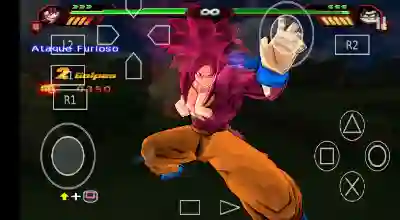
The gameplay remains faithful to Dragon Ball Z: Budokai Tenkaichi 3, featuring large 3D battle arenas, fast movement, powerful beam attacks, transformations, and cinematic ultimate moves.
The addition of Sparking Zero-inspired visuals, updated characters, and Daima content gives the game a modern feel while preserving the classic combat system that fans love.
Whether you’re battling with Goku SSJ4 Daima, testing Ultra Instinct forms, or exploring the updated roster, the mod provides a fresh Dragon Ball experience on the PS2 platform.
Conclusion
Dragon Ball Sparking Zero PS2 ISO MOD successfully brings the excitement of Sparking Zero to the PlayStation 2 generation. With its redesigned interface, new Sparking Zero logo, updated character roster, Goku SSJ4 Daima, additional transformations, and modern visual improvements, it offers a completely refreshed DBZ BT3 experience.
By using the included save file, players can unlock all content and enjoy the mod as intended. Whether you’re playing on Android with AetherSX2 or NetherSX2, on PC using PCSX2, or on iPhone and iPad through IPSX2, this mod is one of the best ways to experience Dragon Ball Sparking Zero on classic PS2 hardware and emulators.