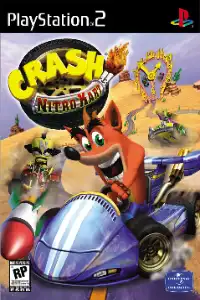


Relive the classic Crash Nitro Kart PS2 on Android and iOS with smooth emulation, exciting races, unlockables, and simple installation steps.

Crash Nitro Kart PS2 Overview
If you love classic kart racing games, Crash Nitro Kart for PlayStation 2 is one of the best titles you can play on your Android or iPhone using a PS2 emulator. Developed as the sequel to Crash Team Racing, the game features fast-paced racing, colorful tracks, powerful weapons, and a fun Adventure Mode that keeps players engaged for hours.
Whether you’re revisiting your childhood favorite or playing it for the first time, here’s everything you need to know about Crash Nitro Kart on Android and iOS.
Crash Nitro Kart Gameplay
Crash Nitro Kart is an arcade-style kart racing game where players compete against AI racers or friends across multiple themed tracks. The game combines skillful driving with exciting power-ups, making every race unpredictable and entertaining.
Just like other kart racers, you’ll collect item crates during races to obtain weapons and boosts, including:
- Homing Missiles
- Bombs
- TNT Crates
- Shields
- Turbo Boosts
- Beakers
- Invincibility Masks
One of the game’s biggest gameplay features is the Team System. Players choose either Team Bandicootn or Team Cortex, with each team offering unique characters. During races, teammates can help each other by exchanging power-ups and working together to gain an advantage.
The game also includes drift boosting, shortcuts, jump boosts, and boost pads that reward skilled driving. Mastering these mechanics is the key to winning races and achieving faster lap times.
Game Modes
Crash Nitro Kart includes several exciting game modes that offer plenty of replay value.
Adventure Mode
Adventure Mode is the main story campaign where you choose either Team Bandicoot or Team Cortex. Your goal is to defeat Emperor Velo’s racers across different planets, collect trophies, boss keys, relics, gems, and eventually become the Galactic Champion.
As you progress, new tracks, cups, and challenges become available.
Arcade Mode
Arcade Mode is perfect if you simply want to jump into quick races without playing the story.
It includes:
- Single Race
- Cup Tournament
- Team Race
- Quick Race
Time Trial
In Time Trial Mode, players race alone to achieve the fastest possible lap time.
You can also challenge ghost racers after meeting certain conditions, making this mode ideal for players who enjoy mastering every track.
Multiplayer
The PS2 version supports local multiplayer, allowing friends to compete together in split-screen races and battle arenas.
Unlockable Characters and Extras
Crash Nitro Kart rewards players with plenty of unlockable content as they progress.
Some unlockable characters include:
- Polar
- Pura
- Dingodile
- Zem
- Zam
- Fake Crash
- N. Tropy
- Real Velo
Players can also unlock:
- Hyper Spaceway track
- Terra Drome battle arena
- Gem Cups
- Time Trial Ghosts
- Extra cutscenes and rewards through Adventure Mode progression.
These unlockables provide excellent replay value long after finishing the main story.
Best AetherSX2 Settings for Crash Nitro Kart
Crash Nitro Kart is one of the easier PS2 games to emulate and runs smoothly on most modern Android devices.
For the best experience, use these settings:
Graphics
Renderer: Vulkan
Internal Resolution:
- 1x Native (Low-end devices)
- 2x Native (Mid-range devices)
- 3x Native (High-end Snapdragon devices)
- Bilinear Filtering: Bilinear (PS2)
- Texture Filtering: Default
- Blending Accuracy: Basic
- Hardware Download Mode: Disable if you notice performance issues.
System
- EE Cycle Rate: 100% (Default)
- EE Cycle Skip: Normal
- Multi-threaded VU1: Enabled
- Fast Boot: Enabled
Audio
Time Stretch: Enabled
Advanced
- Frame Limit: 100%
- VSync: Off
- Skip Presenting Duplicate Frames: Enabled (optional)
With these settings, most Snapdragon 845 and newer devices can easily achieve full-speed gameplay.
How to Download and Play Crash Nitro Kart on Android
Playing the game is simple.
- Download the Crash Nitro Kart PS2 ISO from our website.
- Install the AetherSX2 (or NetherSX2) emulator on your Android device.
- Download the required PS2 BIOS file.
- Open the emulator and set up the BIOS.
- Locate the downloaded Crash Nitro Kart ISO file and add it to your game library.
- Apply the recommended settings above for the smoothest gameplay.
- Tap the game icon and start racing.
How to Play Crash Nitro Kart on iPhone (iOS)
You can also enjoy Crash Nitro Kart on iPhone or iPad using a compatible PS2 emulator.
- Download the Crash Nitro Kart PS2 ISO from our website.
- Install your preferred PS2 emulator for iOS.
- Import the PS2 BIOS into the emulator.
- Add the downloaded ISO file.
- Configure the graphics settings according to your device’s performance.
- Launch the game and enjoy the full PlayStation 2 experience on your iPhone or iPad.
Final Thoughts
Crash Nitro Kart remains one of the best kart racing games available on the PlayStation 2. With its entertaining Adventure Mode, exciting power-ups, memorable tracks, unlockable characters, and smooth gameplay, it’s still a fantastic game to revisit today.
Thanks to modern PS2 emulators like AetherSX2, you can now enjoy Crash Nitro Kart at higher resolutions with stable performance on Android devices. Simply download the ISO from our website set up your emulator, apply the recommended settings, and you’re ready to race through the galaxy.