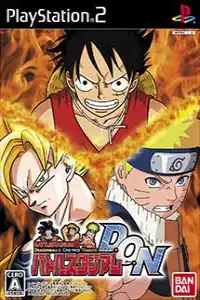

Battle Stadium D.O.N delivers exciting anime crossover battles, fun gameplay, unlockables, and smooth PS2 emulation on mobile.
Battle Stadium D.O.N PS2 Discription
If you’re a fan of anime fighting games, Battle Stadium D.O.N is one of the most unique crossover titles ever released on the PlayStation 2. Developed by Eighting and published by Bandai Namco in 2006, the game brings together legendary characters from Dragon Ball, One Piece, and Naruto in fast-paced arena battles inspired by the Super Smash Bros. formula.
Although the game was released only in Japan, its exciting gameplay, colorful visuals, and easy-to-understand combat mechanics have made it a favorite among anime fans worldwide. Thanks to modern PS2 emulators like AetherSX2 on Android and IPSX2/ArmSX2 on iOS, you can enjoy this classic game on your smartphone with smooth performance.
Battle Stadium D.O.N Gameplay
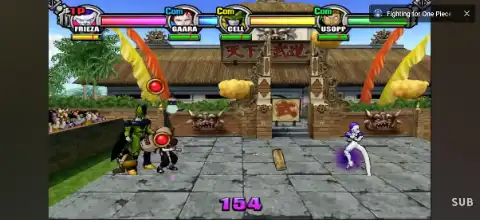
Unlike traditional 2D fighting games, Battle Stadium D.O.N features free-roaming 3D arenas where players battle by knocking opponents out of the stage or draining their stamina.
Each character has unique normal attacks, aerial combos, grabs, special moves, and ultimate techniques based on their respective anime series. Players collect energy during battle to unleash devastating super attacks.
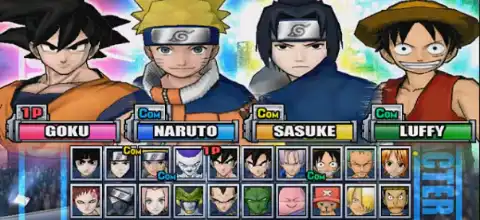
The game supports team battles where you can mix characters from different anime franchises, creating dream matchups like Goku vs Naruto or Luffy vs Vegeta.
Interactive stages, items, power-ups, and environmental hazards keep every match exciting and unpredictable. The controls are simple enough for beginners while still offering enough depth for competitive multiplayer sessions.
Game Modes
Battle Stadium D.O.N includes several entertaining modes that add plenty of replay value.
Battle Stadium (Story Mode)
This is the primary single-player mode where players progress through a series of battles and missions. Completing stages rewards coins that are later used in the game’s slot machine system to unlock new content.
VS Battle
Fight against CPU opponents or challenge friends in local multiplayer. Players can customize teams using characters from Dragon Ball, Naruto, and One Piece.
Custom Battle
One of the game’s most enjoyable modes, Custom Battle allows players to use special rule cards (tickets) that modify gameplay. These can change movement speed, gravity, item types, damage, time limits, disable special moves, and many other battle conditions for unique matches.
Time Attack
Unlocked after clearing the highest difficulty, this mode challenges players to finish battles as quickly as possible.
Gallery Mode
Gallery Mode lets players view unlocked artwork and other bonus content after meeting the unlock requirements.
Unlockable Characters & Extras
Battle Stadium D.O.N rewards players with several unlockables.
Unlockable content includes:
- Cell
- Frieza
- Majin Buu
- Trunks
- Gaara
- Rock Lee
- Nami
- Usopp
To unlock these characters, you must defeat them in Battle Stadium mode, earn slot coins, and successfully obtain the required bonus combinations in the game’s slot machine mini-game.
Additional unlockables include:
- Gallery Mode
- Hard Difficulty
- Very Hard Difficulty
- Time Attack Mode
- Bonus Stages
- Custom Battle Cards
The slot machine system introduces an element of randomness, making unlocking every character and stage an enjoyable long-term challenge.
Best AetherSX2 Settings for Battle Stadium D.O.N
Battle Stadium D.O.N is one of the lighter PS2 games to emulate, so even mid-range Android devices can run it smoothly with the right settings.
Use these recommended AetherSX2 settings:
- Graphics Renderer: Vulkan (recommended) or OpenGL if Vulkan causes issues
- Internal Resolution: 2x Native (1080p phones), 1x Native for low-end devices
- Texture Filtering: Bilinear (PS2)
- Blending Accuracy: Basic
- Hardware Download Mode: Disable Readbacks
- Threaded Presentation: Enabled
- Multi-Threaded VU1: Enabled
- EE Cycle Rate: 100%
- EE Cycle Skip: 0
- Fast Boot: Enabled
- Frame Limit: 100%
- Audio Latency: Low
- Enable Widescreen Patches: Optional
These settings provide excellent performance on most Snapdragon, Dimensity, and Tensor-powered Android devices while maintaining stable frame rates during battles.
How to Download and Play Battle Stadium D.O.N on Android and iOS
Follow these steps to start playing Battle Stadium D.O.N on your mobile device:
- Download the Battle Stadium D.O.N PS2 ISO from our website.
- Install AetherSX2 if you’re using Android.
- Install IPSX2 or ArmSX2 if you’re using an iPhone or iPad.
- Download and import a PlayStation 2 BIOS into your emulator.
- Open the emulator and scan your game folder.
- Select the downloaded Battle Stadium D.O.N ISO.
- Apply the recommended emulator settings listed above for the best performance.
- Connect a Bluetooth controller for a console-like experience (optional).
- Start the game and enjoy one of the best anime crossover fighting games ever made.
Final Words
Battle Stadium D.O.N remains one of the most entertaining anime crossover games available on the PlayStation 2. Featuring beloved characters from Dragon Ball, Naruto, and One Piece, the game offers exciting arena combat, enjoyable multiplayer matches, unlockable content, and plenty of replay value.
Whether you’re revisiting this nostalgic classic or experiencing it for the first time, modern emulators like AetherSX2 for Android and IPSX2/ArmSX2 for iOS make it incredibly easy to enjoy this PS2 masterpiece on your mobile device. Simply download the ISO from our website, configure your emulator, and jump into epic anime battles anytime, anywhere.