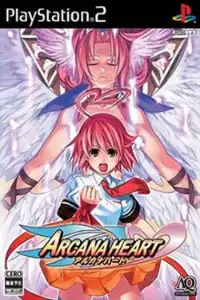
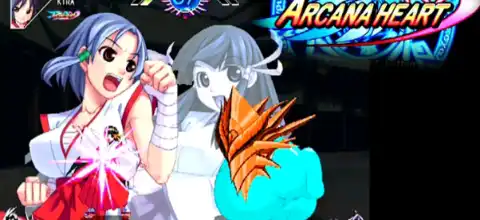

Arcana Heart PS2 offers fast anime fighting, unique Arcana mechanics, unlockables, and smooth mobile emulation.

Arcana Heart PS2 Overview
Arcana Heart is a 2D fighting game originally developed by Examu and released for arcades before receiving a PlayStation 2 version. What makes it stand out from a conventional anime fighting game is its airborne combat system and the ability to pair each fighter with an Arcana, giving you a large number of possible character-and-Arcana combinations. The PS2 release also adds extra gallery content and progression-based unlockables, making it an interesting version for fans of the original game.
Game Modes in Arcana Heart PS2
The PS2 version provides the main modes expected from a traditional fighting game. Story Mode lets you choose a character and follow her individual route through a series of battles. Completing stories is also important for unlocking some of the game’s gallery content.
Arcade Mode recreates the classic arcade experience, taking your selected character through successive opponents before the final encounters. Versus Mode allows two players to fight each other or lets you battle the computer, making it useful for quick matches and experimenting with different combinations.
There is also Training Mode, where you can practice attacks, movement and combinations without the pressure of a normal match. Finally, the PS2 release includes a Gallery/Extras section containing artwork, music and video material that can be expanded by playing through the game.
Gameplay Features
The biggest attraction is the game’s fast, aerial-focused fighting system. Matches are one-on-one, with a four-button control scheme built around three attack strengths and a homing/special-action button. The game emphasizes movement in the air, allowing fighters to chase opponents and quickly change their position.
The Arcana system is the feature that gives Arcana Heart much of its strategic depth. Before a fight, you select an Arcana to accompany your character. Different Arcana provide different abilities, passive effects, special moves and Arcana-specific attacks. This means the same character can play very differently depending on the Arcana selected.
The game also features Arcana Force, a temporary powered-up state that changes the way your character and Arcana function during battle. Players therefore have to manage both their character’s normal attacks and the additional options provided by their chosen Arcana.
With eleven playable characters in the PS2 version and multiple Arcana choices, experimenting with different combinations is a major part of the experience. Contemporary reviews specifically noted the variety created by character-and-Arcana combinations.
Unlockable Elements
The PS2 release does contain unlockable content, although there are no unlockable characters or Arcana. Fiona and Orichalkos, which had unlock requirements in the arcade version, are already available in the PS2 release. Mildred is not a normally playable character.
Instead, progression mainly unlocks artwork and gallery material. Selecting characters and Arcana repeatedly can unlock additional portraits, poses and bonus artwork. Completing Story Mode with characters unlocks their ending artwork, while completing the required Story Mode progression across the roster opens additional story and gallery content.
This gives the PS2 edition a small but worthwhile collection goal: play different characters, experiment with Arcana combinations, complete stories and gradually fill the Extras/Gallery section.
Best AetherSX2 Settings for Smooth Android Gameplay
Arcana Heart is a relatively lightweight 2D fighter compared with some of the more demanding PS2 titles, so a reasonably modern Android phone should have a good chance of running it smoothly. There is no single perfect configuration for every phone, but these are good starting settings.
- GPU Renderer: Vulkan
- Internal Resolution: 1x Native to prioritize performance; try 2x on a mid-range or high-end phone
- EE Cycle Rate: 100% initially
- EE Cycle Skip: 0/Normal
- Multi-Threaded VU1: On where available
- Bilinear Filtering: PS2/Bilinear
- Anisotropic Filtering: Off initially
- FXAA: Off
- Blending Accuracy: Basic
- Frame Limiting: On/100%
- Aspect Ratio: 4:3 for the original presentation, or widescreen if preferred
Vulkan is generally a good first choice, while keeping the EE settings at their normal values is the safest starting point. If your phone struggles, reducing the internal resolution to 1x is usually preferable to aggressively using frame skipping. Underclocking the EE rate to around 75% can also be tested on slower devices, but it may introduce gameplay or timing problems, so use it only when necessary.
For a stronger Android phone, try 2x resolution with 100% EE rate and Vulkan first. If you notice slowdowns, return to 1x resolution before changing CPU emulation settings.
How to Download and Play Arcana Heart PS2 on Android and iOS
- Get a legally obtained copy of the Arcana Heart PS2 game image. I can’t direct you to a site offering an unauthorized ISO download. If you own the game, create a PS2 disc dump for personal use and use that ISO with your emulator. You will also need a compatible PS2 BIOS obtained from your own console.
- For Android, install AetherSX2 (or a current compatible PS2 emulator). Create a folder for your PS2 games, copy your legally dumped Arcana Heart ISO there, and open the emulator.
- Configure the emulator. Add your BIOS, scan the folder containing your game, then select Arcana Heart. Start with Vulkan, 1x resolution, 100% EE cycle rate and normal cycle skip. Increase the resolution if your phone maintains full-speed gameplay.
- For iPhone/iPad, use iPSX2 or an appropriate ARMSX2-based iOS build. Current iOS PS2 emulation is developing quickly, and iPSX2 has been reported as an iOS port based on PS2-emulation projects. Depending on the build and device, additional setup such as sideloading and JIT may be required.
- Import your own BIOS and legally dumped ISO into the iOS emulator, following its file-import instructions. Do not download copyrighted game files from unofficial ROM/ISO sites.
- Launch the game and configure controls. Touch controls can work for basic play, but a Bluetooth controller is strongly recommended for Arcana Heart because precise directional inputs, homing attacks and special-move commands are much easier with physical controls.
- Tune performance if necessary. On Android, lower the resolution to 1x before experimenting with EE underclocking. On iOS, performance will depend heavily on the emulator build, device chipset, JIT availability and current compatibility.
Once configured, Arcana Heart is a particularly fun PS2 game to revisit on mobile because its relatively focused 2D presentation doesn’t demand the same level of hardware as many 3D PS2 games, while its character-and-Arcana system gives you plenty of room to experiment.