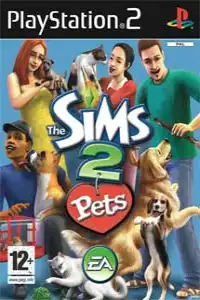
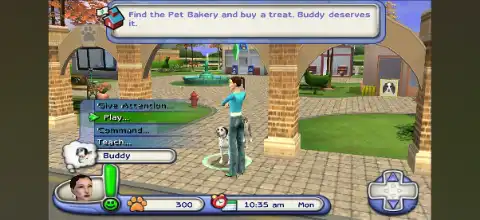

The Sims 2: Pets PS2 lets you build your dream life, raise lovable pets, explore town, and customize everything.
The Sims 2 Pets PS2 Discription
The Sims 2: Pets for PlayStation 2 is one of the most enjoyable life simulation games released by Electronic Arts. Unlike the PC expansion pack, the PS2 version is a standalone game that focuses on building your dream life alongside adorable pets. You can create your own Sim, adopt cats and dogs, decorate your home, build relationships, earn money, and explore a lively town filled with activities.
Even years after its release, The Sims 2: Pets remains popular among retro gamers thanks to PS2 emulators like AetherSX2 on Android and iPSX2/ArmSX2 on iOS. With the right emulator settings, the game runs smoothly on most modern smartphones.
Game Modes
Unlike some earlier console Sims titles, The Sims 2: Pets doesn’t feature a traditional story mode. Instead, it offers a sandbox experience where you are free to play at your own pace.
Open-Ended Life Simulation
The main mode lets you create a custom Sim, choose a house, adopt pets, and live your virtual life however you want. You’re free to build your home, develop skills, make friends, and care for your pets without following a fixed storyline. The game encourages exploration and progression through optional goals and town upgrades.
Create-a-Pet
One of the biggest attractions is the Create-a-Pet feature. Players can customize cats and dogs with different:
- Breeds
- Fur colors
- Patterns
- Ear and tail styles
- Personalities
- Accessories and clothing
Each pet develops unique behaviors depending on its personality, making every companion feel different.
Gameplay Features
The Sims 2: Pets expands the classic Sims gameplay with several fun mechanics centered around pet ownership.
Raise and Train Pets
Pets can be trained to perform a variety of fun tricks and commands. Your pets can master commands like:
- Sit
- Stay
- Roll Over
- Shake Hands
- Speak
Proper training also improves their behavior and strengthens your relationship with them.
Build Your Dream Home
Earn Simoleons by working jobs and spend your money on:
- Furniture
- Decorations
- Kitchen appliances
- Electronics
- Pet beds
- Toys
- Outdoor items
As your home improves, your Sims become happier and more productive.
Explore the Town
Unlike earlier console Sims games, The Sims 2: Pets allows you to visit several community areas where you can:
- Meet new Sims
- Buy pet supplies
- Visit parks
- Upgrade shops
- Socialize
- Adopt new pets
Town progression unlocks additional activities and stores over time.
Build Relationships
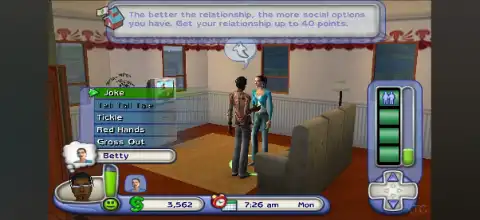
Interact with neighbors by making friends, dating, or starting a family. Pets also become an important part of your household by increasing your Sim’s happiness and social needs.
Learn Skills
Your Sim can improve various skills that unlock better job opportunities and increase income.
These include:
- Cooking
- Cleaning
- Mechanical
- Creativity
- Charisma
Improving skills also helps complete personal goals faster.
Unlockable Elements
The Sims 2: Pets PS2 includes plenty of unlockable content that rewards long-term play.
Unlock New Pet Accessories
As you continue progressing, you’ll unlock:
- New collars
- Clothing
- Fur colors
- Unique markings
- Additional customization options
- Upgrade Town Shops
One unique progression system allows stores in Town Square to gradually improve as you spend money and complete objectives. Eventually, the Pet Emporium becomes fully upgraded, giving you access to additional items and services.
Unlock Hidden Pets & Customization
Several hidden pet colors, patterns, and accessories become available through gameplay progression, while additional cosmetic items can also be unlocked using in-game codes.
Best AetherSX2 Settings for The Sims 2: Pets
The game isn’t very demanding, making it perfect for mid-range Android devices.
Use these settings for the best balance between graphics and performance.
Graphics
- Renderer: Vulkan (Recommended)
- OpenGL if Vulkan has issues
- Internal Resolution: 2x (1080p)
- 3x or 4x on flagship phones
- Texture Filtering: Bilinear (PS2)
- Blending Accuracy: Basic
- Hardware Download Mode: Disable Readbacks
System
- EE Cycle Rate: 100%
- EE Cycle Skip: Normal (0)
- Multi-threaded VU1: Enabled
- Fast Boot: Enabled
- Instant VU1: Enabled
Advanced
- Enable MTVU
- Disable Frame Limiter only if needed
- Skip Presenting Duplicate Frames: Enabled
With these settings, most Snapdragon 720G, 778G, 7 Gen series, 8 Gen series, Dimensity 8100+, and newer processors can run the game at full speed.
How to Download and Play The Sims 2: Pets on Android and iOS
- Download The Sims 2: Pets PS2 ISO from our website.
- Download AetherSX2 if you’re using Android.
- Download iPSX2 or ArmSX2 if you’re using an iPhone or iPad.
- Install your preferred PS2 emulator on your device.
- Launch the emulator and allow storage access if requested.
- Import or select the downloaded The Sims 2: Pets ISO.
- If required, load a compatible PS2 BIOS that you’ve legally obtained from your own console.
- Apply the recommended emulator settings listed above for smoother gameplay.
- Launch the game and create your first Sim.
- Adopt your favorite pet, build your dream home, and enjoy one of the best life simulation games available on the PlayStation 2.
Final Words
The Sims 2: Pets on PS2 remains one of the most entertaining simulation games ever released for the console. Its combination of life simulation, home customization, pet care, exploration, and open-ended gameplay still feels enjoyable today. Whether you’re revisiting it for nostalgia or playing it for the first time, modern Android and iOS emulators make it easy to experience this classic anywhere. With the recommended AetherSX2 settings and the right emulator, you can enjoy smooth performance and relive the charm of this beloved Sims adventure on your mobile device.