
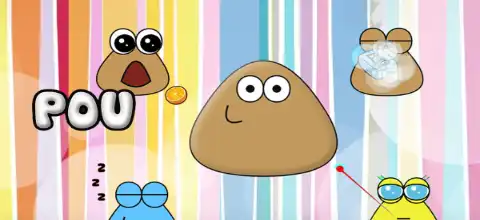

Download the Pou PlayStation 2 Port ISO from our website, configure your preferred emulator, and enjoy smooth gameplay on mobile.

Pou (Port) PlayStation 2 Discription
If you’re looking for a unique homebrew experience on the PlayStation 2, the Pou PS2 Port is one of the most interesting fan-made projects available. Inspired by the popular mobile virtual pet game, this unofficial port brings the adorable alien pet to Sony’s legendary console with controls optimized for the DualShock controller. Like many PS2 homebrew ports, it showcases what the console’s homebrew scene is capable of and offers a fun way to enjoy a familiar game on classic hardware.
Today, thanks to powerful PS2 emulators, you can also play the Pou PS2 Port directly on your Android phone or iPhone using the game’s ISO file.
Pou PS2 Port Gameplay
The gameplay remains faithful to the original Pou experience. Your objective is to take care of your virtual pet by feeding it, cleaning it, keeping it healthy, and playing mini-games to earn coins.
As your Pou grows, you’ll unlock additional customization options and activities. The game is simple, relaxing, and suitable for players of all ages.
Unlike action-heavy PS2 games, Pou focuses on casual gameplay where you can check on your pet whenever you like.
Game Modes & Features
Although this is a homebrew PS2 port rather than an official commercial release, it includes many enjoyable features:
- Feed your Pou to keep it healthy.
- Clean and bathe your pet.
- Put Pou to sleep and wake it up.
- Play fun mini-games to earn coins.
- Customize Pou with different outfits and accessories.
- Change wallpapers and room decorations.
- Simple and responsive PS2 controller support.
- Lightweight game that runs smoothly on most PS2 emulators.
The interface has been adapted for PlayStation 2 controls while preserving the charm of the original mobile game.
Unlockable Elements
As you continue playing and collecting coins, you can unlock various customization options, including:
- New hats
- Glasses
- Costumes
- Room decorations
- Wallpapers
- Food varieties
- Cosmetic accessories
Unlocking these items gives players more ways to personalize their virtual pet and keeps gameplay rewarding over time.
Best PS2 Emulators for Android & iOS
Modern smartphones are powerful enough to emulate PlayStation 2 games with excellent performance. Here are the best emulators for playing the Pou PS2 Port.
AetherSX2 (Android)
AetherSX2 remains one of the most popular PS2 emulators for Android. It offers:
- High compatibility
- Fast performance
- Resolution upscaling
- Save states
- External controller support
- BIOS configuration options
Even mid-range Android devices can run lightweight homebrew titles like Pou smoothly.
NetherSX2 (Android)
NetherSX2 is a community-maintained continuation based on AetherSX2 builds. It includes bug fixes, improved compatibility, and continued support for newer Android versions, making it one of the best choices today.
ArmmSX2 / ARMSX2 (Android)
ARMSX2 is another newer PS2 emulator project designed for ARM-powered Android devices. It focuses on improved performance, stability, and compatibility with homebrew applications alongside many commercial PS2 games.
Play! Emulator (Android & iOS)
Play! is available on both Android and iOS and does not require a BIOS file. While compatibility is still improving, lightweight homebrew games like Pou generally perform well on modern devices.
PCSX2 (Windows, macOS & Linux)
If you’d also like to enjoy the game on your PC, PCSX2 remains the gold standard for PlayStation 2 emulation with excellent compatibility and advanced graphics enhancements.
How to Download & Play Pou PS2 Port on Android and iOS
Follow these simple steps to start playing:
- Download the Pou PS2 Port ISO from our website.
- Install a compatible PS2 emulator on your device (AetherSX2, NetherSX2, ARMSX2, or Play!).
- Obtain a valid PlayStation 2 BIOS file and configure it within your emulator if required. (Play! does not require a BIOS, while AetherSX2- and NetherSX2-based emulators do.)
- Open your emulator and locate the downloaded Pou PS2 ISO.
- Select the game and launch it.
- Adjust graphics settings if necessary for smoother gameplay.
- Create save states or use virtual memory cards to save your progress.
- Enjoy taking care of your virtual pet on your Android phone or iPhone.
BIOS Setup
Before launching the game, make sure your emulator is properly configured.
- Download a legal PS2 BIOS dumped from your own PlayStation 2 console.
- Open the emulator settings.
- Select the BIOS directory.
- Load the BIOS file.
- Restart the emulator.
- Scan or manually add your downloaded Pou PS2 ISO.
- Launch the game and begin playing.
Final Words
The Pou PlayStation 2 Port is a fun homebrew adaptation that brings one of the most beloved virtual pet games to the PS2 platform. Whether you’re a fan of the original mobile game or simply enjoy exploring creative PS2 homebrew projects, this port is definitely worth trying.
For the best experience on mobile, use NetherSX2, AetherSX2, ARMSX2, or Play! Emulator, download the Pou PS2 ISO from our website, configure your emulator, and start playing in just a few minutes.