


Download Cabela’s Big Game Hunter PS2 ISO and enjoy realistic hunting gameplay on Android and iOS smoothly.
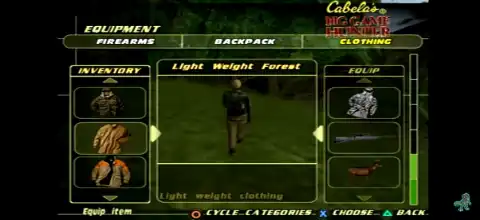
Cabela’s Big Game Hunter PS2 Overview
Cabela’s Big Game Hunter for the PlayStation 2 is one of the earliest hunting simulation games that brings realistic wildlife tracking, strategic hunting, and large open environments to the console. Instead of fast-paced action, the game focuses on patience, observation, and using the right hunting equipment to track down trophy animals across North America.
Whether you’re revisiting this classic or playing it for the first time on your Android or iPhone, here’s everything you need to know about its gameplay, game modes, unlockables, and the best emulator settings.
Game Modes
Career Mode
Career Mode is the game’s primary single-player experience, where you complete hunting missions and unlock new locations. You travel to different hunting locations, complete hunting objectives, earn tags, and unlock new areas as you progress. Each location features different wildlife, terrain, and weather conditions, requiring you to adapt your hunting strategy.
Quick Hunt
If you don’t want to play through the entire campaign, Quick Hunt lets you jump directly into previously unlocked hunting areas. You can customize your hunt, choose your equipment, and enjoy the game without progressing through Career Mode.
Trophy Room
Every successful hunt is recorded in your Trophy Room. This mode allows you to view the animals you’ve harvested throughout your adventure, giving players a sense of progression and achievement.
Gameplay Features
Unlike arcade shooting games, Cabela’s Big Game Hunter emphasizes realistic hunting mechanics.
Realistic Animal AI
Animals react to your presence, scent, movement, and gunshots. Running toward wildlife usually scares them away, making stealth essential.
Large Hunting Environments
The game features expansive forests, mountains, rivers, and open plains. Players must carefully explore each region while keeping track of their surroundings.
Wind and Scent System
Wind direction plays an important role. If your scent blows toward an animal, it may flee before you get close enough for a clean shot.
Hunting Equipment
Players can choose from various firearms, bows, and hunting gear. Using the right equipment for each hunt helps improve accuracy and overall success.
Survival Elements
Your hunter’s health can be affected by dangerous wildlife, harsh weather, hunger, and fatigue, adding another layer of realism to the hunting experience.
Unlockable Elements
Although Cabela’s Big Game Hunter doesn’t feature dozens of hidden rewards, there are several unlockables worth earning.
- Bonus Hunters – Complete an area in Career Mode, save your progress, then begin a new Career to unlock additional hunter characters.
- X-Ray Scope – Unlock it by collecting all tags in a level, then replaying that stage in Quick Hunt mode. It lets you spot animals more easily while aiming. Press the X button while aiming through the scope to activate X-Ray Vision, making it easier to locate animals behind obstacles.
- Best AetherSX2 Settings for Smooth Gameplay
Cabela’s Big Game Hunter is not a particularly demanding PS2 game, so most modern Android devices can run it smoothly using AetherSX2.
Recommended Settings
System
- EE Cycle Rate: 100% (Normal)
- EE Cycle Skip: Normal (0)
Graphics
- Renderer: Vulkan (Recommended) or OpenGL if Vulkan causes issues
- Internal Resolution:
- 2x for mid-range devices
- 3x–4x for flagship phones
- Texture Filtering: Bilinear (PS2)
- Blending Accuracy: Basic
- Hardware Download Mode: Disable Readbacks
Advanced
- Multi-threaded VU1: Enabled
- Instant VU1: Enabled
- Fast Texture Invalidation: Enabled
Audio
- Time Stretching: Enabled
Performance Tips
- Enable Frame Limiter (100%)
- Disable unnecessary post-processing filters
- Close background apps before launching the game
These settings provide stable performance on most Snapdragon 730, 778G, 855, 865, 870, 8 Gen 1, 8 Gen 2, Tensor, and newer MediaTek processors.
How to Download and Play Cabela’s Big Game Hunter on Android and iOS
- Download the Cabela’s Big Game Hunter PS2 ISO from our website.
- Android users: Install AetherSX2 on your device.
- iPhone/iPad users: Install IPSX2 or ArmSX2.
- Launch the emulator and grant storage permission if prompted.
- Locate the downloaded ISO file and add it to your game library.
- Make sure you have a PS2 BIOS configured in the emulator before launching the game.
- Use the recommended emulator settings for smooth gameplay.
- Connect a Bluetooth controller for a better gaming experience (optional).
- Start the game, create a memory card if required, and enjoy hunting across beautiful wilderness environments.
Final Thoughts
Cabela’s Big Game Hunter remains a unique PlayStation 2 hunting simulator that rewards patience, strategy, and accurate shooting rather than fast reflexes. Its realistic animal behavior, expansive hunting environments, and satisfying progression system still make it enjoyable today. With modern emulators like AetherSX2 for Android and IPSX2/ArmSX2 for iOS, you can easily experience this PS2 classic on your mobile device with smooth performance and enhanced graphics.