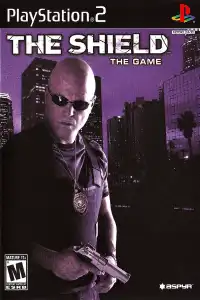


Download The Shield PS2, configure AetherSX2, enjoy immersive police action gameplay smoothly on Android today.
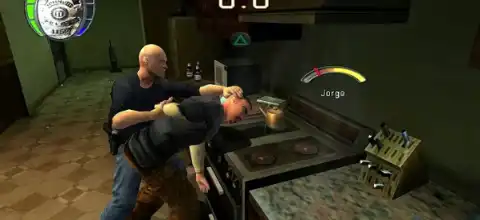
The Shield The Game PS2 Description
If you’re a fan of classic PlayStation 2 games and crime-action adventures, The Shield: The Game is a title worth revisiting. Released in 2007 and based on the hit TV series The Shield, the game puts you in the shoes of Detective Vic Mackey as you fight gangs, investigate crimes, interrogate suspects, and make difficult moral choices throughout the story.
Unlike traditional third-person shooters, The Shield mixes action, investigation, and decision-making mechanics, making every mission feel different. Whether you’re playing it for nostalgia or experiencing it for the first time, modern PS2 emulators let you enjoy this game on Android and even iOS devices with smooth performance.
The Shield PS2 Gameplay
The Shield is primarily a third-person action game with light stealth and investigation elements. Players step into the role of Detective Vic Mackey, taking on a series of high-risk assignments across crime-ridden neighborhoods where every operation involves dangerous criminals, tough decisions, and intense police action.
The gameplay revolves around:
- Third-person shooting with multiple firearms.
- Arresting or eliminating suspects depending on your choices.
- Interrogating criminals to gather information.
- Searching buildings for hidden evidence and contraband.
- Protecting civilians and hostages during dangerous missions.
- Completing optional objectives that affect rewards and unlockables.
- Making moral decisions that influence the ending and bonus content.
Unlike many PS2 shooters, the game encourages exploration. Searching cabinets, lockers, rooms, and suspects can reveal hidden evidence, weapons, cash, or bonus collectibles. Your choices also determine how the story unfolds and which ending you receive.
Game Modes
Although The Shield doesn’t feature multiplayer, it offers enough replay value through its mission structure and branching choices.
Story Mode
Story Mode is the heart of the game. You complete a series of police operations including:
- Drug busts
- Gang raids
- Hostage rescues
- Crime investigations
- Undercover missions
- Evidence collection
Every mission combines combat with investigative objectives, making it feel more like a police drama than a standard shooter.
Difficulty Levels
Players can choose from multiple difficulty settings:
- Easy
- Normal
- Hard
Hard difficulty is recommended for experienced players because several bonus rewards can only be unlocked while playing on higher difficulties.
Gameplay Features
The Shield includes several unique mechanics that separate it from other PS2 action games.
Tactical Police Gameplay
Instead of simply defeating enemies, you’ll often need to:
- Arrest suspects
- Search crime scenes
- Recover evidence
- Question witnesses
- Escort civilians
- Choice-Based Missions
Many missions allow players to make decisions that affect the storyline. You can choose to:
- Accept bribes
- Arrest criminals
- Kill important suspects
These choices determine which ending you receive and unlock different bonus rewards.
Optional Objectives
Almost every mission includes optional objectives such as:
- Finding hidden evidence
- Recovering stolen weapons
- Discovering drug stashes
- Arresting additional suspects
- Saving hostages
Completing these objectives rewards players with bonus content.
Exploration
Searching drawers, lockers, rooms, suspects, and hidden areas often reveals useful items and contributes toward unlocking bonus material.
Unlockable Elements
The Shield rewards players who fully explore each mission.
Unlockable content includes:
- Bonus videos
- Behind-the-scenes content
- Extra artwork
- Multiple ending bonuses
- Hidden collectibles
- Mission-specific rewards
Many bonuses require completing optional objectives, while others unlock after finishing the game or completing it on Hard difficulty. Certain endings are also unlocked depending on whether you arrest, kill, or accept bribes from key characters.
Best AetherSX2 Settings for The Shield PS2 (Android)
The Shield isn’t one of the most demanding PS2 games, so it runs smoothly on most modern mid-range and flagship Android phones.
Use these recommended settings for the best performance:
Graphics
- Graphics Renderer: Vulkan (recommended)
- OpenGL: Use only if Vulkan causes issues
- Internal Resolution: 2x (1080p devices) or 1x for budget phones
- Bilinear Filtering: Bilinear (PS2)
- Texture Preloading: Full
- Anisotropic Filtering: 4x
- Blending Accuracy: Basic
System
- EE Cycle Rate: 100%
- EE Cycle Skip: Normal (0)
- Multi-threaded VU1: Enabled
- Fast Boot: Enabled
Speed Hacks
- Instant VU1: Enabled
- MTVU: Enabled
- Hardware Download Mode: Disable Readbacks
- Threaded Presentation: Enabled (if supported)
Audio
- Audio Latency: Low
- Time Stretching: Enabled
These settings provide stable gameplay on most Snapdragon 700-series, Snapdragon 8-series, Dimensity 800+, Tensor, and newer flagship processors.
How to Download and Play The Shield PS2 on Android & iOS
- Download The Shield PS2 ISO from our website.
- Extract the ISO file if it is compressed in ZIP, RAR, or 7Z format.
- Install AetherSX2 on Android or iPSX2/ArmSX2 on iPhone or iPad.
- Download and set up the required PS2 BIOS in your emulator.
- Open the emulator and add the extracted ISO file.
- Apply the recommended emulator settings listed above for smoother gameplay.
- Connect a Bluetooth controller (optional) or customize the on-screen controls.
- Launch the game and enjoy The Shield PS2 on your Android or iOS device.
Thank you.