


Experience intense World War II battles in Call of Duty 3 PS2, featuring action-packed missions, multiplayer modes, classic combat, and immersive gameplay.
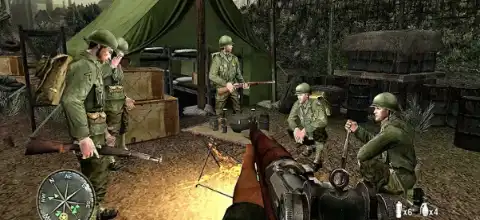
Call of Duty 3 PS2 Overview
Call of Duty 3 for PlayStation 2 is one of the most memorable World War II shooters released during the PS2 era. Developed by Treyarch and published by Activision in 2006, the game takes players through the intense battles of the Normandy Campaign following the D-Day invasion. Unlike modern Call of Duty titles, Call of Duty 3 focuses on historical warfare, squad-based combat, and cinematic storytelling.
Gameplay Features
The gameplay follows the classic Call of Duty formula with fast-paced first-person shooting, objective-based missions, and large battlefield encounters. Players take control of soldiers from multiple Allied forces, including American, British, Canadian, and Polish troops throughout the campaign.
Some notable gameplay features include:
- Regenerative health system instead of traditional health packs.
- Ability to carry two primary weapons at a time.
- Smoke grenades and fragmentation grenades.
- Picking up weapons and ammunition from fallen soldiers.
- Iron-sight aiming for improved accuracy.
- Ability to throw enemy grenades back.
- Scripted close-quarter combat (CQB) sequences requiring quick button inputs.
- Vehicle sections including tank and jeep missions.
The game also introduced cinematic hand-to-hand combat encounters that were uncommon in earlier Call of Duty titles. During certain missions, players must react quickly to on-screen prompts to defeat enemy soldiers in close combat.
Game Modes
Single-Player Campaign
The main attraction of Call of Duty 3 is its story campaign. Players experience the war from multiple perspectives while participating in missions inspired by real historical events during the liberation of France. The campaign features intense infantry battles, sabotage missions, tank assaults, and defensive operations.
Multiplayer
The PS2 version supports multiplayer and class-based gameplay. Players can choose different soldier classes, each equipped with unique weapons and abilities. The available classes include:
- Rifleman
- Light Assault
- Heavy Assault
- Medic
- Scout
- Support
- Anti-Armor
Each class offers specialized equipment and battlefield roles, encouraging team-based tactics.
Multiplayer Modes
- Battle (Free-for-All Deathmatch)
- Team Battle
- War
- Capture the Flag (CTF)
- Single Capture the Flag
- Headquarters
These modes provide a mix of objective-based and combat-focused gameplay.
Unlockable Content
Call of Duty 3 PS2 does not feature modern-style weapon progression systems, but players can unlock bonus content through gameplay.
Unlock All Levels Cheat
On the Chapter Select screen:
Hold SELECT and enter:
Right, Right, Left, Left, Square, Square
This unlocks all levels and certain bonus materials.
Bonus Interviews
Completing the campaign unlocks developer and character interviews accessible through the Extras menu.
Additional Cheat Codes
Extra Smoke Grenades:
R1, Circle, R2, L2, Square
Extra Frag Grenades:
R1, R1, L2, Circle, Circle, X
These cheats work in single-player mode.
How to Activate Unlimited Ammo & Health in Call of Duty 3 (PS2) on AetherSX2
Call of Duty 3 on the PS2 doesn’t offer a traditional currency or “money” system since it’s a linear, stage-based military shooter. However, you can still gain total dominance over the battlefield. By using RAW patch codes on the AetherSX2 emulator, you can bypass the need for scavenged resources entirely, granting you the ultimate tactical advantage: Unlimited Ammo and Infinite Health / Invincibility.
To activate God Mode on the NTSC-U (USA) version of the game, copy the exact code block below:
gametitle=Call of Duty 3 (USA)
comment=Infinite Ammo + Health for AetherSX2

// Master Code (Required)
patch=1,EE,9030A910,extended,0C0FC0D4

// Infinite Ammo
patch=1,EE,2041DEBC,extended,24630000

// Infinite Health / Invincibility
patch=1,EE,200FFF00,extended,8C910268
patch=1,EE,200FFF04,extended,36310001
patch=1,EE,200FFF08,extended,AC910268
patch=1,EE,200FFF0C,extended,08040736
patch=1,EE,200FFF10,extended,0080902D
patch=1,EE,20101CD0,extended,0803FFC0
How to Add Cheat Codes in AetherSX2
- Enable Patches: Open AetherSX2, head to App Settings > System, and toggle Enable Patch Codes to ON.
- Create the File: Paste the code block above into a text editor on your Android device.
- Format Correctly: Save the file with a
.pnachextension (for example:cod3_cheats.pnach). Ensure it does not mistakenly end in.txt. - Import & Play: Boot up the game, tap the Pause overlay menu, select Patch Codes, and choose Import From File. Select your created file, check the boxes to toggle the cheats on, and enjoy your unstoppable campaign!
Best AetherSX2 Settings for Call of Duty 3
If you’re playing Call of Duty 3 on Android using AetherSX2, these settings generally provide the best balance between performance and visual quality.
Graphics Settings
- Renderer: Vulkan (Recommended)
- Upscaling: 2x Native
- Texture Filtering: Bilinear
- Hardware Download Mode: Disable Readbacks
- Blending Accuracy: Basic
- V-Sync: Off
System Settings
- EE Cycle Rate: 100%
- EE Cycle Skip: Mild Underclock (1)
- Multi-Threaded VU1: Enabled
- Fastmem: Enabled
- Instant VU1: Enabled
Advanced Settings
- Enable Frame Limit
- Disable Software Rendering
- Enable Host VSync Only If Screen Tearing Occurs
- Recommended Device
For smooth gameplay, a Snapdragon 845 processor or better is recommended. Mid-range processors can still run the game well with lower resolution scaling.
How to Download and Play Call of Duty 3 on Android/iOS
- Download the Game ISO: Download the Call of Duty 3 PS2 ISO from our website.
- Download and Install AetherSX2 (Android)/IPSX2 (iOS)
- Setup BIOS: Launch AetherSX2 and import your PlayStation 2 BIOS file.
- Add the ISO: Move the downloaded ISO file to your phone storage and scan the folder inside AetherSX2.
- Configure Settings: Apply the recommended settings listed above for optimal performance.
- Start Playing: Tap the game icon in AetherSX2 and enjoy Call of Duty 3 on your Android device.
Final Thoughts
Call of Duty 3 remains one of the best World War II shooters available on PlayStation 2. Its cinematic campaign, multiple playable armies, class-based multiplayer, and intense battlefield moments make it a must-play title for fans of classic Call of Duty games. Thanks to modern PS2 emulators like AetherSX2, Android users can now enjoy this classic game with improved graphics, better performance, and portable gameplay anywhere.