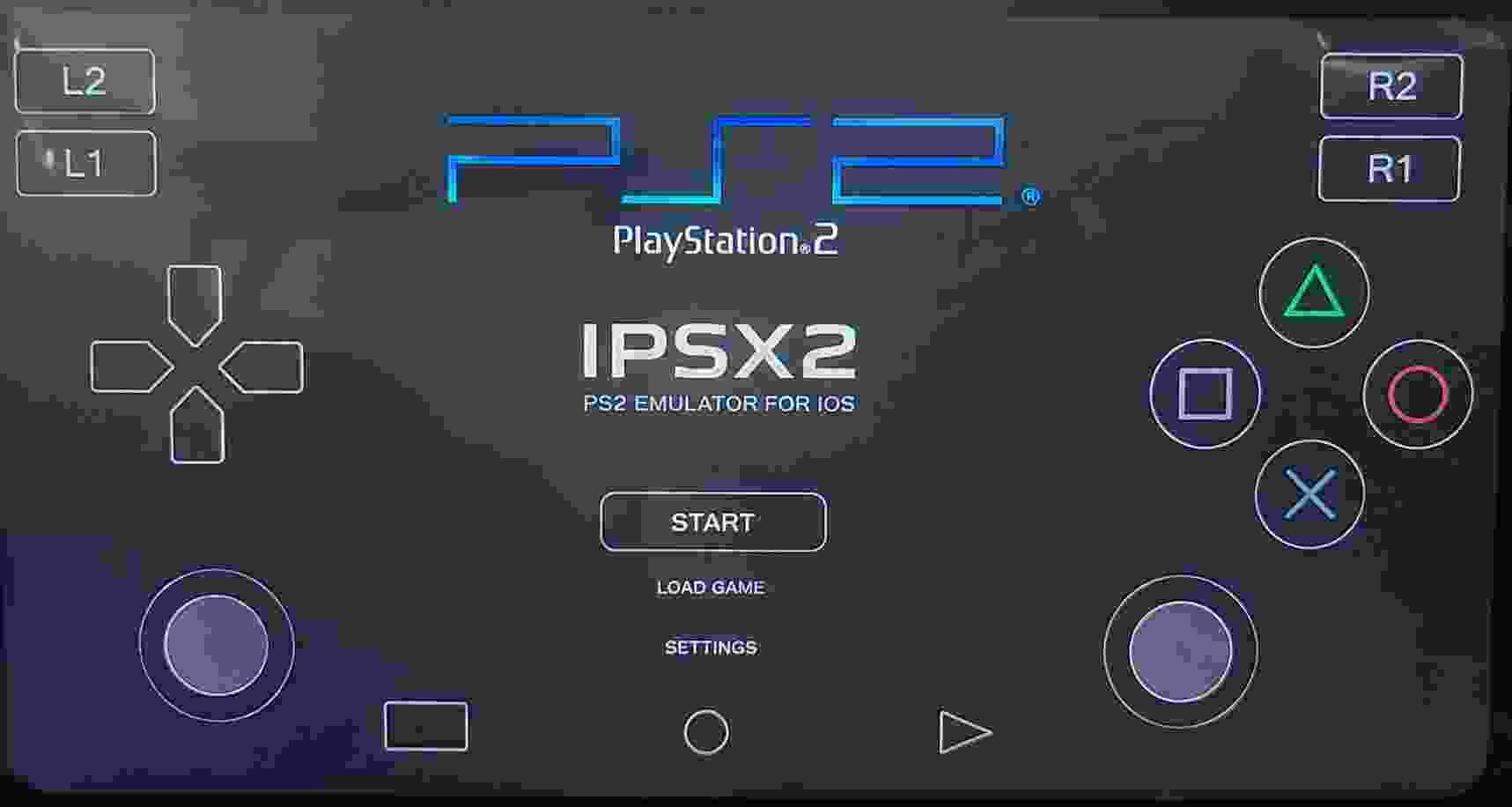

If you want to play classic PlayStation 2 games on your iPhone or iPad, IPSX2 IPA is one of the most popular PS2 emulators available for iOS devices. This emulator allows users to run PS2 ISO games directly on iPhones and iPads without needing a physical PlayStation 2 console. With improved performance, customizable controls, and support for external controllers, IPSX2 has become a favorite choice among retro gaming enthusiasts.
In this guide, you will learn everything about IPSX2 IPA, including its features, installation process, system requirements, and frequently asked questions.
What is IPSX2 IPA?
IPSX2 IPA is a PlayStation 2 emulator designed specifically for iOS devices. It enables users to play PS2 games on iPhone and iPad by emulating the PS2 hardware environment. The emulator is optimized for modern Apple devices, offering smooth gameplay and enhanced graphics for many popular PS2 titles.
Unlike traditional consoles, IPSX2 provides additional customization options such as screen scaling, save states, controller mapping, and performance adjustments. This makes it easier to enjoy classic PS2 games on mobile devices.
Features of PS2 Emulator IPSX2 IPA
Play PS2 Games on iPhone
IPSX2 allows you to load compatible PS2 ISO files and play them directly on your iPhone or iPad. Many popular games run smoothly on newer iOS devices.
High-Quality Graphics
The emulator can render games at higher resolutions than the original PS2 hardware. This improves image quality and provides a sharper gaming experience.
Save States Support
Save states let you save your progress at any moment and continue later without relying on in-game save points.
Customizable Touch Controls
Users can adjust button layouts, transparency levels, and control positions to create a more comfortable gaming setup.
External Controller Support
IPSX2 works with many Bluetooth controllers, making gameplay more accurate and enjoyable than touch controls alone.
Fast Performance
The emulator includes performance optimizations that help maintain stable frame rates on supported devices.
Easy Game Management
Organize your PS2 game collection with a simple interface that makes launching games quick and convenient.
System Requirements
Before downloading IPSX2 IPA, make sure your device meets the following requirements:
- iOS 15 or later
- iPhone XR or newer recommended
- At least 4 GB RAM
- Sufficient storage for game files
- Compatible PS2 BIOS file
- PS2 ISO game files
Newer devices generally provide better performance and compatibility.
How to Install IPSX2 IPA on iPhone
Follow these steps to install IPSX2 IPA:
- Download the latest IPSX2 IPA file.
- Install the IPA using a sideloading tool such as AltStore or Sideloadly.
- Trust the application certificate through iOS settings if required.
- Launch IPSX2 after installation.
- Import your PS2 BIOS file.
- Add your PS2 ISO games.
- Configure graphics and controls according to your preferences.
- Start playing your favorite PS2 games.
Best Settings for Better Performance
If some games run slowly, try the following settings:
- Use native or 2x resolution.
- Enable frame skipping when necessary.
- Disable unnecessary graphical enhancements.
- Lower texture filtering options.
- Close background applications before playing.
- Use performance mode if available.
These adjustments can significantly improve gameplay on older devices.
Advantages of IPSX2 IPA
- Play PS2 games anywhere.
- Supports both touch and controller input.
- Enhanced graphics compared to original hardware.
- Portable gaming experience.
- Frequent updates and improvements.
- Convenient save state functionality.
Is IPSX2 Safe?
IPSX2 IPA itself is generally safe when downloaded from trusted sources. However, users should always download emulator files from reputable websites to avoid modified or malicious versions. It is also recommended to use legally obtained game backups and BIOS files.
Frequently Asked Questions
Yes, IPSX2 IPA is generally available for free, although some builds may include additional features or experimental updates.
No. Most users can install IPSX2 through sideloading methods without jailbreaking their device.
Yes. Save states are supported, allowing you to save and load progress instantly.
Final Words
IPSX2 IPA is an excellent solution for iPhone and iPad users who want to enjoy PlayStation 2 gaming on iOS. With support for PS2 ISO games, customizable controls, controller compatibility, and improved graphics, it provides a convenient way to relive some of the greatest PS2 classics. If you are looking for a reliable PS2 emulator for iOS, IPSX2 IPA is definitely worth trying.