

Experience CJ’s epic adventure across San Andreas with enhanced graphics, missions, vehicles, customization, gang wars, and endless open-world action today.
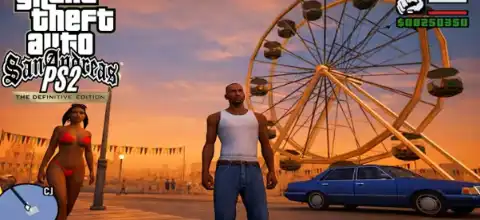
GTA San Andreas Definitive Edition Overview
Grand Theft Auto: San Andreas is widely regarded as one of the greatest open-world games ever made. Developed by Rockstar Games, the game follows Carl “CJ” Johnson as he returns to Los Santos after the death of his mother and becomes involved in gang wars, criminal organizations, as well as a trip through the whole state of San Andreas.
The Definitive Edition modernizes the classic experience with improved visuals, enhanced controls, GPS navigation, weapon wheels, mission checkpoints, and several quality-of-life improvements while keeping the original storyline intact.
Game Modes
Story Mode
Story Mode is the main attraction of GTA San Andreas. Players take control of CJ and complete dozens of missions across Los Santos, San Fierro, and Las Venturas. The story includes gang wars, heists, racing missions, police chases, and various side activities.
Free Roam Mode
Outside of missions, players can freely explore the massive open world. You can drive vehicles, buy properties, customize CJ, participate in mini-games, and discover hidden locations.
Side Activities
The game includes numerous optional activities such as:
- Taxi Driver Missions
- Vigilante Missions
- Firefighter Missions
- Paramedic Missions
- Burglar Missions
- Street Races
- BMX Challenges
- Vehicle School Tests
- Casino Games
- Gym Training
- Gang Territory Wars
These activities help increase stats, unlock rewards, and contribute toward 100% game completion.
Gameplay Features
One of the biggest reasons for San Andreas’ popularity is its deep gameplay systems.
Massive Open World
The game features three major cities:
- Los Santos
- San Fierro
- Las Venturas
Along with deserts, forests, mountains, villages, military bases, and highways connecting everything.
Character Customization
Players can completely customize CJ by:
- Changing clothes
- Getting tattoos
- Changing hairstyles
- Building muscle
- Losing or gaining weight
RPG-Style Stats
CJ has multiple stats that improve over time:
- Stamina
- Muscle
- Fat
- Respect
- Lung Capacity
- Driving Skill
- Flying Skill
- Weapon Skills
Huge Vehicle Variety
The game offers over 200 vehicles including:
- Sports Cars
- Motorcycles
- Trucks
- Boats
- Helicopters
- Fighter Jets
- Bicycles
Definitive Edition Improvements
Compared to the original PS2 release, the Definitive Edition includes:
- Improved graphics and lighting
- Modern GTA V-style controls
- Weapon selection wheel
- Radio selection wheel
- GPS navigation and waypoints
- Mission checkpoints and restart options
- Updated achievements and trophies
- Unlockable Elements
GTA San Andreas contains many unlockables for dedicated players.
Cities Unlock
At the beginning of the game, only Los Santos is accessible. As the story progresses:
- San Fierro unlocks
- Las Venturas unlocks
- Full map access becomes available
Safehouses
Completing missions and purchasing properties unlocks additional save locations throughout the map.
Weapons and Vehicles
Many powerful weapons and special vehicles become available after completing certain missions.
Girlfriends
CJ can date multiple girlfriends throughout the game, each offering unique rewards and bonuses.
Gang Territories
Players can capture enemy gang areas and expand Grove Street influence across Los Santos.
100% Completion Rewards
Players who achieve 100% completion unlock special rewards, exclusive vehicle spawns, and additional bonuses.
Best AetherSX2 Settings for GTA San Andreas
If you are playing the PS2 version using AetherSX2 on Android, these settings provide excellent performance on most modern devices.
Graphics Settings
- Renderer: Vulkan (Recommended)
- Internal Resolution: 2x Native
- Texture Filtering: Bilinear
- Hardware Download Mode: Disable Readbacks
- Blending Accuracy: Basic
- VSync: Off
System Settings
- EE Cycle Rate: 100%
- EE Cycle Skip: Normal (0)
- Multi-Threaded VU1: Enabled
- Fastmem: Enabled
- Instant VU1: Enabled
Advanced Settings
- GPU Palette Conversion: Enabled
- Threaded Presentation: Enabled
- Host VSync: Disabled
Performance Tips
For low-end devices:
- Use Native Resolution (1x)
- Switch to Vulkan Renderer
- Disable unnecessary enhancements
- Close background apps before launching the game
These settings generally provide smooth gameplay with stable FPS on Snapdragon 700-series processors and above.
How to Download and Play GTA San Andreas on Android
- Download the GTA San Andreas ISO file from our website.
- Install the latest AetherSX2 emulator on your Android device.
- Extract the downloaded ISO if it is compressed.
- Open AetherSX2.
- Grant storage permissions.
- Select the folder containing the ISO file.
- The game will appear in your library.
- Apply the recommended settings above.
- Launch the game and start playing.
Final Thoughts
GTA San Andreas remains one of Rockstar Games’ most ambitious titles even today. With its huge open world, memorable storyline, extensive customization, gang warfare mechanics, and countless side activities, it continues to be a favorite among GTA fans. The Definitive Edition enhances the experience with modern controls, checkpoints, improved visuals, and better navigation, making it easier than ever to revisit CJ’s legendary journey through San Andreas.