

GTA IV Legacy PS2 brings GTA IV-inspired graphics, vehicles, gameplay, and Niko Bellic to mobile emulators smoothly.
GTA IV Legacy PS2 ISO Information
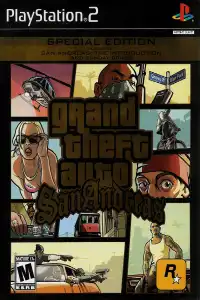
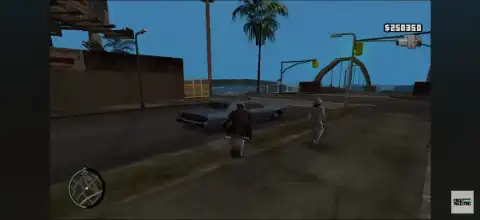
If you’ve ever wondered what Grand Theft Auto IV would look like on the PlayStation 2, then GTA IV Legacy PS2 is one of the most impressive fan-made projects you can try. Built as a heavily modified version of GTA San Andreas for PS2, this mod recreates the look and feel of GTA IV by introducing Niko Bellic, GTA IV-inspired vehicles, HUD, textures, animations, and several visual enhancements.
Although this isn’t an official Rockstar Games release, GTA IV Legacy delivers a unique experience that feels surprisingly close to GTA IV while remaining playable on PS2 hardware and modern mobile emulators.
Game Modes
Since GTA IV Legacy is based on GTA San Andreas, it offers the same core gameplay structure with several GTA IV-inspired improvements.
Story Mode
Play through the original San Andreas missions while controlling Niko Bellic instead of Carl Johnson. Many interface elements, weapons, vehicles, and character models have been redesigned to resemble GTA IV.
Free Roam Mode
Explore the massive open world freely without following missions. Drive different vehicles, discover hidden locations, experiment with weapons, or simply enjoy the redesigned environment inspired by GTA IV.
Mod Menu
Most builds include a built-in debug/mod menu that can be activated using a controller shortcut. Depending on the version, it allows players to spawn vehicles, access special features, and test various gameplay options.
Gameplay Features
GTA IV Legacy adds numerous visual and gameplay enhancements that make San Andreas feel much closer to GTA IV.
Some of the major features include:
- GTA IV-style HUD and radar
- Niko Bellic player model
- GTA IV weapon models
- GTA IV-inspired vehicle replacements
- Improved textures throughout the game
- Updated loading screens
- GTA IV menu design
- Enhanced animations
- Modified sound effects
- Better lighting and atmosphere
- Built-in mod/debug menu (supported builds)
Keep in mind that this is still a fan-made modification, so you may occasionally encounter texture glitches, crashes, or minor bugs depending on the emulator and game version.
Unlockable Elements
Unlike official GTA titles, GTA IV Legacy does not introduce a completely new progression system or exclusive unlockables.
However, players can still unlock everything originally available in GTA San Andreas, including:
- Safehouses
- New city areas as story progression continues
- Weapons
- Vehicles
- Clothing options
- Side missions
- Properties
- Hidden collectibles
If your version includes the built-in mod menu, additional vehicles and gameplay options can also be accessed through that menu instead of being unlocked normally.
Best AetherSX2 Settings for GTA IV Legacy
Since GTA IV Legacy is a heavily modified PS2 game, using optimized emulator settings can greatly improve performance on Android devices.
Recommended AetherSX2 settings:
- Graphics Renderer: Select Vulkan for the best overall performance. If you notice graphical glitches or compatibility problems, switch to OpenGL.
- Internal Resolution: 1x Native (increase only if your phone is powerful)
- Hardware Download Mode: Disable Readbacks
- Texture Filtering: Bilinear (PS2)
- Blending Accuracy: Basic
- V-Sync: Off
- Threaded Presentation: Enabled
- Multi-threaded VU1: Enabled
- EE Cycle Rate: 100%
- EE Cycle Skip: Mild Underclock (1)
- Fast Boot: Enabled
- Frame Limiter: 100%
- Widescreen Patches: Optional
For smoother gameplay:
- Close background apps before launching the emulator.
- Use Vulkan whenever possible.
- If you notice dark graphics, slightly increase the game’s brightness and emulator brightness settings.
- Save using emulator save states if your game version has memory card compatibility issues.
How to Download and Play GTA IV Legacy PS2 on Android & iOS
Follow these steps to start playing GTA IV Legacy on your mobile device:
- Download the GTA IV Legacy PS2 ISO from our website.
- Android users should install AetherSX2.
- iPhone and iPad users should install iPSX2 or ArmSX2.
- Open your preferred PS2 emulator.
- Grant storage permission if prompted.
- Locate the folder where you saved the GTA IV Legacy ISO.
- Scan or import the ISO into the emulator.
- Tap the game icon to launch it.
- Apply the recommended emulator settings for the best performance.
- Connect a Bluetooth controller for the most authentic PS2 gaming experience (optional).
- Enjoy GTA IV Legacy on your Android or iOS device.
Final Words
GTA IV Legacy is one of the most ambitious GTA San Andreas PS2 modifications ever created. While it doesn’t fully recreate Liberty City or GTA IV’s original storyline, it successfully delivers the atmosphere, vehicles, HUD, weapons, and visual style of GTA IV on the PlayStation 2 engine.
Combined with AetherSX2 on Android or iPSX2/ArmSX2 on iOS, the game runs surprisingly well on modern smartphones. If you’re looking for a fresh way to experience GTA San Andreas with a GTA IV makeover, GTA IV Legacy is definitely worth trying.