
My Living with Tsunade APK delivers comedy, adventure, and engaging character interactions in a Naruto-inspired visual novel experience for anime fans.
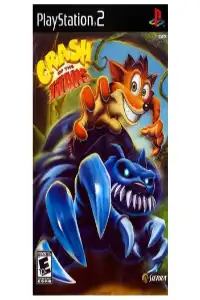
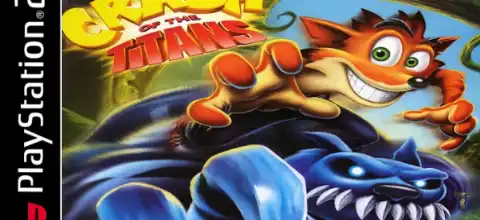
Crash of the Titans PS2 Overview
Released in 2007 for the PlayStation 2, Xbox 360, Wii, PSP, and other platforms, Crash of the Titans is one of the most unique entries in the Crash Bandicoot franchise. Unlike the classic platforming-focused Crash games, this title combines platforming with beat-’em-up combat and introduces the innovative “Titan Jacking” system, allowing players to take control of powerful mutant creatures.
Gameplay
In Crash of the Titans, players control Crash Bandicoot as he fights through various levels to stop Dr. Neo Cortex and rescue Coco. The game places a much larger focus on combat than previous Crash titles.
Crash can perform light attacks, heavy attacks, blocks, dodges, and combo moves. As enemies are defeated, they release Mojo, which can be collected to unlock new abilities and combat techniques. Crash eventually gains strength and a wider range of moves thanks to these improvements.
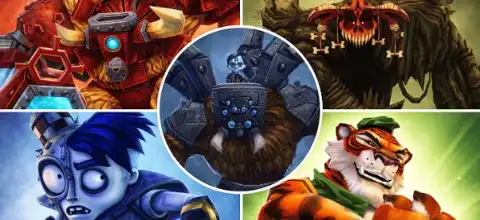
The most notable gameplay feature is the Jacking System. Large mutant creatures called Titans can be stunned and then “jacked,” allowing Crash to ride and control them. Combat is more varied and strategic since each Titan has distinct attacks, skills, and special powers. There are numerous Titans throughout the game, including Spike, Goar, Rhinoroller, Magmadon, Shellephant, Scorporilla, and more.
Game Modes
Story Mode
The main mode follows Crash’s adventure across the Wumpa Islands as he battles Cortex’s mutant army. As they progress through multiple episodes, players accumulate Mojo, fight enemies, and learn new skills.
Co-Op Mode
Crash of the Titans includes local cooperative gameplay. A second player can join as Carbon Crash, a white-furred version of Crash.
The game offers two cooperative styles:
- Leapfrog Mode – Players swap control during specific actions.
- Piggyback Mode – Players can carry each other and assist during combat and platforming sections.
- Mojo Room Challenges
Many levels contain special Mojo Rooms where players complete timed objectives such as defeating enemies, collecting Mojo, or using Titans to hit targets. These optional challenges provide additional replay value.
Unlockables
Crash of the Titans contains a variety of unlockable content.
Combat Upgrades
Collecting Mojo unlocks new moves and abilities, including advanced combat techniques and powerful attacks. One notable unlockable is the classic Old Skool Spin Attack, which references the original Crash games.
Character Skins
Players can unlock numerous skins by completing specific tasks such as defeating enemies or jacking Titans a certain number of times. Examples include:
- Battler Skin
- Goar Skin
- Magmadon Skin
- Rhinoroller Skin
- Scorporilla Skin
- Halloween Skin
- Valentine Skin
- Ratnician Skin
Many skins provide fun cosmetic changes and can be unlocked through gameplay milestones.
Concept Art & Collectibles
Hidden Voodoo Dolls unlock concept art galleries and additional information about Titans and enemies encountered throughout the game. Players aiming for 100% completion will want to collect all of them.
Best AetherSX2 Settings for Android
Crash of the Titans is not an extremely demanding PS2 game, so most mid-range and flagship Android devices can run it smoothly.
Recommended Settings
System
- EE Cycle Rate: 100% (Normal)
- EE Cycle Skip: Normal
- Multi-Threaded VU1: Enabled
- Fastmem: Enabled
Graphics
- Renderer: Vulkan (Recommended)
- Resolution:
- 2x Native (Mid-range devices)
- 3x–4x Native (Flagship devices)
- Texture Filtering: Bilinear
- Blending Accuracy: Basic
- Hardware Download Mode: Disable Readbacks
Advanced
- Threaded Presentation: Enabled
- GPU Palette Conversion: Enabled
- Skip Presenting Duplicate Frames: Enabled
For Low-End Devices
- Use Native Resolution (1x)
- Disable FXAA
- Enable Frame Skipping only if required
- Use Vulkan renderer for better performance
These settings generally provide stable gameplay at full speed on modern Android phones.
How to Install HD Texture Pack in AetherSX2 for Crash of the Titans (USA)
If you want to enhance the graphics of Crash of the Titans (USA) with HD textures, AetherSX2 supports texture replacement just like PCSX2. The process is simple once you know the correct folder location and game serial.
Step 1: Locate the AetherSX2 Data Folder
Open your file manager and navigate to:
Android/data/xyz.aethersx2.android/files/
Inside this directory, AetherSX2 stores memory cards, saves, screenshots, and texture replacement files.
Step 2: Create the Textures Folder (If It Doesn’t Exist)
Some AetherSX2 installations do not create a texture folder automatically. If you cannot find a folder named textures, simply create it yourself.
Your folder structure should become:
Android/data/xyz.aethersx2.android/files/textures/
Step 3: Create the Game Serial Folder
The USA version of Crash of the Titans uses the serial:
SLUS-21654
Inside the textures folder, create a new folder with this exact name:
Android/data/xyz.aethersx2.android/files/textures/SLUS-21654/
Step 4: Create the Replacements Folder
Inside the serial folder, create another folder named:
replacements
Final structure:
Android/data/xyz.aethersx2.android/files/textures/
└── SLUS-21654
    └── replacements
Step 5: Copy the Texture Pack Files
Extract all texture pack files and place them inside the replacements folder.
Example:
Android/data/xyz.aethersx2.android/files/textures/
└── SLUS-21654
    └── replacements
        ├── 00000001.png
        ├── 00000002.png
        ├── 00000003.png
        └── ...
Step 6: Enable Texture Replacement
Launch AetherSX2 and open:
Graphics Settings → Texture Replacements
Enable the following options:
- Load Texture Replacements
- Asynchronous Texture Loading
- Precache Textures (Recommended)
Restart the game after enabling these settings.
Troubleshooting
Texture folder missing?
Create it manually inside the AetherSX2 files directory.
Textures not loading?
Verify that:
- The game serial folder is named exactly SLUS-21654.
- The texture files are inside the replacements folder.
- Texture replacement options are enabled in Graphics Settings.
Game becomes slow after installing the pack?
Large HD texture packs require additional RAM. If performance drops, disable Precache Textures or use a lighter texture pack.
Once installed correctly, Crash of the Titans will display improved textures, sharper environments, and enhanced character details, providing a much cleaner visual experience on Android devices.
How to Play Crash of the Titans on Android or PC
To play the PS2 version on Android:
- Install AetherSX2 or NetherSX2. Or PCSX2 on PC.
- Set up a PS2 BIOS file from your own PlayStation 2 console.
- Obtain a legally created backup (ISO) of your Crash of the Titans PS2 disc.
- Open the emulator.
- Scan or import the ISO file.
- Configure the recommended settings above.
- Launch the game and enjoy.
How to Play on iPhone and iPad (iOS)
PS2 emulation on iOS is more limited than Android, but newer emulator projects and alternative app-store options may support PS2 games depending on your device and iOS version.
General process:
- Install a compatible PS2 emulator like Play! Or IPSX2 for your device.
- Import your legally backed-up game ISO.
- Configure graphics and performance settings.
- Connect a controller for the best experience.
- Start the game and play.
Final Thoughts
Crash of the Titans remains one of the most experimental entries in the Crash Bandicoot series. While longtime fans were divided by its beat-’em-up direction, many players enjoyed the Titan Jacking mechanic, cooperative gameplay, upgrade system, and large variety of mutants. Community opinions are still mixed, with some praising its polished presentation and others criticizing repetitive combat, but it remains a memorable PS2 title worth revisiting today through emulation.