


Steambot Chronicles is a unique PS2 action RPG featuring customizable mechs, open-world exploration, music, and branching choices.
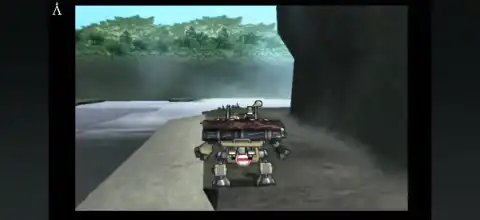
Steambot Chronicles PS2
Steambot Chronicles is one of the most unique action RPGs ever released for the PlayStation 2. Developed by Irem and published by Atlus, the game blends open-world exploration, mech combat, life simulation, music performances, and multiple story choices into a memorable adventure. Unlike traditional RPGs, you’re free to shape your own journey, take on different jobs, customize your giant robot, and even become either a hero or a villain depending on your decisions.
If you’re looking to play Steambot Chronicles on your Android or iPhone, modern PS2 emulators make it possible with smooth performance on capable devices. Here’s everything you need to know.
Steambot Chronicles Gameplay
Steambot Chronicles puts you in the role of a young man who wakes up with no memory of his past. After being rescued by a girl named Connie, your journey begins in a massive world filled with towns, quests, and opportunities.
The biggest highlight of the game is the Trotmobile, a customizable steam-powered mech used for exploration and combat. Players can replace engines, arms, weapons, legs, and other parts to create their own battle machine.
Combat takes place in real time, where players control both movement and attacks of the Trotmobile. Winning battles earns money that can be spent on better upgrades and equipment.
Outside combat, the game offers an impressive amount of freedom. You can:
- Complete story missions or ignore them for side activities.
- Perform music using different instruments and even join a band.
- Take on jobs like delivery services, mining, photography, and construction.
- Buy new clothes and customize your character’s appearance.
- Build relationships with different NPCs.
- Make choices that influence the storyline and ending.
- Explore towns, deserts, caves, and hidden areas.
This sandbox approach makes every playthrough feel different, which is why Steambot Chronicles remains a cult classic among PS2 fans.
Game Modes
Although the main attraction is the single-player story, Steambot Chronicles also includes several additional modes and mini-games that unlock through gameplay.
Story Mode
The main campaign follows your journey across the world while uncovering your forgotten past. Your choices throughout the adventure determine your reputation and eventually affect the game’s ending.
Arena Battles
Fight against increasingly difficult Trotmobile opponents to earn money, parts, and experience. Arena matches are one of the fastest ways to improve your mech.
Music Mode
Players can perform songs using multiple instruments and even become part of a music band. Successful performances earn rewards and increase popularity.
Billiards
Visit billiards locations throughout the game to challenge various opponents. Once enough players have been defeated, extra billiards modes become available.
Two-Player Battle
A local split-screen battle mode becomes available after participating in arena battles during the main game.
Two-Player Billiards
Unlock local multiplayer billiards by playing or practicing billiards during Story Mode.
Unlockable Elements
Steambot Chronicles includes several unlockable rewards for dedicated players.
- Deathmatch Mode – Unlock by defeating all arena-style Trot enemies.
- Support Engine – Earned after defeating 10 consecutive Deathmatch opponents.
- Skull Grill – Reward for defeating 20 consecutive enemies.
- Deathmatch Plate – Awarded after clearing the entire Deathmatch challenge.
- Tournament Mode (Billiards) – Unlock by facing every billiards opponent.
- Hustler King Mode – Available after unlocking every billiards player.
- Hustler Plate – Complete Tournament Mode.
- Demon Cue – Complete Hustler King Mode.
- 2 Player Battle Mode – Fight in an arena battle.
- 2 Player Billiards – Play or practice billiards once during Story Mode.
Best AetherSX2 Settings for Steambot Chronicles
Steambot Chronicles is one of the more demanding PS2 games, but these settings provide smooth gameplay on most mid-range and flagship Android devices.
Graphics Settings
- Graphics Renderer: Vulkan (Recommended)
- Upscale Multiplier: 2x (3x for flagship devices)
- Texture Filtering: Bilinear
- Blending Accuracy: Basic
- Hardware Download Mode: Disable Readbacks
- Threaded Presentation: Enabled
System Settings
- EE Cycle Rate: 100%
- EE Cycle Skip: Mild Underclock (1)
- Multi-Threaded VU1: Enabled
- Fastmem: Enabled
- Instant VU1: Enabled
Advanced Settings
- Enable Frame Limiter
- Disable VSync
- Enable Optimal Speed Hacks
If you notice slowdowns during large outdoor areas, reduce the internal resolution from 3x to 2x for a significant performance boost.
How to Download and Play Steambot Chronicles on Android & iOS
- Download the Steambot Chronicles PS2 ISO from our website.
- Extract the downloaded ZIP or RAR file if necessary.
- Install AetherSX2 on Android or IPSX2 / ArmSX2 on iPhone and iPad.
- Add your PlayStation 2 BIOS file to the emulator.
- Open the emulator and locate the Steambot Chronicles ISO file.
- Import the game into your library.
- Apply the recommended emulator settings listed above for the best performance.
- Connect a Bluetooth controller (optional but highly recommended).
- Launch the game and enjoy Steambot Chronicles on your Android or iOS device.
Final Thoughts
Steambot Chronicles remains one of the most creative and underrated PS2 games ever made. Its combination of open-world exploration, customizable mech combat, life simulation, music performances, and branching story paths offers an experience unlike any other game on the console. Whether you’re revisiting this classic or playing it for the first time, modern emulators like AetherSX2 for Android and IPSX2 or ArmSX2 for iOS make it easier than ever to enjoy this hidden gem on mobile devices.








