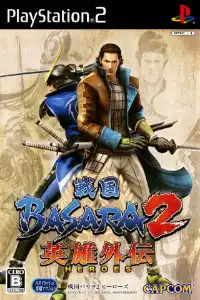
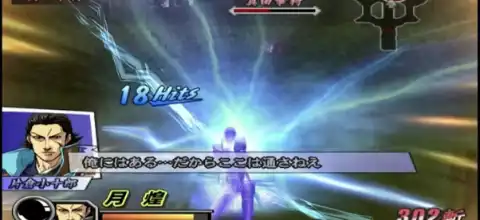

Sengoku Basara 2 Heroes is a fast hack-and-slash PS2 game with tag-team combat, unlockable characters, and intense battles.
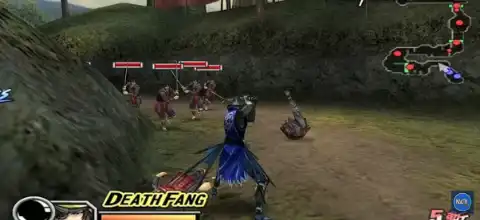
Overview of Sengoku Basara 2 Heroes (PS2)
Sengoku Basara 2 Heroes is an expanded version of Sengoku Basara 2, developed by Capcom for the PlayStation 2. It is a fast-paced hack-and-slash action game set in Japan’s Sengoku (Warring States) era, but with a highly stylized, exaggerated, anime-inspired presentation.
Unlike realistic samurai games, this title focuses on over-the-top combat, flashy abilities, and massive battlefield destruction.
Game Modes
The game includes several core modes designed to extend replay value:
Story Mode
Each playable character has a unique storyline. You progress through different historical battles, but with fictional twists. Cutscenes and dialogue vary depending on the chosen warrior.
Free Battle Mode
This mode allows you to replay any unlocked stage using any character. It is ideal for farming experience, unlocking items, and practicing combos.
Heroes Mode (Key Feature of Expansion)
This is the signature addition in the “Heroes” version. It introduces tag-team gameplay, where you can pair two characters together and switch between them during battle. This adds strategic depth and combo variety.
Versus Mode
A local multiplayer mode where players can fight against each other using unlocked characters and abilities.
Challenge/Conquest-style Battles
Certain missions test survival, score attack, or special conditions like defeating enemies within a time limit.
Gameplay Features
The gameplay of Sengoku Basara 2 Heroes is built around fast-paced action similar to Dynasty Warriors but more aggressive and cinematic.
Key Features:
Hack-and-Slash Combat
- Fight hundreds of enemies on-screen
- Simple controls with deep combo systems
- Heavy emphasis on speed and style
Basara Arts (Special Attacks)
Each character has unique “Basara” ultimate moves that deal massive damage and clear entire enemy groups.
Character Switching (Heroes System)
- Switch between two selected characters mid-battle
- Combine attacks for chain combos
- Tactical advantage in boss fights
Weapon & Skill Growth
- Weapons can be upgraded
- Skills and stats improve as you progress
- Custom builds depending on playstyle
Large Battlefield Maps
Battles are not linear; multiple objectives exist across wide maps including bases, generals, and enemy commanders.
How to Use English Patch/HD Textures in AetherSX2 / NetherSX2 for Sengoku Basara 2 Heroes
Follow these steps to install the HD Texture Pack with the integrated English Patch for Sengoku Basara 2 Heroes on AetherSX2 or NetherSX2.
Installation Guide
- Download the HD Texture Pack and English Patch package.
- Extract the downloaded ZIP, RAR, or 7Z file.
- Locate the texture files inside the extracted folder.
- Open the following directory on your Android device:
Android/data/xyz.aethersx2.android/files/textures/
- Create a new folder using your game’s serial number if it does not already exist (for example, SLPM-66447).
- Inside the game ID folder, create a folder named replacements.
- Copy all extracted files into the replacements folder.
Example Path:
Android/data/xyz.aethersx2.android/files/textures/SLPM-66447/replacements/
- Launch AetherSX2 or NetherSX2.
- Go to Settings > Graphics > Texture Replacements.
- Enable Load Texture Replacements.
- Enable Async Texture Loading for better performance.
- Restart the game to apply the HD textures and English translation.
Troubleshooting
- Make sure the texture pack matches your game’s exact serial number.
- Using a different game region may cause missing textures or untranslated text.
- Verify that all files are placed inside the correct replacements folder.
- Restart the emulator after installing the texture pack.
- For best compatibility, use the latest version of AetherSX2 or NetherSX2.
Features
- High-Resolution HD Textures
- English Menus and Interface
- Improved Character Visuals
- Enhanced Effects and UI Elements
- Better Gameplay Experience
- Optimized for AetherSX2 and NetherSX2.
How to Save Data (Unlock All Item) in AetherSX2 / NetherSX2
- Download and extract the Sengoku Basara 2 Heroes save data file.
- Open AetherSX2 or NetherSX2 on your Android device.
- Tap the ≡ Menu button and go to App Settings.
- Open the Memory Cards section.
- Select the memory card slot you want to use (usually Mcd001.ps2).
- Replace your current memory card with the downloaded Mcd001.ps2 file, or import the save if your emulator version supports save importing.
- Make sure the new memory card is assigned to the selected slot.
- Restart AetherSX2 or NetherSX2 after copying the memory card file.
- Launch Sengoku Basara 2 Heroes.
- From the main menu, select Load Game and load the imported save data.
- If the save data is not detected, verify that the save file matches your game’s exact version and region (NTSC-J, NTSC-U, or PAL).
- After loading the save, all characters, stages, weapons, and other unlockable content should be available.
- Always create a backup of your original memory card before replacing it with a new save file.
Unlockable Elements
One of the most rewarding parts of the game is its progression system. Unlockables include:
Playable Characters
Many characters are locked at the start
Unlock by completing story paths or special missions
Weapons
Stronger weapon tiers unlocked through progression or drops
Rare weapons often have bonus effects
Costumes/Alternate Outfits
Different visual skins for characters
Some are tied to completion achievements
Extra Modes and Stages
Certain story branches and missions unlock after clearing main campaigns
Gallery Content
Artwork, cutscenes, and character bios unlock as you progress
Best AetherSX2 Settings for Smooth Gameplay (Android)
To run Sengoku Basara 2 Heroes smoothly on Android, the AetherSX2 emulator must be properly configured.
Recommended Settings:
Graphics Settings
- Renderer: Vulkan (preferred)
- Internal Resolution: 2x (720p) for mid devices, 3x+ for high-end
- Blending Accuracy: Basic
- Texture Filtering: Bilinear (PS2)
- Anisotropic Filtering: Optional (2x–4x if device is strong)
Performance Settings
- EE Cycle Rate: -1 (underclock slightly for stability)
- EE Cycle Skip: 0 or 1 (if lag occurs)
- Multi-Threaded VU: ON
- Fast Boot: ON
Speed Hacks
- MTVU (Multi-threaded VU1):
- Enabled
- Frame Skipping: OFF (only enable if heavy lag)
Audio
Time-stretching: ON (prevents audio crackle during slowdown)
These settings generally give stable 50–60 FPS on mid-range Snapdragon devices.
Final Notes
Sengoku Basara 2 Heroes remains one of the most stylish PS2 action games, offering fast combat, deep character variety, and high replay value through unlockables and team-based gameplay. When paired with the right emulator settings in AetherSX2, it can run smoothly even on mid-range Android devices, bringing console-quality samurai battles to mobile.