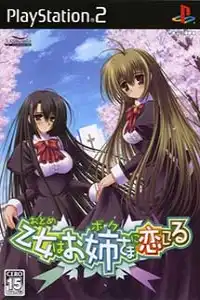

Experience Otome wa Boku ni Koishiteru PS2 on Android and iOS with smooth emulation, optimized settings, easy installation, and immersive visual novel gameplay.
Otome wa Boku ni Koishiteru PS2 Overview
Otome wa Boku ni Koishiteru (also known as Otoboku: Maidens Are Falling for Me!) is a romance visual novel released for the PlayStation 2 by Alchemist. The PS2 version is based on the original PC game but removes the adult content while adding new story scenarios and extra sub episodes, making it the definitive console edition for many fans.
The story follows Mizuho Miyanokouji, a young man who is forced to disguise himself as a girl and attend an elite all-girls academy due to his late grandfather’s final wish. As Mizuho tries to keep his identity secret, he builds friendships, experiences school life, and develops romantic relationships depending on the choices you make throughout the game.
If you enjoy story-driven visual novels with memorable characters and multiple endings, Otome wa Boku ni Koishiteru remains one of the best PS2 romance games to experience through emulation.
Game Modes
Unlike action or RPG titles, Otome wa Boku ni Koishiteru is a traditional visual novel focused on reading, choices, and character routes.
Main Story Mode
The main mode follows Mizuho’s school life through a branching storyline. Players progress by reading dialogue and selecting responses at key moments. Your decisions determine which heroine’s route you enter and which ending you receive.
Multiple Character Routes
The PS2 version features several heroine routes, each offering unique events, conversations, and endings. To experience every storyline, you’ll need to replay the game while making different choices throughout the story.
Sub Episodes
One of the biggest additions in the PS2 release is the inclusion of six exclusive sub episodes, expanding character interactions and providing additional story content not found in the original PC release.
Gameplay Features
Although the gameplay is simple, the storytelling offers plenty of replay value.
- Branching visual novel with multiple endings.
- Choice-based progression that affects the story.
- Several heroine routes with unique events.
- High-quality anime-style character artwork.
- Fully voiced dialogue for major characters.
- Background music that matches emotional scenes.
- Save and load system for exploring different story paths.
- Fast-forward option for previously read text.
- Beautiful CG illustrations unlocked during story progression.
- Additional PS2-exclusive scenarios and sub episodes.
Unlockable Elements
While Otome wa Boku ni Koishiteru doesn’t include traditional unlockable weapons or costumes, players can unlock plenty of bonus content by completing different routes.
Unlockable content includes:
- Multiple character endings.
- Event CG illustrations.
- Character-specific story scenes.
- Additional sub episodes included in the PS2 version.
- Different dialogue variations depending on your choices.
To achieve 100% completion, you’ll need to replay the game several times and experience every heroine route.
Best AetherSX2 Settings for Otome wa Boku ni Koishiteru
Since this is a lightweight visual novel, even budget Android devices can emulate it smoothly.
Use these recommended settings:
- Graphics Renderer: Vulkan (OpenGL also works)
- Internal Resolution: 2x (1080p devices) or 3x (high-end phones)
- Blending Accuracy: Basic
- Texture Filtering: Bilinear
- Mipmapping: Automatic
- GPU Palette Conversion: Enabled
- Threaded Presentation: Enabled
- Multi-threaded VU1: Enabled
- EE Cycle Rate: 100%
- EE Cycle Skip: Normal (0)
- Frame Limit: 100%
- Fast Boot: Enabled
- Widescreen Patches: Optional
- Screen Filter: Disabled
These settings provide full-speed gameplay with crisp visuals while maintaining excellent battery life.
How to Download and Play Otome wa Boku ni Koishiteru on Android and iOS
- Download the Otome wa Boku ni Koishiteru PS2 ISO from our website.
- Extract the downloaded ZIP or RAR file if the game is compressed.
- Install AetherSX2 on your Android device or iPSX2/ArmSX2 on your iPhone or iPad.
- Obtain a legally dumped PS2 BIOS from your own PlayStation 2 console and add it to the emulator before launching games.
- Open the emulator and grant storage permissions.
- Locate the extracted ISO file and add it to your game library.
- Tap the game icon to launch it.
- Apply the recommended emulator settings above for the smoothest experience.
- Create save states or use in-game saves to continue your progress anytime.
- Enjoy Otome wa Boku ni Koishiteru on your Android or iOS device with smooth performance and enhanced visuals.
Thank you and we hope that you find out article helpful.