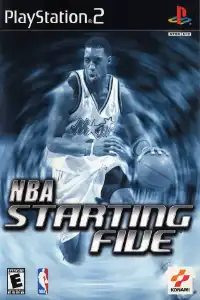


NBA Starting Five PS2 delivers realistic basketball gameplay, multiple game modes, franchise management, smooth emulation, and nostalgic NBA action.

NBA Starting Five PS2 Description
NBA Starting Five is a basketball simulation game developed by Konami for the PlayStation 2 and Xbox. Released in 2002, the game serves as the successor to the NBA 2Night series and features official NBA teams, players, and arenas from the 2002–03 season. While it never became as popular as NBA Live or NBA 2K, NBA Starting Five still offers an enjoyable basketball experience with solid gameplay mechanics, deep franchise management, and multiple game modes.
If you’re looking to relive this classic on your Android or iPhone, modern PS2 emulators make it possible to enjoy the game with smooth performance.
NBA Starting Five PS2 Game Modes
NBA Starting Five includes several game modes that offer both casual and long-term gameplay.
Exhibition Mode
This is the standard quick match mode where you can select any NBA team and jump straight into a game. It’s perfect for practicing controls or enjoying a quick basketball session with friends.
Quick Start
Quick Start automatically creates a random matchup, allowing you to begin playing within seconds without manually selecting teams or settings.
Season Mode
Season Mode lets you guide your favorite NBA team through a full regular season. You’ll compete across the schedule and attempt to qualify for the playoffs before chasing the championship.
Playoffs Mode
If you prefer skipping the regular season, Playoffs Mode starts directly with the postseason bracket. Win every series to become NBA champions.
Franchise Mode
Franchise Mode is the deepest mode in NBA Starting Five. You can manage a team for up to 25 seasons, making trades, signing free agents, releasing players, and participating in rookie drafts between seasons. The game also includes a budget-style signing system where you use a limited number of points to build your roster. This mode adds long-term replay value and strategic team management.
Gameplay Features
Although NBA Starting Five is over two decades old, it still includes several impressive gameplay features.
- Official NBA teams and players from the 2002–03 season.
- Smooth passing, shooting, dribbling, and defensive controls.
- Multiple camera angles for different gameplay styles.
- AI-controlled teammates that execute offensive plays and defensive rotations.
- Realistic NBA arenas with crowd effects.
- Local multiplayer support for competitive matches.
- Create-A-Player mode for building your own custom basketball star.
- Player trades, rookie drafts, and free agency in Franchise Mode.
The controls are easy to learn, making the game enjoyable for both casual players and basketball fans.
Unlockable Elements
NBA Starting Five doesn’t focus heavily on hidden characters or cheat-based unlockables like arcade basketball games. Instead, most rewards come through progression in Franchise Mode.
Unlockable and progression-based content includes:
Rookie players entering the league after each completed season.
Team roster improvements through trades and free-agent signings.
Season awards such as MVP, Rookie of the Year, Defensive Player of the Year, and Sixth Man recognition.
Custom players created through the Create-A-Player editor.
Best AetherSX2 Settings for NBA Starting Five on Android
NBA Starting Five is not a demanding PS2 title, so most modern Android devices can run it smoothly using AetherSX2.
Use these recommended settings for the best performance:
- Preset: Fast or Normal
- Graphics Renderer: Vulkan (recommended)
- Upscaling: 2x Native (1080p devices) or 1x Native for low-end phones
- Blending Accuracy: Basic
- Hardware Download Mode: Disable Readbacks
- Texture Filtering: Bilinear
- V-Sync: Off
- Threaded Presentation: Enabled
- Multi-Threaded VU1: Enabled
- EE Cycle Rate: 100%
- EE Cycle Skip: Mild Underclock (only if needed)
- Fast Boot: Enabled
- Frame Limit: 100%
- CPU Affinity: Auto
For Snapdragon 700-series or newer processors, the game generally maintains full speed with these settings. MediaTek Dimensity processors also perform well when using the Vulkan renderer.
How to Download and Play NBA Starting Five PS2 on Android and iOS
- Download the NBA Starting Five PS2 ISO from our website.
- On Android, install AetherSX2.
- On iPhone or iPad (iOS), install iPSX2 or ArmSX2.
- Download and install the required PS2 BIOS file.
- Open your emulator and complete the initial BIOS setup.
- Locate the downloaded NBA Starting Five ISO file and add it to the emulator library.
- Configure the recommended graphics settings for smoother gameplay.
- Connect a Bluetooth controller if you want a console-like experience (optional).
- Launch the game and start playing NBA Starting Five on your Android or iOS device.
Final Words
NBA Starting Five remains an underrated PS2 basketball title that combines solid on-court gameplay with a surprisingly deep Franchise Mode. While it may not have the presentation of NBA 2K or NBA Live, it offers enjoyable basketball action, official NBA licensing, roster management, and long-term replayability. With modern PS2 emulators like AetherSX2 for Android and iPSX2 or ArmSX2 for iOS, you can easily enjoy this classic basketball game on your mobile device anytime.