

Relive classic basketball action in NBA Live 2005 PS2 with exciting gameplay, Dynasty Mode, unlockables, and smooth emulation.
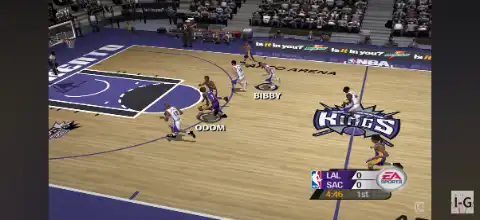
NBA Live 2005 PS2 Discription
If you’re a fan of classic basketball games, NBA Live 2005 remains one of the best entries in EA Sports’ legendary NBA Live series. Released for the PlayStation 2, the game introduced several new gameplay mechanics, realistic animations, and deeper franchise management that made it a fan favorite. Even today, many retro gamers prefer NBA Live 2005 over modern basketball titles thanks to its fast-paced gameplay, iconic 2004–05 NBA rosters, and easy-to-learn controls.
With the power of modern PS2 emulators, you can now enjoy NBA Live 2005 on both Android and iPhone/iPad without needing the original console. In this guide, we’ll cover the game’s modes, gameplay features, unlockable content, the best AetherSX2 settings, and the complete installation process for Android and iOS.
NBA Live 2005 Game Modes
NBA Live 2005 offers a variety of game modes that keep players entertained for hours.
Play Now
Jump straight into a quick exhibition match using any NBA team. This mode is perfect for casual games or practicing your skills.
Dynasty Mode
Dynasty Mode is the heart of NBA Live 2005. Manage your favorite franchise through multiple seasons by handling player trades, scouting, drafting rookies, signing free agents, and improving your team’s finances. Building a championship-winning roster is both challenging and rewarding.
Season Mode
Play through a full NBA season using your favorite team. Compete against every opponent, qualify for the playoffs, and chase the NBA Championship.
Playoffs
Skip the regular season and start directly from the NBA Playoffs. Fight through every round to lift the championship trophy.
All-Star Weekend
One of the biggest additions in NBA Live 2005 is the complete All-Star Weekend experience. Participate in exciting events such as:
- Rookie Challenge
- Three-Point Shootout
- Slam Dunk Contest
- NBA All-Star Game
These events add plenty of variety beyond standard basketball matches.
One-on-One
Challenge another player or the AI in an intense one-on-one basketball match where individual skills matter the most.
Practice Mode
Learn shooting, passing, dribbling, and defensive mechanics before taking on tougher opponents.
NBA Live 2005 Gameplay Features
NBA Live 2005 introduced several improvements over previous entries, making gameplay smoother and more realistic.
Freestyle Air Control
Players can adjust their shots while in mid-air, allowing difficult layups, reverse finishes, and athletic dunks.
Improved Defensive Controls
Stealing, blocking, and contesting shots feel more responsive. Defensive positioning plays a much bigger role than in previous NBA Live games.
Better Player AI
Teammates move intelligently without the ball, create open spaces, and execute plays more naturally.
Enhanced Animations
Motion-captured dribbling, shooting, rebounding, and dunk animations give the game a realistic feel despite its age.
Dynamic Crowd and Commentary
The crowd reacts to big plays while commentators provide play-by-play coverage that enhances immersion.
Authentic NBA Rosters
The game features official NBA teams, players, arenas, jerseys, and realistic player ratings from the 2004–05 season.
Unlockable Elements
NBA Live 2005 includes several unlockable rewards that encourage long-term play.
- Unlock legendary NBA players by completing various in-game objectives.
- Earn reward points by playing matches and completing challenges.
- Purchase bonus content from the Rewards menu.
- Unlock alternate jerseys for selected teams.
- Unlock special courts and gameplay bonuses.
- Complete Dynasty milestones to receive additional rewards.
These unlockables provide extra replay value beyond the standard game modes.
Best AetherSX2 Settings for NBA Live 2005
NBA Live 2005 runs extremely well on most modern Android devices. Use the following settings for smooth gameplay.
Graphics
- Graphics Backend: Vulkan (Recommended)
- Rendering Resolution: 2x Native (3x for flagship devices)
- Bilinear Filtering: PS2
- Texture Preloading: Full
- Blending Accuracy: Basic
- Hardware Download Mode: Disabled
- Threaded Presentation: Enabled
System
- EE Cycle Rate: 100%
- EE Cycle Skip: Normal (0)
- Multi-threaded VU1: Enabled
- Fastmem: Enabled
- Instant VU1: Enabled
Audio
- Audio Latency: Low
- Time Stretching: Enabled
Controller
- On-screen Controls or Bluetooth Controller
- Enable Vibration if supported
These settings provide stable performance with minimal lag on most Snapdragon, MediaTek Dimensity, and Tensor-powered smartphones.
How to Download and Play NBA Live 2005 on Android & iOS
- Download the NBA Live 2005 PS2 ISO from our website.
- Download AetherSX2 if you’re using an Android device.
- Download IPSX2 or ArmSX2 if you’re using an iPhone or iPad.
- Install the emulator on your device.
- Extract the downloaded ISO file if it is compressed in ZIP, RAR, or 7Z format.
- Open your emulator and grant storage permissions.
- Locate and select the extracted NBA Live 2005 ISO.
- Add the game to your emulator library.
- (Android only) Apply the recommended AetherSX2 settings listed above for the best performance.
- Connect a Bluetooth controller if you want a console-like gaming experience (optional).
- Tap the game icon and start playing NBA Live 2005 on your Android or iOS device.
Final Thoughts
NBA Live 2005 remains one of the most enjoyable basketball games ever released on the PlayStation 2. Its deep Dynasty Mode, exciting All-Star Weekend events, responsive gameplay, and rewarding unlockable content make it a timeless classic. Thanks to AetherSX2 on Android and IPSX2 or ArmSX2 on iOS, you can easily relive this legendary basketball experience on your smartphone or tablet. Simply download the ISO from our website, follow the setup steps above, and enjoy one of the greatest classic NBA games anywhere, anytime.