


GTA San Andreas Project Phoenix PS2 delivers enhanced graphics, improved gameplay, smoother performance, and nostalgic action.
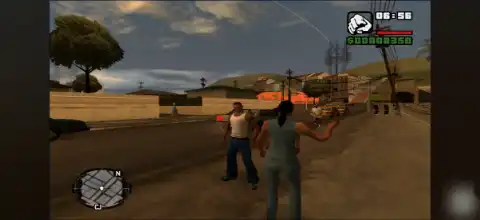
GTA San Andreas Project Phoenix PS2 Discription
If you’ve already completed the original GTA San Andreas countless times, GTA San Andreas Project Phoenix PS2 offers a refreshing way to experience Rockstar’s classic open-world masterpiece. This fan-made PS2 mod enhances the original game with improved visuals, updated gameplay mechanics, redesigned vehicles, and several quality-of-life improvements while preserving the nostalgic feel of the PlayStation 2 version.
Whether you’re playing on Android using AetherSX2 or on iPhone/iPad with IPSX2 or ArmSX2, this guide covers everything you need to know, including gameplay features, game modes, unlockables, the best emulator settings, and how to install the game.
GTA San Andreas Project Phoenix PS2 Gameplay Features
Project Phoenix isn’t a brand-new GTA game but rather a comprehensive overhaul of the original PS2 version. The mod focuses on improving immersion, graphics, and gameplay while maintaining the original storyline. Available builds include High, Low, and Low + Kaizo, with the High version offering increased draw distance at the cost of heavier performance, while the Low version keeps smoother frame rates.
Some of the major gameplay improvements include:
- Enhanced driving physics for more realistic vehicle handling.
- New visual effects and particle effects.
- Improved player animations.
- Remastered CJ appearance.
- Higher weapon damage, making combat more challenging.
- Updated weapon textures.
- Better road, sidewalk, and building textures.
- Redesigned vehicles.
- Updated character models for Smoke and Ryder.
- Improved interior for CJ’s house.
- Native 16:9 widescreen support for modern displays.
- Optional High, Low, and Low + Kaizo editions depending on your device’s performance.
Game Modes
Since Project Phoenix is built on the original GTA San Andreas PS2 version, it retains all of the game’s classic modes and activities.
Story Mode
Experience Carl “CJ” Johnson’s iconic journey across Los Santos, San Fierro, and Las Venturas with the enhanced visuals and gameplay tweaks introduced by Project Phoenix.
Free Roam
Explore the massive open world freely, complete side missions, purchase properties, customize vehicles, and discover hidden collectibles just like in the original game.
Side Activities
Players can still enjoy various optional activities, including:
- Taxi Missions
- Vigilante Missions
- Firefighter Missions
- Paramedic Missions
- Burglary Missions
- Street Races
- Gym Training
- Casino Games
- Vehicle Challenges
- BMX & NRG Challenges
- Unlockable Elements
Project Phoenix does not introduce completely new unlockable content but preserves nearly all unlockables from the original GTA San Andreas.
Players can unlock:
- Safehouses across San Andreas.
- New cities as story missions progress.
- Special outfits.
- Weapon upgrades through skill progression.
- Vehicle rewards from side missions.
- Respect, stamina, lung capacity, driving, flying, and weapon skill upgrades.
- Hidden collectibles like Spray Tags, Snapshots, Horseshoes, and Oysters.
- Additional properties and businesses.
These unlockables remain fully compatible with the Project Phoenix gameplay overhaul.
Best AetherSX2 Settings for GTA San Andreas Project Phoenix
To enjoy stable performance on Android, especially when using the High version of Project Phoenix, use the following AetherSX2 settings.
System Settings
- EE Cycle Rate: 100%
- EE Cycle Skip: Normal (0)
- Multi-Threaded VU: Enabled
- Fast Boot: Enabled
Graphics Settings
- Renderer: Vulkan (Recommended)
- Internal Resolution:
- 2x for mid-range devices
- 3x–4x for flagship phones
- Texture Filtering: Bilinear (PS2)
- Blending Accuracy: Basic
- Hardware Download Mode: Disabled
- Threaded Presentation: Enabled
- V-Sync: Disabled
Speed Hacks
- Enable Instant VU1
- Fast Texture Invalidation
- MTVU Enabled
- Optimal Frame Pacing Enabled
If you’re using the High edition of Project Phoenix and notice frame drops, switch to the Low version, which uses the original PS2 draw distance for much smoother gameplay.
Open the emulator and import the downloaded ISO file
- Download the GTA San Andreas Project Phoenix PS2 ISO from our website.
- On Android, install the AetherSX2 emulator.
- For iPhone or iPad, install IPSX2 or ArmSX2 to run the game.
- Launch your emulator and complete the initial setup.
- Grant storage permission when prompted.
- Locate the downloaded GTA San Andreas Project Phoenix ISO file.
- Import the downloaded ISO into the emulator.
- Select the game from your library.
- Apply the recommended emulator settings for the best performance.
- Connect a Bluetooth controller if you prefer console-style controls.
- Start the game and enjoy the enhanced PS2 version of GTA San Andreas on your mobile device.
Final Words
GTA San Andreas Project Phoenix PS2 is one of the most polished fan-made enhancements for the original PlayStation 2 version of GTA San Andreas. Instead of changing the core experience, it improves textures, animations, vehicle designs, effects, and gameplay while keeping the nostalgic feel that made the original so memorable.
Combined with AetherSX2 on Android or IPSX2/ArmSX2 on iOS, Project Phoenix delivers an excellent portable PS2 gaming experience. If you’re looking for the definitive modded PS2 version of GTA San Andreas on mobile, this is definitely worth trying.








