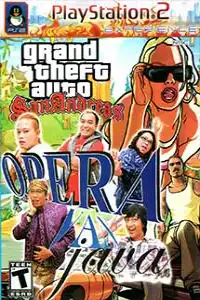

GTA San Andreas Opera Van Java PS2 brings hilarious modded gameplay, exciting missions, and nostalgic action everywhere.
GTA San Andreas Opera Van Java PS2 Discription
GTA San Andreas Opera Van Java PS2 is a fun and entertaining mod of the classic Grand Theft Auto: San Andreas for the PlayStation 2. Instead of the original storyline and character appearances, this mod introduces content inspired by Opera Van Java (OVJ), making the game feel fresh and humorous while keeping the core San Andreas gameplay intact.
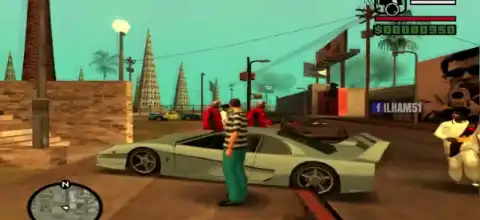
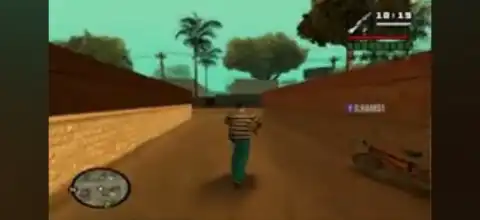
Players can freely explore the massive open world, complete missions, drive different vehicles, and enjoy the unique character replacements and visual changes included in the mod. Whether you’re a longtime GTA fan or simply looking for something different, this PS2 mod offers a unique experience that combines the beloved mechanics of GTA San Andreas with a comedic twist.
Game Modes
Although this is a modified version of GTA San Andreas, it retains the same core game structure as the original PS2 release.
Story Mode
The Story Mode follows the traditional San Andreas progression where players complete missions to unlock new areas, earn money, and advance through the game’s narrative. Depending on the specific version of the mod, many characters and cutscenes may feature altered appearances inspired by Opera Van Java.
Free Roam
Free Roam allows players to ignore story missions and simply explore the enormous map. You can drive around cities, customize vehicles, fight NPCs, discover hidden locations, and enjoy the modified visuals at your own pace.
Side Activities
Like the original game, players can participate in various optional activities such as:
- Taxi Missions
- Vigilante Missions
- Firefighter Missions
- Ambulance Missions
- Street Races
- Vehicle Challenges
- Property Purchasing
- Collectibles and Exploration
These activities help earn money, rewards, and additional gameplay hours.
Gameplay Features
One of the biggest attractions of GTA San Andreas Opera Van Java PS2 is its combination of classic GTA gameplay with entertaining visual modifications.
Some notable gameplay features include:
- Open-world exploration across Los Santos, San Fierro, and Las Venturas.
- Modified character models inspired by Opera Van Java.
- Unique skins and redesigned NPC appearances.
- Classic GTA combat with melee weapons, firearms, and explosives.
- Hundreds of vehicles including cars, motorcycles, helicopters, boats, and aircraft.
- Vehicle customization in selected garages.
- Large variety of side missions and optional activities.
- Dynamic day and night cycle.
- Weather effects including rain, fog, and sunshine.
- Swimming, climbing, flying, and driving mechanics from the original game.
- Hidden Easter eggs and collectibles scattered throughout the world.
- Enjoy the authentic PS2 experience with touchscreen or external controller support.
The gameplay remains smooth and enjoyable while offering a refreshing look through the custom modded content.
Unlockable Elements
Like the original GTA San Andreas, many features become available as you progress through the game.
Unlockable elements include:
- New cities after completing story missions.
- Additional safehouses.
- New weapons.
- Vehicle garages.
- Aircraft and airports.
- Special vehicles.
- Businesses and purchasable properties.
- Hidden collectibles.
- Extra missions and activities.
- Improved player abilities such as stamina, driving, flying, and weapon skills.
Since this is a fan-made modification, some unlockables may vary depending on the specific version of the ISO.
Best AetherSX2 Settings for GTA San Andreas Opera Van Java PS2
For the best performance on Android, use AetherSX2 with the recommended settings below. These configurations help deliver smoother gameplay on most mid-range and high-end smartphones.
Graphics
- Renderer: Vulkan (Recommended)
- OpenGL: Use only if Vulkan causes issues
- Internal Resolution: 2x Native (1x for low-end devices)
- Texture Filtering: Bilinear
- Blending Accuracy: Basic
- Anisotropic Filtering: 4x
- V-Sync: Off
- Threaded Presentation: Enabled
System
- EE Cycle Rate: 100%
- EE Cycle Skip: Normal (0)
- Multi-Threaded VU1: Enabled
- Instant VU1: Enabled (if stable)
- Fast CDVD: Enabled
Audio
- Audio Latency: Low
- Time Stretching: Enabled
Performance
- Hardware Download Mode: Disable Readbacks
- GPU Palette Conversion: Enabled
- Frame Limiter: 100%
- Fast Boot: Enabled
These settings should allow stable gameplay on most Snapdragon, Dimensity, and Tensor-powered Android devices.
How to Download and Play GTA San Andreas Opera Van Java PS2 on Android and iOS
- Download the GTA San Andreas Opera Van Java PS2 ISO from our website.
- Extract the downloaded archive if the ISO file is compressed (ZIP, RAR, or 7Z).
- Install AetherSX2 on Android or iPSX2/ArmSX2 on iPhone and iPad.
- Launch the emulator and finish the one-time setup.
- Import or scan the folder containing your PS2 ISO.
- Select the game from your library.
- Adjust the emulator settings if you want better performance.
- Play using the touch controls or connect a Bluetooth controller for a console-like experience.
- Tap the game icon and start playing.
- Save your progress using the emulator’s memory card feature or save states.
- Enjoy GTA San Andreas Opera Van Java PS2 on your Android or iOS device.
Final Words
GTA San Andreas Opera Van Java PS2 is an entertaining twist on one of the greatest open-world games ever made. By blending the classic San Andreas gameplay with humorous Opera Van Java-inspired modifications, it delivers a nostalgic yet refreshing experience for both new and returning players.
Play GTA San Andreas Opera Van Java PS2 on your phone using AetherSX2 for Android or iPSX2/ArmSX2 for iOS. With the right emulator settings, you can enjoy smooth gameplay anytime, anywhere. Simply download the ISO from our website, follow the setup steps above, apply the recommended emulator settings, and dive back into the streets of San Andreas.








