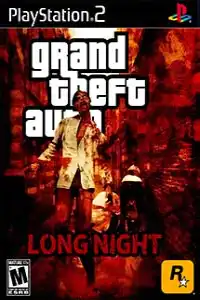


Grand Theft Auto Long Night PS2 is a zombie-themed GTA mod featuring survival gameplay, open-world exploration, and challenging missions.

Grand Theft Auto Long Night PS2 Discription
The Grand Theft Auto Long Night PS2 edition is one of the most popular fan-made modifications based on the classic GTA engine. Unlike the original Grand Theft Auto titles, Long Night completely changes the atmosphere by introducing a post-apocalyptic world filled with zombies, abandoned streets, and survival-focused gameplay. The familiar city is transformed into a dangerous environment where every mission becomes more challenging because of the constant threat from the undead.
For players looking for something fresh while still enjoying classic GTA mechanics, Grand Theft Auto Long Night offers an exciting experience. Whether you’re revisiting the PS2 version or trying it for the first time through emulation, this game delivers a unique mix of exploration, action, and survival.
Game Modes
Despite being based on the classic GTA formula, Grand Theft Auto: Long Night delivers a fresh experience with its zombie survival theme, revamped missions, and darker atmosphere.
Story Mode
The primary game mode follows a survival-based storyline set during a zombie outbreak. Players must complete missions, explore dangerous locations, and fight both hostile humans and zombies while progressing through the narrative.
Free Roam
Once you gain access to different areas of the city, you can freely explore the map. Vehicles, hidden locations, weapons, and random zombie encounters make exploration much more exciting than in the original game.
Survival Combat
Combat becomes far more intense due to the increased number of enemies. Instead of dealing only with rival gangs or police, players constantly face zombie hordes that attack from multiple directions.
Gameplay Features
Grand Theft Auto Long Night stands out because of its unique modifications compared to the original PS2 release.
Zombie Apocalypse Setting
The biggest attraction is the complete transformation of the game world. Streets are overrun with zombies, abandoned vehicles, and destroyed environments, creating a survival horror atmosphere rarely seen in classic GTA games.
Enhanced Difficulty
Resources such as health and ammunition become more valuable. Fight only when necessary—sometimes escaping is the smarter way to survive.
Large Open World
Despite the horror theme, players still enjoy the freedom of exploring the entire city. Hidden routes, abandoned buildings, and secret areas encourage exploration.
Variety of Weapons
Players can collect pistols, shotguns, assault rifles, explosives, melee weapons, and other equipment to survive against increasingly dangerous enemies.
Vehicle Exploration
Many vehicles remain available throughout the game. Cars, bikes, and other transportation options help players escape zombie hordes or travel between mission locations quickly.
Challenging Missions
The modified missions often feature more enemies, survival objectives, rescue scenarios, and difficult combat encounters that require better strategy than the original GTA missions.
Unlockable Elements
Grand Theft Auto Long Night includes several unlockable rewards depending on your progress.
- New weapons become available as you advance through missions.
- Additional city areas unlock after completing story objectives.
- Safehouses become accessible for saving progress.
- Better vehicles appear in different locations later in the game.
- Certain weapons and equipment become easier to obtain after reaching specific milestones.
- Completing missions also opens access to more challenging sections of the map.
While the exact unlockables vary depending on the version of the mod you’re playing, exploration and story progression reward players with new equipment, locations, and gameplay opportunities.
Best AetherSX2 Emulator Settings for Grand Theft Auto Long Night
If you’re playing Grand Theft Auto Long Night PS2 on Android, the right emulator settings can greatly improve performance.
Recommended Settings
- Graphics Renderer: Use Vulkan for the best performance; switch to OpenGL if you encounter graphical issues.
- Upscale Multiplier: 2x Native (use 1x on low-end devices).
- Blending Accuracy: Basic.
- Texture Filtering: Bilinear (PS2).
- Anisotropic Filtering: Off or 2x.
- Hardware Download Mode: Disable Readbacks.
- VSync: Off.
- Threaded Presentation: Enabled.
- Multi-Threaded VU1: Enabled.
- Fast Boot: Enabled.
- EE Cycle Rate: 100% (Default).
- EE Cycle Skip: Moderate only if extra FPS is needed.
- Frame Limit: 100%.
- Audio Latency: Low.
- Enable Game Patches: On.
These settings provide smooth gameplay on most mid-range and flagship Android devices while maintaining good visual quality.
How to Download and Play Grand Theft Auto Long Night on Android and iOS
- Download the Grand Theft Auto Long Night PS2 ISO from our website.
- Extract the ISO if it’s in a ZIP, RAR, or 7Z archive.
- Install AetherSX2 (Android) or IPSX2/ArmSX2 (iOS).
- Open the emulator and import the extracted ISO.
- Configure the recommended settings for smoother gameplay.
- Start the game and enjoy! You can also connect a Bluetooth controller for a better gaming experience.
Final Thoughts
Grand Theft Auto Long Night PS2 is a fan-made GTA mod that transforms the classic game into a thrilling zombie survival adventure. By replacing the familiar crime-filled city with a zombie-infested apocalypse, it creates a completely different experience while preserving the open-world gameplay that made classic GTA games so memorable. With intense survival mechanics, challenging missions, an expansive map to explore, and plenty of weapons to collect, Long Night remains a favorite among GTA mod enthusiasts.
Play Grand Theft Auto Long Night PS2 on your mobile using AetherSX2 (Android) or IPSX2/ArmSX2 (iOS). Download the game ISO from our website, load it into your preferred emulator, apply the recommended settings, and enjoy a smooth zombie survival adventure on the go.








