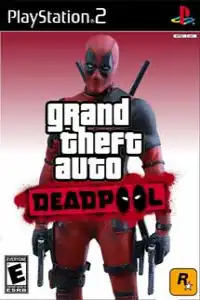
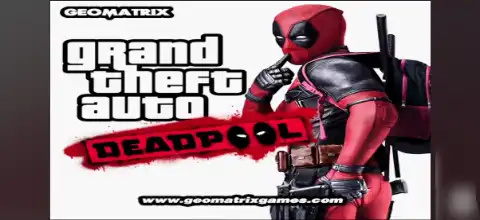

Grand Theft Auto Deadpool PS2 brings Deadpool-themed action, open-world gameplay, exciting missions, and smooth emulator performance.
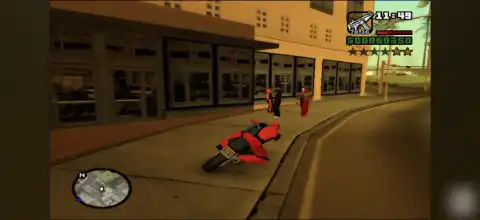
Grand Theft Auto Deadpool PS2 Discription
If you’re a fan of both Grand Theft Auto: San Andreas and Marvel’s Deadpool, then Grand Theft Auto Deadpool PS2 is a fun modded version worth trying. This custom PS2 edition replaces the traditional GTA experience with Deadpool-inspired character models, weapons, and visual changes while keeping the original San Andreas open-world gameplay intact. It is a fan-made modification rather than an official Rockstar Games release, making it a unique experience for players looking for something different.
Whether you want to relive San Andreas with a superhero twist or simply enjoy an exciting mod on your Android or iPhone, this guide covers everything you need to know, including gameplay features, game modes, unlockables, the best AetherSX2 settings, and how to play it on mobile devices.
Grand Theft Auto Deadpool PS2 Gameplay
Grand Theft Auto Deadpool PS2 retains the complete San Andreas storyline and open-world map while introducing Deadpool-themed modifications. Players control Deadpool instead of Carl Johnson (CJ), giving the game a fresh comic-book-inspired appearance.
Like the original GTA San Andreas, players can freely explore cities, complete missions, steal vehicles, purchase weapons, and interact with NPCs. The Deadpool character model, themed weapons, and visual enhancements make combat more entertaining while preserving the familiar gameplay mechanics of the PS2 classic.
Game Modes
Since Grand Theft Auto Deadpool is based on GTA San Andreas, it includes the same gameplay structure:
- Story Mode – Complete the original San Andreas missions while playing as Deadpool.
- Free Roam Mode – Explore Los Santos, San Fierro, and Las Venturas without mission restrictions.
- Vehicle Exploration – Drive cars, bikes, helicopters, boats, and aircraft across the massive map.
- Combat Gameplay – Use various firearms and melee weapons with Deadpool-themed character visuals.
- Side Activities – Taxi missions, Vigilante missions, Firefighter missions, races, collectibles, and more.
Gameplay Features
Some of the major highlights include:
- Deadpool character replacing CJ
- Modified character textures and appearance
- Open-world exploration
- Hundreds of missions from GTA San Andreas
- Large collection of vehicles
- Weapon customization through the mod
- Smooth PS2 gameplay on emulators
- Compatible with save states and memory card saves
- Controller support on Android and iOS emulators
Depending on the version of the mod, some builds may also include customized weapon models, Deadpool-inspired skins, or altered loading screens. Features can vary because this is a community-made modification rather than an official game.
Unlockable Elements
Grand Theft Auto Deadpool PS2 does not introduce a completely new unlock system. Instead, it follows GTA San Andreas progression.
Players can unlock:
- New cities by progressing through the story
- Safehouses
- Additional weapons
- Vehicles
- Clothing options
- Hidden collectibles
- Side missions
- Achievements through game completion
Some mod versions may also include exclusive Deadpool-themed skins or weapon changes, although these differ between releases.
Best AetherSX2 Settings for Grand Theft Auto Deadpool PS2
To enjoy smooth gameplay on Android, use these recommended AetherSX2 settings.
System Settings
- EE Cycle Rate: 100% (0)
- EE Cycle Skip: Normal (0)
- Fast Boot: Enabled
- Multi-Threaded VU1: Enabled
Graphics Settings
- Renderer: Vulkan (Recommended)
- Hardware Download Mode: Disable Readbacks
- Blending Accuracy: Basic
- Texture Preloading: Full
- Aspect Ratio: 16:9
- Internal Resolution:
- 1x for low-end devices
- 2x for mid-range devices
- 3x–4x for flagship phones
- Anisotropic Filtering: 4x
- Bilinear Filtering: Bilinear (PS2)
- Threaded Presentation: Enabled
Advanced Settings
- Skip Presenting Duplicate Frames: Enabled
- GPU Palette Conversion: Enabled
- VSync: Disabled
- Host VSync: Disabled
These settings provide stable performance for most Snapdragon, Dimensity, Exynos, and Tensor-powered Android devices while maintaining good visual quality.
How to Download and Play Grand Theft Auto Deadpool PS2 on Android and iOS
- Download the Grand Theft Auto Deadpool PS2 ISO from our website.
- Download and install AetherSX2 on Android or iPSX2/ArmSX2 on iPhone and iPad.
- Launch the emulator and complete the initial setup.
- Add your legally obtained PS2 BIOS file to the emulator.
- Locate the downloaded GTA Deadpool PS2 ISO file using the emulator’s game directory.
- Tap the game icon to launch it.
- Configure graphics settings for your device if needed.
- Connect a Bluetooth controller (optional) for a console-like experience.
- Save your progress using either Memory Card saves or Save States.
- Enjoy playing Grand Theft Auto Deadpool PS2 on your Android or iOS device.
Final Words
Grand Theft Auto Deadpool PS2 is an entertaining fan-made modification that combines the massive open world of GTA San Andreas with the iconic look of Marvel’s Deadpool. While it doesn’t completely change the original game’s story, it offers a refreshing visual experience for longtime GTA fans. Thanks to modern PS2 emulators like AetherSX2 for Android and iPSX2/ArmSX2 for iOS, you can enjoy this classic mod smoothly on today’s smartphones with the right settings.








