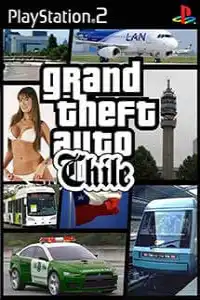
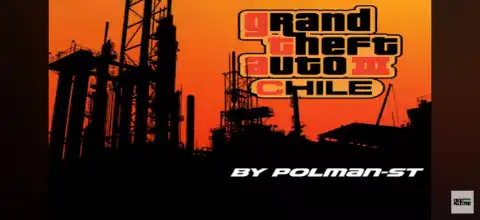

Grand Theft Auto Chile PS2 brings a localized GTA experience with custom vehicles, textures, missions, and immersive gameplay.
Grand Theft Auto Chile PS2 – Information
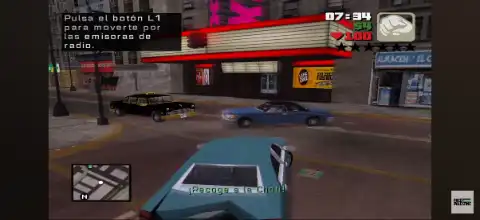
Grand Theft Auto Chile PS2 is a popular fan-made modification of the original Grand Theft Auto game for the PlayStation 2. Instead of introducing an entirely new story, this mod changes various aspects of the game to give players a fresh experience inspired by Chilean culture. You’ll notice modified vehicles, localized textures, custom radio stations, and several visual changes that make the game feel unique while retaining the classic GTA gameplay that fans love.
Since it is based on the PS2 version of GTA, the core mechanics remain familiar, making it easy for returning players to jump in while offering enough new content to keep things interesting.
Game Modes
Although Grand Theft Auto Chile is a mod, it retains the primary game modes found in the original PS2 release.
Story Mode
The Story Mode remains the heart of the game. Players complete missions, explore the open world, unlock new locations, purchase properties, and progress through the storyline while experiencing the visual and audio modifications introduced by the Chile mod.
Free Roam
Free Roam allows players to ignore story missions and freely explore the map. You can drive different vehicles, interact with NPCs, discover hidden locations, create chaos, complete side activities, or simply enjoy the customized environment.
Side Activities
Depending on the version of the mod, players can still participate in various optional activities such as:
- Taxi Driver missions
- Vigilante missions
- Ambulance missions
- Firefighter missions
- Street races
- Property purchases
- Collectibles and hidden packages
These activities provide additional rewards and increase replay value.
Gameplay Features
Grand Theft Auto Chile keeps the classic GTA gameplay while adding several localized enhancements.
Open World Exploration
Players can travel across a massive open-world environment without restrictions. Walk, run, steal vehicles, or complete missions in any order once they become available.
Modified Vehicles
One of the biggest attractions of this mod is the inclusion of customized vehicles inspired by real cars commonly seen in Chile. Many vehicle textures and appearances have been altered to match the regional theme.
Localized Visuals
Buildings, billboards, road signs, advertisements, and environmental textures have been modified to better reflect Chilean culture and locations, giving the game a fresh identity.
Custom Radio Stations
Several versions of the mod feature edited radio stations with Spanish music and localized audio, making the driving experience much more immersive.
Classic GTA Combat
Players can use fists, melee weapons, pistols, shotguns, rifles, explosives, and other weapons to complete missions or freely explore the world.
Vehicle Variety
Drive cars, motorcycles, trucks, boats, helicopters, and other vehicles while completing missions or simply exploring the map.
Missions and Side Content
Like the original game, you’ll encounter story missions, optional side jobs, hidden collectibles, races, and various challenges throughout the game.
Unlockable Elements
Since Grand Theft Auto Chile is based on the original PS2 game, many unlockable features are still available.
Some unlockable content may include:
- New areas unlocked through story progression
- Safehouses and purchasable properties
- Additional vehicles
- Hidden Packages rewards
- Weapon unlocks
- Increased player statistics
- Special mission rewards
- Vehicle spawning at garages after completing certain objectives
The exact unlockables may vary depending on the specific version of the Chile mod you are playing.
Best AetherSX2 Emulator Settings for Grand Theft Auto Chile PS2
For smooth gameplay on Android, these settings work well for most mid-range and flagship devices.
- System: Fast Boot Enabled
- EE Cycle Rate: 100% (Normal)
- EE Cycle Skip: Normal (0)
- Preset: Fast or Safe (depending on your device)
- Renderer: Vulkan (Recommended)
- Hardware Download Mode: Disable Readbacks
- Upscaling: 2x Native (1080p) for mid-range devices, 3x Native for high-end phones
- Texture Filtering: Bilinear (PS2)
- Blending Accuracy: Basic
- V-Sync: Disabled
- Multi-threaded VU1: Enabled
- Threaded Presentation: Enabled
- CPU Affinity: Enabled
- Frame Limit: 100%
- Fast Memory: Enabled
If your device experiences frame drops, reduce the internal resolution to Native (1x) and keep Vulkan as the graphics renderer for the best performance.
How to Download and Play Grand Theft Auto Chile PS2 on Android and iOS
- Download the Grand Theft Auto Chile PS2 ISO from our website.
- Extract the downloaded archive if the ISO file is compressed in ZIP, RAR, or 7Z format.
- Install AetherSX2 on Android or IPSX2/ArmSX2 on iOS.
- Launch the emulator and complete the initial setup.
- Grant storage permissions when prompted.
- Tap Add Game or Scan Directory inside the emulator.
- Select the folder where the Grand Theft Auto Chile PS2 ISO is stored.
- The game will appear in your emulator library automatically.
- Apply the recommended emulator settings for smoother gameplay.
- Connect a Bluetooth controller if you prefer console-style controls, or use the on-screen touch controls.
- Tap the game icon to start playing and enjoy Grand Theft Auto Chile on your Android or iOS device.
- Save your progress using the emulator’s memory card feature and optional save states so you can continue your adventure anytime.
Final Thoughts
Grand Theft Auto Chile PS2 offers a refreshing twist on the classic GTA experience by introducing localized vehicles, custom textures, regional radio stations, and a unique atmosphere inspired by Chile. While the main story and gameplay remain faithful to the original release, the visual and audio modifications make it worth trying for fans who want something different.
With modern PS2 emulators like AetherSX2 for Android and IPSX2/ArmSX2 for iOS, it’s easier than ever to enjoy this fan-favorite mod on mobile devices. Simply download the ISO from our website, configure your emulator using the recommended settings, and you’ll be ready to experience Grand Theft Auto Chile wherever you go.








