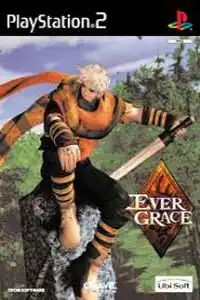

Evergrace is a classic PS2 action RPG featuring dual protagonists, real-time combat, equipment-based progression, hidden unlockables, and smooth gameplay through emulation.
Evergrace PS2 Overview
Released in 2000 by FromSoftware, Evergrace is one of the earliest action RPGs available on the PlayStation 2. Although it launched before the studio became famous for games like Dark Souls and Elden Ring, Evergrace already showcased FromSoftware’s unique approach to exploration, equipment customization, and challenging combat. The game features two playable protagonists with separate storylines, making it a memorable experience for fans of classic RPGs.
If you want to relive this underrated PS2 title on your Android or iPhone, modern PS2 emulators make it possible with excellent performance.

Evergrace PS2 Game Modes
Evergrace is a single-player Action RPG with a story-driven campaign. Unlike many RPGs of its era, the game lets you experience the adventure through two different protagonists.
Dual Character Campaign
Players can choose between:
- Darius – A skilled swordsman searching for answers after being transported to the mysterious kingdom of Rieubane.
- Sharline – A young woman with her own unique journey and gameplay style.
Each character has different starting locations, equipment, combat styles, and story events. To fully understand the game’s narrative, you’ll need to complete both campaigns. The two stories eventually connect, revealing the complete plot.
Gameplay Features
Evergrace combines real-time combat with RPG progression and exploration.
Real-Time Combat
Combat takes place in real time using melee attacks, ranged weapons, and magical abilities. Players must carefully time their attacks and avoid enemy strikes instead of simply mashing buttons.
Equipment-Based Progression
One of Evergrace’s most unique mechanics is that characters do not level up in the traditional RPG sense. Instead, your overall strength depends heavily on the armor, weapons, and accessories you equip. Collecting stronger equipment and upgrading your gear is the primary way to become more powerful.
Weapon Variety
Throughout the adventure you’ll find:
- Swords
- Bows
- Shields
- Magical equipment
- Unique armor sets
Different equipment provides different stats and abilities, allowing players to experiment with various playstyles.
Exploration
The game encourages players to explore dungeons, castles, forests, and ancient ruins filled with enemies, hidden treasures, puzzles, and secret areas. Careful exploration often rewards players with rare equipment and useful items.
Magic System
Special equipment grants magical abilities that can help during difficult battles. Choosing the right combination of gear becomes increasingly important as stronger enemies appear later in the game.
Unlockable Elements
Although Evergrace doesn’t include modern achievements or trophies, it does feature several unlockable extras for dedicated players.
Character Menu
Collect every enemy file in the game to unlock the Character Menu, which provides additional character profiles and story information.
Story Menu
Collect every item in the game—including weapons, armor, and equipment—to unlock the Story Menu, offering additional lore and background details.
Secret Shadow Tower Dungeon
The game also contains a hidden bonus dungeon inspired by FromSoftware’s earlier title Shadow Tower. Completing this optional area rewards players with the legendary Moonlight Sword, one of FromSoftware’s most iconic weapons.
Best AetherSX2 Settings for Evergrace on Android
Evergrace isn’t one of the most demanding PS2 games, so even mid-range Android devices can run it smoothly with the right settings.
Graphics Settings
- Graphics Renderer: Vulkan (Recommended)
- OpenGL: Use only if Vulkan causes issues
- Internal Resolution: 2x (1080p)
- 1x for low-end devices
- Bilinear Filtering: Enabled
- Texture Preloading: Full
- VSync: Off
- Hardware Download Mode: Disable Readbacks
System Settings
- EE Cycle Rate: 100%
- EE Cycle Skip: Normal (0)
- Multi-threaded VU1: Enabled
- Fastmem: Enabled
- Instant VU1: Enabled
Speed Hacks
- MTVU: Enabled
- Affinity Control: Enabled
- Frame Limit: 100%
- Audio Latency: Low
These settings provide stable performance on most Snapdragon, Dimensity, and modern MediaTek processors while maintaining good visual quality.
How to Download and Play Evergrace on Android and iOS
- Download the Evergrace PS2 ISO from our website.
- Extract the downloaded ZIP or RAR file if the game is compressed.
- Download AetherSX2 on Android or IPSX2/ArmSX2 on iPhone or iPad.
- Install the emulator on your device.
- Import your PS2 BIOS into the emulator if it hasn’t already been configured.
- Open the emulator and locate the Evergrace ISO file.
- Add the game to your library.
- Apply the recommended emulator settings for smoother gameplay.
- Connect a Bluetooth controller if you want the best console-like experience.
- Launch the game and enjoy playing Evergrace on your Android or iOS device.
Final Words
Evergrace may not be as well-known as FromSoftware’s modern masterpieces, but it’s still an interesting action RPG that introduced several ideas the studio would later refine. Its dual-character story, equipment-focused progression, hidden bonus content, and challenging combat make it worth revisiting today. Thanks to AetherSX2 on Android and IPSX2/ArmSX2 on iOS, you can enjoy this classic PS2 adventure smoothly on your mobile device with the right emulator settings.








