


Download eFootball 2024 PS2 ISO, play smoothly on Android with AetherSX2 and iOS using IPSX2/ArmSX2 today.
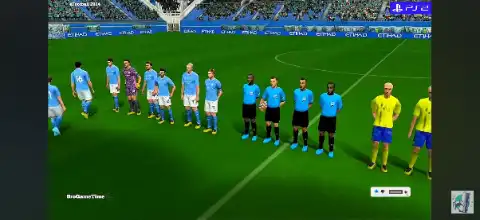
eFootball 2024 PS2 Discription
If you’re a fan of classic PlayStation 2 football games, eFootball 2024 PS2 is one of the best fan-made football mods you can play today. Although Konami never officially released eFootball 2024 for the PlayStation 2, the modding community has transformed older PES/Winning Eleven PS2 titles into an updated football experience with the latest player transfers, club kits, stadiums, scoreboards, and gameplay improvements. These projects are unofficial fan-made modifications rather than official Konami releases.
Thanks to PS2 emulators, you can enjoy this game on Android and even iPhone or iPad without owning a PlayStation 2 console. In this guide, we’ll cover everything you need to know about the game, including gameplay features, game modes, unlockable content, the best AetherSX2 settings, and how to play it on Android and iOS.
eFootball 2024 PS2 Gameplay Features
Despite running on PS2 hardware, eFootball 2024 PS2 offers an impressive football experience with several modern updates. Most versions include:
- Updated 2024 player transfers and squad lineups
- Latest club and national team kits
- New player faces and hairstyles
- Improved grass textures and stadium atmosphere
- Modern scoreboards and TV broadcast overlays
- Updated footballs and boots
- Enhanced camera angles
- Better crowd effects
- Improved menu interface
- Refined gameplay with smoother passing and ball control
The gameplay remains familiar to longtime PES fans while adding updated visuals and player databases that make it feel much closer to modern football games. Different mod creators may include slightly different features depending on the version.
Game Modes
One of the biggest reasons players still love the PS2 version is the variety of offline game modes.
Exhibition Match
Play a quick match using any available club or national team.
Master League
Manage your favorite club over multiple seasons by signing players, developing your squad, and competing in league competitions.
League Mode
Play a complete domestic league season with updated clubs and fixtures.
Cup Mode
Compete in knockout tournaments inspired by famous football competitions.
Training Mode
Practice passing, shooting, free kicks, defending, and other football skills before entering competitive matches.
Penalty Shootout
Jump directly into penalty kicks for quick football action with friends or AI.
Multiplayer
Most PS2 versions still support local multiplayer, allowing two players to compete on the same device when supported by the emulator.
Unlockable Elements
Since eFootball 2024 PS2 is based on older PES/Winning Eleven games, unlockable content depends on the specific mod version.
Possible unlockables include:
- Hidden classic teams
- Legendary players
- Bonus stadiums
- Additional footballs
- Extra formations
- Secret cups and tournaments
- Shop rewards using in-game points
Some fan-made patches unlock everything from the beginning, while others keep the original unlock progression intact.
Best AetherSX2 Settings for eFootball 2024 PS2
To get smooth gameplay on Android, use these recommended AetherSX2 settings.
System
- EE Cycle Rate: 100%
- EE Cycle Skip: Normal (0)
- Multi-Threaded VU: Enabled
- Fast Boot: Enabled
Graphics
- Renderer: Vulkan (Recommended)
- OpenGL (use only if Vulkan causes issues)
- Internal Resolution: 2x (Mid-range phones)
- 3x–4x (High-end phones)
- Texture Filtering: Bilinear
- Blending Accuracy: Basic
- Hardware Download Mode: Disable Readbacks
- V-Sync: Off
Performance
- Threaded Presentation: Enabled
- GPU Palette Conversion: Enabled
- Skip Duplicate Frames: Disabled
These settings provide stable frame rates on most Snapdragon, Dimensity, and Tensor-powered Android devices. Lower the internal resolution to 1x if you experience lag on entry-level phones.
How to Download and Play eFootball 2024 PS2 on Android & iOS
Follow these simple steps to start playing:
- Download the eFootball 2024 PS2 ISO from our website.
- Android users should install AetherSX2.
- iPhone and iPad users should install IPSX2 or ArmSX2.
- Extract the downloaded ISO file if it comes in ZIP or RAR format.
- Open your emulator.
- Grant storage permission when requested.
- Locate the extracted ISO file.
- Add the game to your emulator library.
- Configure the graphics settings for your device.
- Connect a Bluetooth controller (optional) for the best experience.
- Launch the game and start playing.
The entire setup process only takes a few minutes, and once completed, you can enjoy one of the best football experiences available on a PS2 emulator.
Final Words
eFootball 2024 PS2 is an excellent choice for football fans who miss the classic PES gameplay while still wanting updated squads, transfers, kits, and improved graphics. Although it is an unofficial fan-made modification built on older PS2 football games rather than an official Konami release, it successfully brings modern football to the PlayStation 2 era.
Whether you’re playing on Android using AetherSX2 or on iPhone using IPSX2 or ArmSX2, the game delivers smooth gameplay and hours of offline football entertainment. Download the ISO from our website, follow the setup guide above, and enjoy classic football action anytime, anywhere.
If you’d like, I can also Optimize this post with SEO title, meta description, FAQ schema, and focus keywords for better Google rankings.