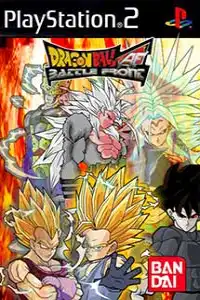
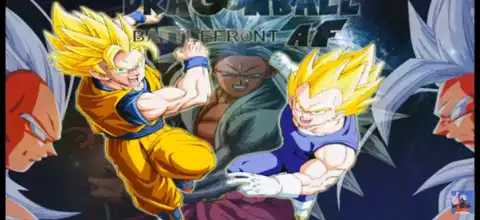

Dragon Ball Battlefront AF PS2 ISO features epic battles, AF transformations, smooth gameplay, and mobile emulator support.
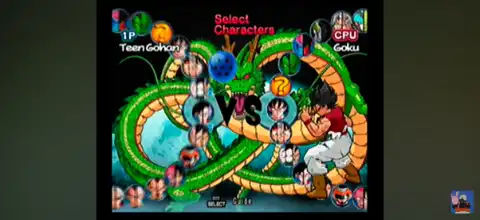
Dragon Ball Battlefront AF PS2 Discription
Dragon Ball Battlefront AF is one of the most popular fan-made PS2 mods inspired by Dragon Ball Z: Budokai Tenkaichi 3. Instead of being an official Dragon Ball game, Battlefront AF is a community-created modification that introduces new Dragon Ball AF characters, fresh transformations, updated visual effects, redesigned menus, and improved gameplay while keeping the fast-paced combat that made Budokai Tenkaichi 3 a fan favorite.
Whether you want to battle with Super Saiyan 5 Goku, try custom AF transformations, or enjoy enhanced effects and character models, Dragon Ball Battlefront AF offers plenty of exciting content for longtime Dragon Ball fans.
Dragon Ball Battlefront AF Gameplay Features
The gameplay remains faithful to the classic Budokai Tenkaichi formula with full 3D arena battles, aerial combat, beam clashes, and cinematic Ultimate Attacks. However, Battlefront AF introduces several improvements that make the experience feel fresh.
Some of the major gameplay features include:
- Large roster featuring Dragon Ball AF characters and custom transformations.
- Fast-paced 3D combat with free movement across battle arenas.
- Updated character models, textures, and visual effects.
- New aura effects and improved energy attacks.
- Enhanced Ultimate Moves and special attack animations.
- Redesigned menus, HUD, and character selection screens.
- Multiple transformation stages for selected fighters.
- Local multiplayer support for split-screen battles.
- Improved sound effects and background music in many versions of the mod.
Different releases of Battlefront AF may include different characters, stages, transformations, and balance changes depending on the creator’s version.
Game Modes
Dragon Ball Battlefront AF includes most of the classic modes found in Budokai Tenkaichi-style games.
Duel Mode
Fight against the CPU or another player in quick one-on-one battles. This is the fastest way to test new characters and transformations.
Tournament Mode
Compete through multiple rounds against increasingly stronger opponents until you become the tournament champion.
Training Mode
Practice combos, movement, transformations, and Ultimate Attacks without worrying about time limits.
Ultimate Battle
Take on special battles with custom rules and powerful opponents. This mode is ideal for experienced players looking for an extra challenge.
Versus Mode
Play local multiplayer with friends using two controllers. This remains one of the best features of the game for offline battles.
Unlockable Elements
Since Dragon Ball Battlefront AF is a fan-made modification, unlockables depend on the specific version you’re playing.
Some releases include:
- Additional playable characters.
- Extra AF transformations.
- Hidden costumes.
- Custom battle stages.
- Alternate character colors.
- Bonus music tracks.
- Special fusion characters.
Many newer Battlefront AF builds already have most characters unlocked from the beginning so players can immediately enjoy the complete roster without spending hours unlocking content.
Best AetherSX2 Settings for Smooth Gameplay
If you’re playing Dragon Ball Battlefront AF on Android, AetherSX2 provides excellent performance on most modern devices.
Use these recommended settings:
- Graphics Renderer: Vulkan (recommended) or OpenGL if Vulkan causes issues.
- Internal Resolution: 2x Native (1080p) for mid-range devices, 3x Native for flagship phones.
- Blending Accuracy: Basic.
- Texture Filtering: Bilinear.
- Hardware Download Mode: Disable Readbacks.
- V-Sync: Off.
- Multi-threaded VU1: Enabled.
- EE Cycle Rate: 100%.
- EE Cycle Skip: Normal (0).
- Frame Limit: 100%.
- Fast Boot: Enabled.
- Widescreen Patches: Enabled (optional).
- Enable Game Patches: On.
If your device has a Snapdragon 8-series processor, you can comfortably increase the internal resolution to 3x or even 4x Native while maintaining smooth gameplay.
How to Download and Play Dragon Ball Battlefront AF on Android and iOS
- Download the Dragon Ball Battlefront AF PS2 ISO directly from our website.
- Extract the downloaded archive if the ISO file is compressed.
- Download AetherSX2 if you’re using Android, or install IPSX2 or ArmSX2 if you’re using an iPhone or iPad.
- Install a compatible PlayStation 2 BIOS file inside your emulator.
- Open the emulator and allow it to scan your game folder, or manually browse to the downloaded ISO.
- Select the Dragon Ball Battlefront AF ISO from your game library.
- Apply the recommended emulator settings listed above for the best performance.
- Connect a Bluetooth controller if you prefer console-style gameplay, although touchscreen controls also work well.
- Launch the game and start playing your favorite Dragon Ball AF battles.
- Save your progress using in-game memory cards or emulator save states so you can continue anytime.
Final Words
Dragon Ball Battlefront AF PS2 ISO is an excellent choice for Dragon Ball fans looking for a fresh experience beyond the original Budokai Tenkaichi 3. With updated characters, AF transformations, improved visuals, exciting battle modes, and smooth performance on Android and iOS emulators, it remains one of the best fan-made Dragon Ball PS2 mods available. Simply download the ISO from our website, load it into AetherSX2 on Android or IPSX2/ArmSX2 on iOS, apply the recommended settings, and enjoy an action-packed Dragon Ball adventure on your mobile device.








