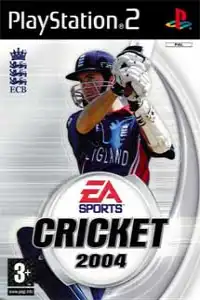

Cricket 2004 delivers authentic cricket action with licensed teams, realistic gameplay, multiple tournaments, and classic PlayStation 2 fun.
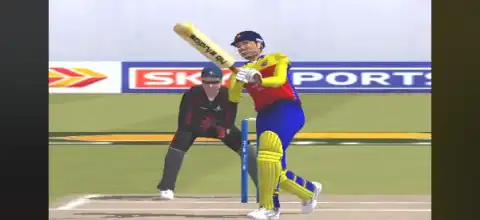
Cricket 2004 PS2 Discription
If you’re a fan of classic cricket games, Cricket 2004 for the PlayStation 2 is still one of the most enjoyable titles to revisit. Developed by EA Sports, the game captures the excitement of international cricket with officially licensed teams, multiple tournaments, realistic stadiums, and engaging gameplay that still holds up surprisingly well today.
Thanks to modern PS2 emulators, you can now enjoy Cricket 2004 on both Android and iPhone/iPad without needing the original console. In this guide, we’ll cover the game’s modes, gameplay features, unlockable content, the best AetherSX2 settings for smooth performance, and how to play it on Android and iOS.
Cricket 2004 Game Modes
Cricket 2004 offers a variety of game modes that keep players engaged for hours.
Exhibition Match
The quickest way to jump into the action. Choose any available international teams, select a stadium, adjust match conditions, and start playing immediately.
World Cup
Compete in a full Cricket World Cup tournament featuring international teams. Progress through the group stages and knockout rounds as you aim to lift the trophy.
Test Series
Experience the traditional format of cricket with multi-day Test matches. This mode emphasizes patience, strategy, and proper bowling line and length.
One-Day International Series
Play custom ODI series between your favorite nations. You can configure the number of matches before starting the series.
Domestic Competitions
Apart from international cricket, the game also includes several domestic tournaments that add replay value and provide a different challenge.
Practice Mode
Perfect for beginners who want to improve batting, bowling, and fielding skills before entering competitive matches.
Multiplayer
Cricket 2004 supports local multiplayer, allowing two players to compete against each other using separate controllers.
Gameplay Features
Despite its age, Cricket 2004 introduced several mechanics that made it one of the better cricket games of its era.
Realistic Batting
Players can perform defensive shots, aggressive drives, lofted hits, pulls, hooks, cuts, and sweep shots. Timing plays an important role in scoring boundaries.
Multiple Bowling Styles
Choose between fast bowlers, medium pacers, off-spinners, and leg-spinners. Each bowling type behaves differently, making bowling strategy important.
Dynamic Field Placements
Captains can adjust field settings depending on the batsman and match situation, adding a tactical layer to gameplay.
Official Teams
The game includes numerous officially licensed international cricket teams with authentic player names and kits.
Various Stadiums
Play matches across several well-designed stadiums featuring different pitch conditions and crowd atmospheres.
Weather and Match Conditions
Different weather and pitch conditions can affect gameplay, requiring players to adapt their batting and bowling strategies.
Commentary
The game includes professional-style commentary that adds authenticity to every match.
AI Difficulty Levels
Whether you’re a beginner or an experienced player, multiple difficulty settings provide an enjoyable challenge.
Unlockable Elements
Cricket 2004 includes several unlockable rewards that encourage continued play.
- Unlock additional teams by progressing through tournaments.
- Earn bonus content by completing specific challenges.
- Unlock classic players and special squads in certain versions of the game.
- Access hidden extras through successful tournament victories.
- Improve your collection by winning championships and completing various game objectives.
While the exact unlockables may vary depending on the game version, completing tournaments and performing well generally rewards players with additional content.
Best AetherSX2 Settings for Cricket 2004
Cricket 2004 is relatively lightweight compared to later PS2 games, so even mid-range Android devices can run it smoothly with the right settings.
System Settings
- EE Cycle Rate: 100%
- EE Cycle Skip: Normal (0)
- Multi-Threaded VU1: Enabled
- Fast Boot: Enabled
Graphics Settings
Renderer: Vulkan (Recommended)
Switch to OpenGL if Vulkan causes graphical issues.
Internal Resolution:
- 2x for entry-level devices
- 3x for mid-range phones
- 4x–5x for flagship devices
- Bilinear Filtering: Bilinear (PS2)
- Texture Filtering: Enabled
- Hardware Download Mode: Disabled
- V-Sync: Off
Performance Settings
- Threaded Presentation: Enabled
- Instant VU1: Enabled
- GPU Palette Conversion: Enabled
- Skip Duplicate Frames: Disabled
These settings provide stable performance with smooth gameplay on most modern Android smartphones.
How to Download and Play Cricket 2004 PS2 on Android and iOS
- Download the Cricket 2004 PS2 ISO from our website.
- Install AetherSX2 on Android or iPSX2/ArmSX2 on your iPhone or iPad.
- Launch the emulator and grant storage permissions if prompted.
- Locate the downloaded Cricket 2004 ISO file on your device.
- Add or scan the game library inside the emulator.
- Select the Cricket 2004 ISO to import it into your game library.
- (Android only) Apply the recommended AetherSX2 settings listed above for the best performance.
- Connect a Bluetooth controller if you want a console-like experience, or use the emulator’s on-screen controls.
- Save your progress using either the game’s memory card feature or emulator save states.
- 10. Launch the game and enjoy playing Cricket 2004 on your Android phone or iPhone/iPad.
Final Thoughts
Cricket 2004 remains one of the most memorable cricket games ever released on the PlayStation 2. With its enjoyable gameplay, multiple tournament modes, realistic batting and bowling mechanics, licensed international teams, and rewarding progression system, it continues to be a favorite among cricket gaming enthusiasts.
Using AetherSX2 on Android or iPSX2/ArmSX2 on iOS makes it easier than ever to relive this classic. Simply download the Cricket 2004 PS2 ISO from our website, set up your preferred emulator, follow the installation steps above, and you’ll be ready to enjoy one of the best cricket games from the PS2 era wherever you go.